

Manual Meta Ads management is broken.
Budget pacing checks. Creative refresh chasing. Pausing the long tail of underperformers. None of it is judgement work. All of it eats Monday morning.
The 2026 fix is a two-tool stack. Make.com handles the rule-led plumbing. Claude Code handles the judgement layer. Together they take a media buyer's weekly grunt work down to a fraction of what it was.
This post lays out the full play. The stack. The five workflows worth automating first. The five-step setup loop. The pitfalls. By the end, you can pick one workflow and ship it tomorrow.
Why Manual Meta Ads Management Is Broken
Meta Ads is now the largest paid channel for most performance marketing teams. The platform changed faster than the management workflow.
Most teams still run a manual Monday loop. Pull spend. Pull ROAS. Decide what to pause. Refresh creative. Update the audience. Write the report. The loop takes half a day. By the time it ships, half the data is stale.
Three forces broke the manual loop. Creative volumes climbed. Audience targeting got noisier with privacy changes. Budget pacing windows shrank because Meta's auction moves intra-day.
Meta's own publications point to AI-driven optimisation as the new default for performant advertisers. Advantage+ campaigns and AI-led creative testing now sit at the centre of the platform's recommendations. (Source: Meta for Business, 2024 — business.facebook.com)
Q: Can a small team run Meta Ads without automation?
A: Yes, up to a point. Below 10 active campaigns, the manual loop just barely works. Above 25 active campaigns or three live brands, the loop breaks. The team starts shipping bad work because the data is stale. Automation is the only way back to a clean loop.
The Make + Claude Stack
The stack has three layers. Each one earns its keep.

Layer 1 — Meta Ads. Where the spend lives. The source of truth. Read access for data. Scoped write access for pause and budget actions only.
Layer 2 — Make.com. The rule layer. Time-based jobs. Event-based webhooks. Plumbing between Meta, the data warehouse, and the team's tools. Make.com runs the recurring tasks.
Layer 3 — Claude Code. The judgement layer. Reads the data Make.com surfaces. Decides which creatives are fatiguing. Drafts new creative variants. Writes the weekly summary. Adds context that a rule cannot capture.
The split matters. Make.com is great at running the same task every Monday at nine in the morning. It is bad at deciding whether a creative needs a refresh. Claude Code is the inverse. Use both for what each does best.
The other reason for the split is cost. Make.com is a flat-fee platform. Once a scenario is built, every additional run is effectively free. Claude Code costs per token. Routing the noisy time-based jobs through the no-code layer keeps the Claude bill low. The judgement work stays close to a senior buyer's instinct.
Q: Why not just use Claude Code for everything?
A: Claude Code is excellent at judgement, but expensive to wake up for every five-minute time-based job. Make.com runs lightweight rule-led tasks all day for a flat monthly fee. The split keeps both the cost and the workflow clean.
The Five Workflows Worth Automating First
Most performance teams ship these five workflows in the first month. Each one earns hours back every week.
Quick Facts: AI in paid media operations
- 73 percent of marketing teams now use AI as part of weekly workflow (Source: Gartner, 2024 — gartner.com).
- McKinsey finds AI-assisted marketing teams ship 3 to 4x more output per FTE (Source: McKinsey, 2024 — mckinsey.com).
- Meta highlights AI-led tools (Advantage+, automated creative) as primary drivers of paid performance in 2024 (Source: Meta for Business, 2024 — business.facebook.com).
- Anthropic positions Claude Code skills as "modular, reusable expertise loaded on demand" — a fit for paid media playbooks (Source: Anthropic, 2025 — docs.claude.com/en/docs/agents-and-tools/agent-skills).
The five workflows:
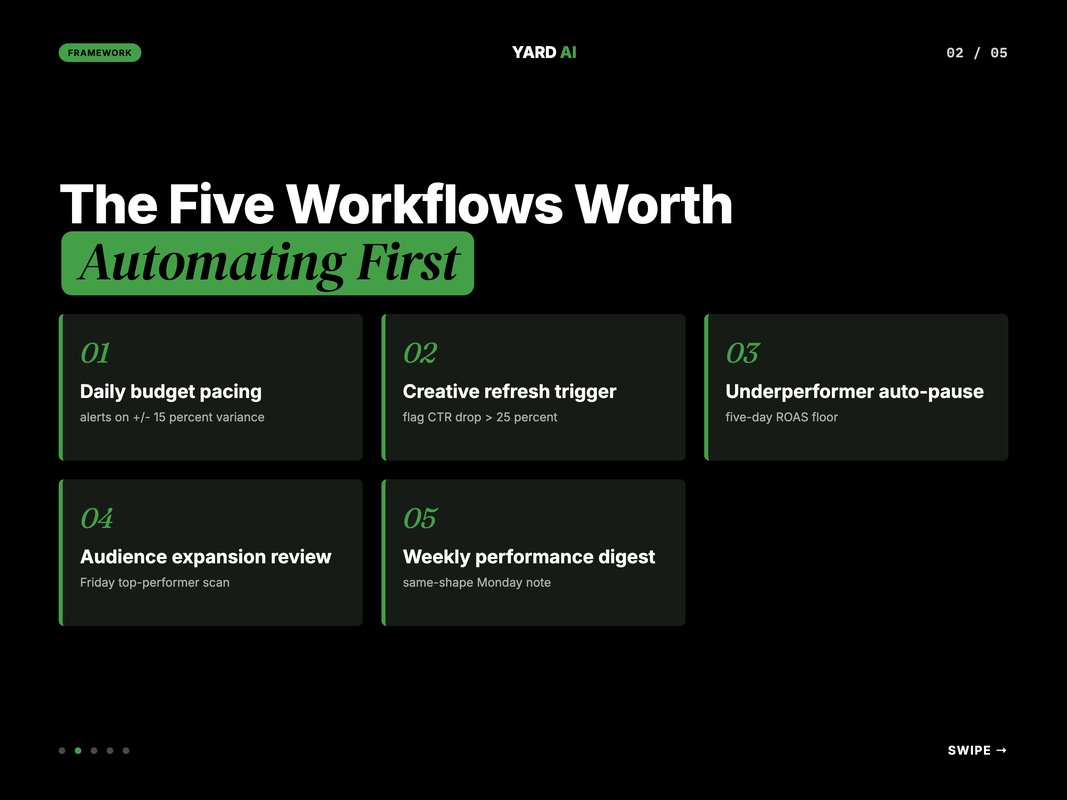
Workflow 1 — Daily budget pacing. Make.com pulls spend at 9 AM. Compares it to the daily target. If a campaign is over-pacing or under-pacing by more than 15 percent, it pings Slack. Claude Code reads the Slack thread later and recommends a budget shift.
Workflow 2 — Creative refresh trigger. Make.com pulls creative-level CTR and CPM weekly. If a creative drops more than 25 percent vs its 30-day baseline, it flags fatigue. Claude Code drafts three replacement hooks based on the brand voice file.
Workflow 3 — Underperformer auto-pause. Make.com checks ad-set performance daily. Anything spending over a threshold with ROAS below the floor for five days gets paused automatically. The team gets notified, not interrupted.
Workflow 4 — Audience expansion review. Every Friday, Make.com pulls top-performing audiences. Claude Code reads them and suggests two adjacent audience tests for the next week. The buyer reviews and ships.
Workflow 5 — Weekly performance digest. Make.com pulls Meta plus GA4 plus shop data. Claude Code writes a 400-word digest in the same shape every week. Headline numbers. What worked. What did not. What to test next.
These five together replace the bulk of a junior media buyer's Monday and a senior buyer's Friday.
The fourth and fifth workflows look small but compound the most. A senior buyer no longer drafts the same audience-expansion plan twice. The buyer finally spends time on creative briefs. A founder who reads the same-shape weekly digest starts asking sharper questions. The output of the team gets smarter, not just faster.
The compounding shows up in three places. Faster decisions on creative refresh. Better audience tests, because the buyer has time to read the suggestions. And cleaner conversations with the founder, because the data lands in the same shape every Monday morning.
How Each Workflow Actually Works
The workflows above sound abstract until you see the wiring. Here is how the first three look in practice.

Daily budget pacing — the wiring. Make.com runs a scenario at 9 AM. It calls Meta Marketing API for the previous day's spend per active campaign. It joins the data with the daily target stored in a Google Sheet. It calculates pacing percent. Anything outside the 85 to 115 percent band gets posted to a Slack channel.
A separate Claude Code skill picks up the Slack thread on demand. The skill reads the thread. Pulls the campaign's seven-day ROAS curve via a Meta Ads MCP. Returns a one-paragraph recommendation. The buyer decides. The buyer ships the change. The whole cycle takes minutes.
Creative refresh trigger — the wiring. Make.com runs a Monday scenario. It pulls 14-day creative-level CTR and CPM via the Meta Marketing API. It compares each creative to its own 30-day baseline. Drops over 25 percent get flagged. The flagged list lands in an Airtable view.
A Claude Code skill picks up the flagged list. Reads the brand voice file in the references folder. Drafts three replacement hooks per creative. The buyer reviews. The winning hooks become a brief for the design team.
Underperformer auto-pause — the wiring. Make.com runs a daily check. It calls Meta Marketing API for ad-set spend and ROAS. Any ad set above the spend threshold with ROAS below the floor for five days gets paused. The pause hits via the Meta API. The team gets a Slack note explaining what was paused and why.
The threshold matters. Setting it too tight pauses ads that are still in their learning phase. Setting it too loose lets the bottom decile leak budget for a week before action. Most teams settle on a five-day window with a fixed spend floor. The numbers vary by account size. Tune by quarter.
A Claude Code skill runs on the pause notifications weekly. Reviews the patterns. Spots whether a single audience or creative segment is consistently the cause. Returns a Monday note that informs next week's testing.
Q: What happens if Meta API throttles?
A: Make.com retries with backoff by default. The Meta Marketing API has clear rate limits documented. Most marketing workflows sit well below the limits. If the team hits throttling, the fix is usually batching by account-id, not parallelism.
The 5-Step Setup Loop
This is the loop most teams follow when they wire the stack from scratch. Five steps. Two to four weeks for the full set.
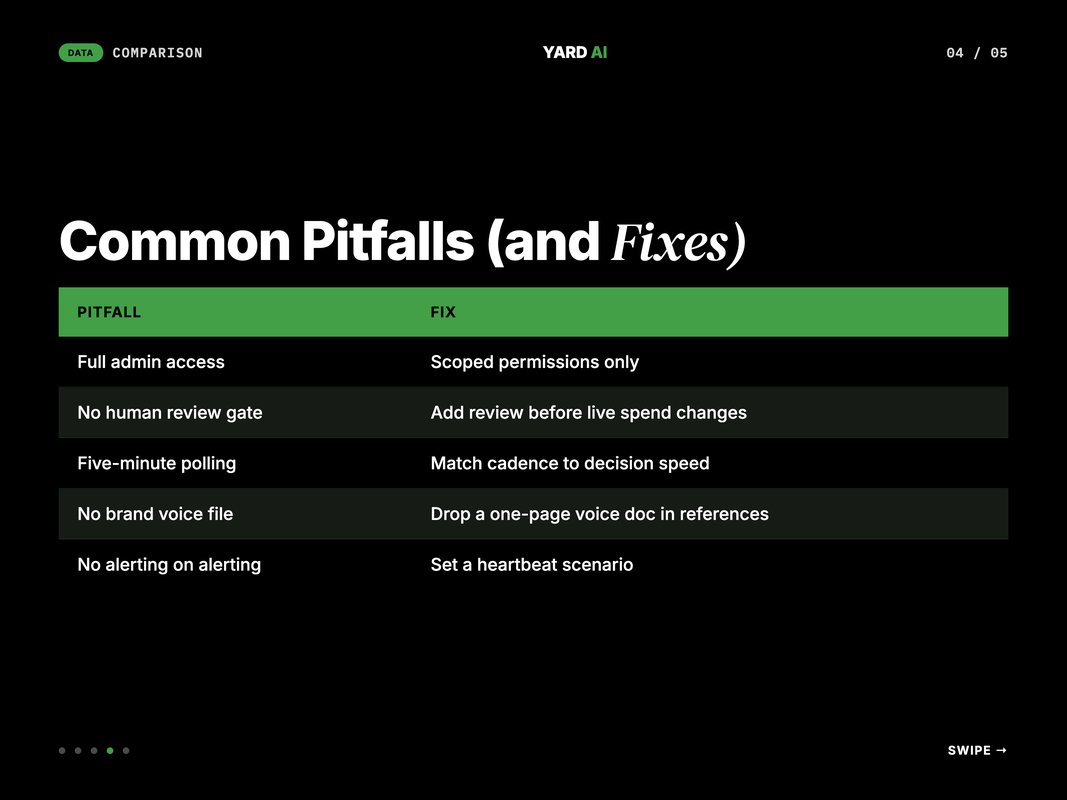
Step 1 — Audit the manual Monday. List every Meta-related task the team does manually in a week. Time-box each task. Anything over 15 minutes that repeats weekly is a candidate for the stack.
Step 2 — Wire scoped credentials. Create a Meta system user with read plus pause-only permissions. Generate a long-lived token. Store it in Make.com's connection vault. Use the same token for the Claude Code MCP if available.
Step 3 — Ship workflow one. Pick the lowest-stakes workflow. Daily budget pacing is a good first. Build it in Make.com. Test for three days. Confirm the Slack messages match reality.
Step 4 — Add Claude Code on top. Write a small skill that reads the Slack thread or the Make.com output. Test it on three real cases. Refine the prompt until the recommendation reads like a senior buyer.
Step 5 — Loop weekly. Every Friday, review what the stack flagged this week. Note the false positives. Patch the rules. Patch the prompts. The stack improves week by week.
The cadence matters more than the speed. A team shipping one workflow a week and refining weekly outperforms a team that ships five at once and fixes nothing.
There is also a soft step zero worth naming. Get team buy-in before the wiring starts. Media buyers can be wary of automation. The pitch should be simple. The stack does the boring half so the buyer can do the strategic half. Most buyers are sold by the first time the daily pacing alert beats them to a misfire.
The other often-skipped step is documentation. Every Make.com scenario gets a one-paragraph note in a shared Notion. Every Claude Code skill gets a five-line README. Six weeks in, the team has a living cookbook. New hires onboard against the cookbook. Old hands refer back to it when something breaks.
Common Pitfalls (and Fixes)
The first three workflows almost always fail in the same way. The fixes are short.
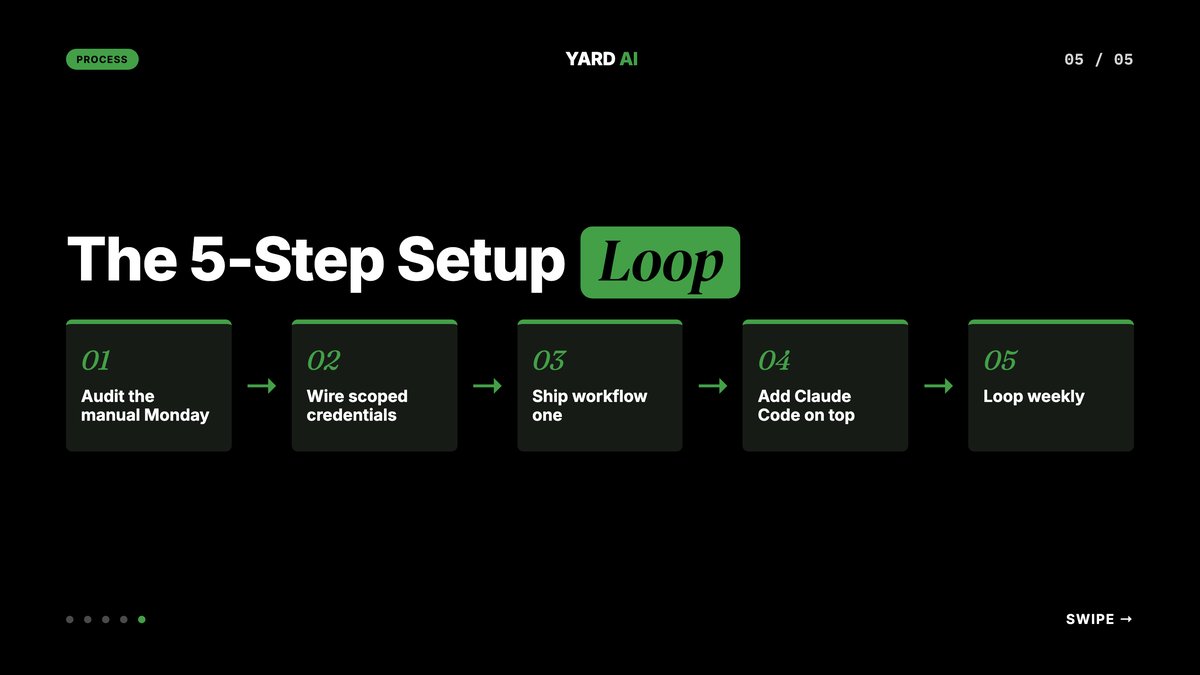
The 5 most common pitfalls:
- Granting full admin access to Make.com or the Claude Code MCP. Use scoped permissions. Pause and read are enough for almost every workflow.
- Skipping the human review gate on budget-change or pause workflows. A bad rule can pause a winner. The review gate is cheap insurance.
- Running the Make.com scenario every five minutes when daily is fine. The platform will throttle. The bill will climb. Match the cadence to the actual decision speed.
- Letting Claude Code draft creative without a brand voice file. The drafts will be generic. Drop a one-page voice file in the skill's references folder. Quality jumps immediately.
- No alerting on the alerting layer. Make.com itself can fail. Set a heartbeat scenario that pings Slack if any other scenario has not fired for 24 hours. Catch silent failures early.
Fix these five and the stack runs cleanly for months without intervention.
Q: How do I keep the team from over-trusting the stack?
A: Insist on a weekly review of every automated decision. Print the list. Read it aloud. The review keeps human judgement in the loop and surfaces the rare bad call before it compounds.
How YARD Wires This for Clients
YARD is a digital marketing agency built around AI-native workflows. We run paid, SEO, and content for B2B and DTC brands. This two-tool stack is part of the wiring on every paid media account we run.
The way we deploy this for a client is the same loop laid out above. We start with the manual Monday audit. We wire scoped credentials in week one. We ship workflow one in week one. We add the Claude Code judgement layer in week two. We expand to all five workflows by week four.
The outcome we look for is consistent. A media buyer who used to spend half of every Monday on Meta data work spends an hour on it. The freed time goes to creative review and strategy, where the actual lift lives.
If you run a paid media account and want a second look at the workflow, that is what we do. The first audit is short. The first workflow ships in week one.
You can see how we work and the verticals we serve at yardagency.ai. The YARD Way is built around automation first, judgement last.
Conclusion — Pick One Workflow, Ship It This Week
Manual Meta Ads management is the most expensive habit a performance team has. Every hour on it is an hour off creative and strategy.
The shift to a two-tool stack is small in scope and large in compound. The team buys back hours that used to leak into Monday data work. Those hours move to creative review and account strategy. The numbers move because the team's attention finally lands where the lift lives.
The fix is small. Pick one workflow from this post. Daily budget pacing is the easiest first. Wire it in a no-code platform this week. Add the Claude Code judgement layer next week. Ship the result.
Then add the next workflow. And the next. By the end of the month the Monday loop has changed shape entirely.
The hardest part is not the wiring. It is the patience to hold the loop. Most teams ship workflow one and stall on workflow two because the urgency drops. The teams that hold the cadence past week three see the compounding hit. The Monday morning that used to feel rushed now feels short and sharp.
If you want help thinking through which workflow to ship first, book a 30-minute call at yardagency.ai. We will pick three highest-impact workflows for your account and rank them by hours saved per week.
The teams that move fastest on this are not the most technical ones. They are the most disciplined ones. They name a single owner for the stack. They keep the workflow count under ten. They review the call log every other Monday. The discipline compounds. The ad-ops tax disappears.
FAQ
Q: Why automate Meta Ads at all?
A: Manual Meta Ads work eats time on the wrong things. Budget pacing, creative refresh, underperformer pause. None of it needs human judgement on a daily basis. Automation frees the team for strategy and creative review, where the actual lift lives.
Q: What does Make.com do in this stack?
A: Make.com is the rule layer. It runs the time-based and event-based jobs. Daily budget checks. Creative refresh triggers. Webhook routing. It is the workflow engine between Meta, the data warehouse, and the team's tools.
Q: What does Claude Code do in this stack?
A: Claude Code is the judgement layer. It reviews ad performance, drafts creative variants, writes the weekly summary, and decides which audiences to expand. The judgement work that used to need a senior is now done in minutes by a skill.
Q: Do I need a developer to set this up?
A: No, not for v1. Make.com is no-code or low-code. Claude Code uses simple Markdown skills and JSON-configured MCP servers. The first three workflows ship in a single afternoon for most marketing teams.
Q: Is this safe for client ad accounts?
A: It is as safe as the access policy. Use scoped tokens for the Meta Ads MCP and the Make.com Meta module. Pause-only actions are safer than budget-change actions. Add a human review gate on any workflow that spends or pauses live ads.
Q: How long does it take to ship the full stack?
A: Two to four weeks for most performance teams. Workflow one ships in week one. Workflows two and three in week two. The remaining workflows and the weekly digest follow. By week four, the manual Monday work has dropped sharply.
Q: What does this cost to run?
A: Most teams run this on a Make.com Core or Pro plan plus a Claude subscription. The combined monthly cost lands well below the salary of a single junior media buyer. The hours saved usually pay it back inside the first month.
Insights from Our Experts
Explore our latest articles on digital marketing strategies.