

Most "AI for marketers" advice stops at writing captions.
That's a waste. The real win is operational.
Claude Code is an agentic tool. It reads your files, runs commands, and edits real outputs. It can connect to your tools through MCP — the Model Context Protocol (Source: Anthropic, 2026 — code.claude.com/docs/en/mcp).
That means it can mine a search-term report, write ad copy, and audit a budget. Not in theory. On your actual data.
This is a how-to. Below are five Claude Code prompts a performance marketer can copy today.
Each one names what it does, gives you the exact text, and shows the output you get back. Use them as starting points. Then save your favourites as reusable commands.
No fluff. No theory. Just five prompts you can run on one export this afternoon.
They cover the daily grind of paid search. Waste, copy, pacing, analytics, and message match. Run one, feel the time you save, then add the rest.
Quick Facts: AI in Performance Marketing at a Glance
- 71% of organisations now use generative AI in at least one business function. Marketing and sales is the most common — (Source: McKinsey, 2025 — mckinsey.com/...the-state-of-ai).
- Claude Code can read files, run commands, and connect to external tools through MCP servers — (Source: Anthropic, 2026 — code.claude.com/docs/en/overview).
- Google responsive search ad headlines cap at 30 characters and descriptions at 90 — (Source: Google, 2026 — support.google.com/google-ads).
- GA4 anomaly detection uses a Bayesian time-series model on 90 days of daily data to flag outliers — (Source: Google, 2026 — support.google.com/analytics).
How Claude Code Actually Works for Marketers
You don't need to code.
You point Claude Code at a folder. You ask in plain English. It does the work.
Behind the scenes, it reads your files, runs commands, and writes the output back to disk (Source: Anthropic, 2026 — code.claude.com/docs/en/overview).
So a CSV export from Google Ads becomes raw material. Claude reads every row. It does the math. It writes the brief.
There are two ways to feed it data.
The simple way: drop CSV exports into a folder. Search-term reports, ad performance, GA4 events. Claude reads them all.
The connected way: link a live source through MCP. Then Claude reads the platform directly, not a stale file (Source: Anthropic, 2026 — code.claude.com/docs/en/mcp).
One more thing matters. Claude Code asks before it acts. It drafts and recommends by default. You approve writes deliberately.
That safety net is why marketers trust it on real accounts.
Think of it like a sharp junior analyst. It reads fast. It does the math. It never gets bored of a thousand-row report.
But it doesn't push changes live on its own. It hands you the work. You decide.
This is the key mental shift. You're not learning to code. You're learning to brief a fast operator clearly. The clearer the ask, the better the output.
A good rule of thumb helps here. If your prompt wouldn't make sense to a smart new contractor, it's too vague. Add the context, the constraint, and the output format you want.
Q: Do I need to install anything technical to use these prompts?
A: You install Claude Code once, then work in plain English. There's no scripting. You drop in exports or connect a source, ask your question, and review what comes back. The tool handles the file reading and math for you.
Prompt 1 — Mine the Search-Term Report for Waste
Every search account leaks money.
Junk queries trigger your ads. You pay for clicks that never convert.
Finding them by hand is slow. Claude Code does it in one pass.
Export your search-terms report as a CSV. Drop it in a folder. Then run this.
Read search-terms.csv. Each row has search_term, campaign, clicks,
cost, conversions, and conv_value.

Find every term with 0 conversions AND more than 20 clicks OR more than $50 spend. These are wasted-spend candidates.

Group them into themes (e.g. "free", "jobs", "DIY", competitor names). For each theme, total the wasted spend.

Output two things:
1. A ranked table of the top 25 waste terms by spend.
2. A clean negative-keyword list I can paste straight into Google Ads,
   one term per line, with the recommended match type.

Flag any term that has conversions — never suggest blocking those.
What you get back is a ranked waste table plus a ready negative list.
Picture the result. The table might show "free crm template" at the top. Forty clicks. Ninety dollars spent. Zero conversions.
Below it sits a theme summary. The "free" cluster cost you two hundred dollars this month. The "jobs" cluster cost ninety more.
Then comes the clean list. One negative keyword per line. Match type beside each. You select all, copy, and paste into the negatives panel.
The themes matter. "Free", "jobs", and "DIY" usually signal the wrong intent. Blocking the theme beats blocking one term.
Why does this beat scrolling? Speed and consistency. You read a thousand-row report once, not by hand.
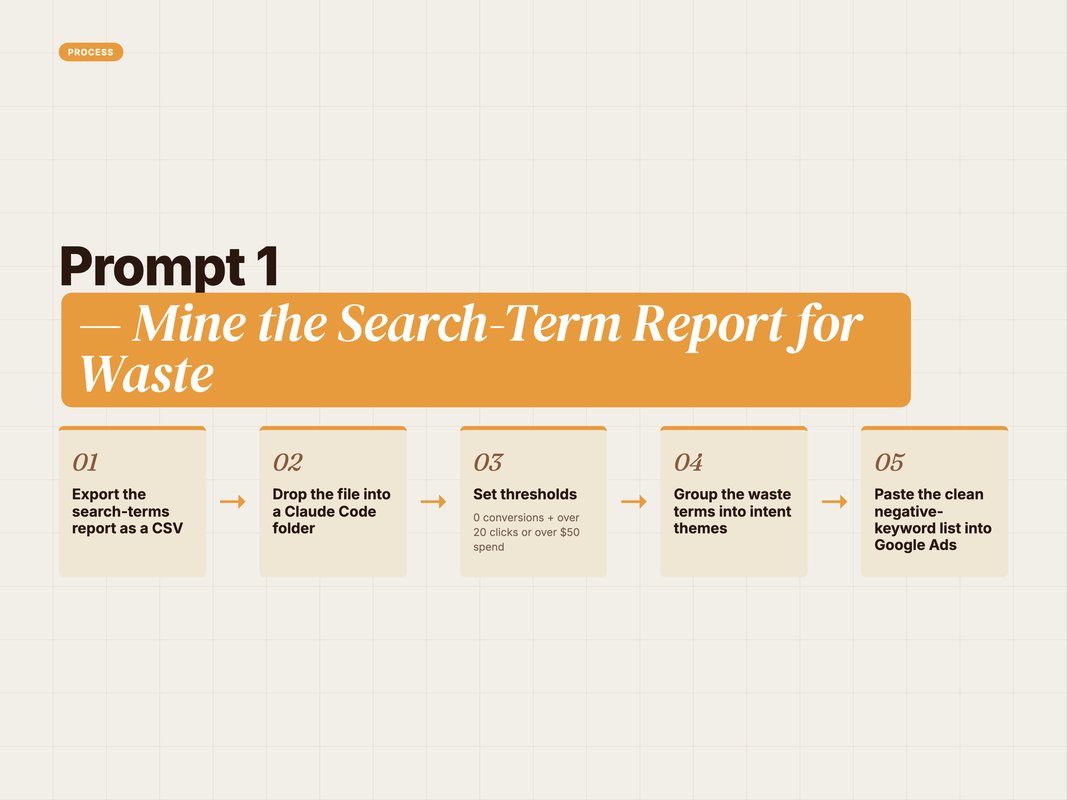
A marketer running this on a mid-size account often finds spend hiding in plain sight. The output pastes straight into the negatives panel.
You also keep control of the rules. Want a stricter cut? Change the threshold to ten clicks. Want to protect a campaign? Name it in the prompt. The logic is yours, not a black box.
Q: Why not just use the built-in Google Ads recommendations?
A: The platform suggests broadly and favours more spend. This prompt is yours to tune. You set the click and cost thresholds, and you protect any term with conversions. It also groups waste into themes, which the native tool rarely does well.
Prompt 2 — Generate Responsive Search Ads That Fit
Ad copy at scale is tedious.
You need many headlines and descriptions. Each must fit a strict limit.
Headlines cap at 30 characters. Descriptions cap at 90 (Source: Google, 2026 — support.google.com/google-ads).
Claude Code writes them and counts every character for you.
You are writing a Google responsive search ad.

Product: [one-line description of what you sell]. Offer: [your promo or hook]. Audience: [who you target]. Primary keyword: [your main keyword].

Write 15 headlines (max 30 characters each) and 4 descriptions (max 90 characters each).

Rules:
- Stay under the limits. Show the character count after each line.
- Include the primary keyword in at least 4 headlines.
- Vary the angle: benefit, proof, urgency, question, brand.
- No exclamation overload. One per ad, max.

Output as a table: column 1 the line, column 2 the type,
column 3 the character count. Flag anything that runs over.
The character count is the magic. No more pasting copy that gets rejected.
Here's what the output looks like. A table with fifteen rows. Each headline sits in column one. The type sits in column two. The exact count sits in column three.
So "Cut Ad Waste Fast" reads as 17 characters. Safe. A longer line that hits 33 gets flagged in red. You fix it before it ever reaches Google.
That single feature saves real time. Most rejected ads die on a length error. This kills the error at the source.
Splitting the work helps too. Anthropic supports sub-agents — one focused worker per job (Source: Anthropic, 2026 — code.claude.com/docs/en/sub-agents).
So one sub-agent can own headlines and the 30-char rule. Another owns descriptions and the 90-char rule. Each stays simple.
You can run this prompt per ad group too. Feed it the keyword theme. Out come fifteen on-message headlines, all counted, ready to upload.
Q: Can Claude Code keep my brand voice across every ad?
A: Yes. Add a short voice note to the prompt, or save it in a CLAUDE.md file in your project. Claude reads that file every session and applies the rules. Your whole team then ships ads in the same tone without re-explaining it.
Prompt 3 — Audit Budget Pacing Mid-Month
Pacing kills budgets quietly.
Some campaigns sprint. Others crawl. By month-end the mix is wrong.
A mid-month check fixes it early. This prompt runs the audit.
Export your campaign spend report. Then ask Claude Code this.
Read campaign-spend.csv. Columns: campaign, monthly_budget,
spend_to_date, conversions, cpa.

Today is day [X] of a [30]-day month.

For each campaign, calculate:
- Expected spend by today (linear pace).
- Actual spend vs expected, as a percentage.
- Projected end-of-month spend if the current pace holds.

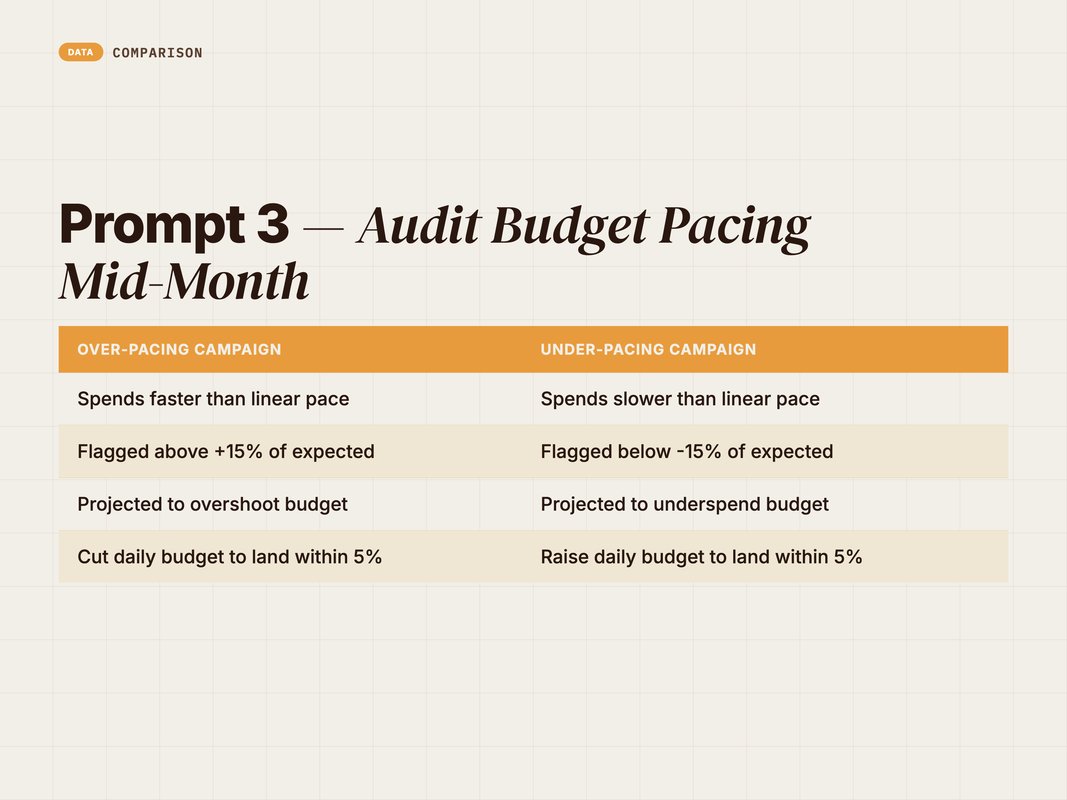
Flag campaigns over-pacing by more than 15% and under-pacing by more than 15%.

Then recommend a daily-budget change for each flagged campaign so it lands within 5% of its monthly target. Show the new daily number.

Sort by CPA so I fix the efficient campaigns first.
The output is a pacing scorecard with exact daily-budget moves.
Imagine day fifteen of the month. One campaign has spent 78% of its budget already. Claude flags it as over-pacing.
It then does the math you'd dread. Projected month-end spend: 156% of target. Recommended daily budget: cut from $100 to $58. That lands you within 5%.
Another campaign sits at 30% spend. Under-pacing. The fix is the reverse. Raise the daily number so the budget actually gets used.
Sorting by CPA is the smart part. You feed the winners first. You starve the losers.
This is performance marketing automation at its most useful. Not flashy. Just hours saved every single month.
The numbers are exact because the math is deterministic. Pacing is arithmetic, not opinion. Claude is reliable on arithmetic, and you can check every figure against the export.
Q: How often should I run a pacing audit?
A: Once a week is plenty for most accounts. Mid-week and again near month-end catches the drift early. Save the prompt as a slash command so the whole audit runs from one short line. Then it's a two-minute habit, not a chore.
Prompt 4 — Triage a GA4 Traffic Anomaly Fast
Traffic drops happen. The panic is real.
You need to know what moved and why. Fast.
GA4 already flags anomalies with a Bayesian time-series model on 90 days of data (Source: Google, 2026 — support.google.com/analytics). But it won't tell you the story.
Claude Code reads the export and writes the story for you.
Read ga4-export.csv. Columns: date, channel, sessions, conversions,
conversion_rate, bounce_rate.

Compare the last 7 days to the previous 7 days.

For each channel, show the percentage change in sessions and conversions. Highlight any change bigger than 20%.

Then triage: write a short ranked list of the most likely causes for the biggest drop. Base it only on what's in the data. For example, "Organic sessions fell 34% while paid held steady, so this looks channel-specific, not site-wide."

End with 3 checks I should run next, in priority order.
You get a plain-English read of what happened, plus a next-step list.
Here's a sample output. "Total sessions fell 22% week over week. The drop is concentrated in organic, down 34%. Paid and direct held steady."
Then the triage. "This looks channel-specific, not site-wide. Most likely a ranking change or an indexing issue, not a tracking break."
Then the next steps. Check Search Console for coverage errors. Confirm the tag still fires. Review any recent site change. Ranked, so you start with the highest-value check.
That structure turns a vague scare into a clear plan. You stop guessing and start checking.
The "based only on the data" rule keeps it honest. Claude won't invent a cause it can't see.
You can widen the lens too. Add campaign or landing-page columns to the export. Then the triage gets sharper, pointing at the exact page or campaign that moved.
Q: Can Claude Code connect to GA4 live instead of a CSV?
A: Yes, through an MCP server that exposes your analytics. Then Claude reads the property directly and skips the export step. CSV is the fastest way to start. The live connection is the upgrade once your workflow settles.
Prompt 5 — QA a Landing Page Against the Ad Promise
Message match wins or loses the click.
If the ad promises X and the page says Y, you lose the sale.
This is easy to miss at scale. Claude Code checks it in seconds.
Save your ad copy and your page copy as two text files. Then run this.
Read ad-copy.txt and landing-page.txt.

ad-copy.txt is the headline, description, and offer from my ad. landing-page.txt is the above-the-fold copy from the page it sends to.

Check message match. Answer these:
1. Does the page headline echo the ad promise? Quote both.
2. Is the exact offer from the ad visible above the fold? Yes or no.
3. Is there one clear primary call to action? Name it.
4. List any claim in the ad that the page fails to back up.

Then give a message-match score out of 10 and three specific fixes,
ranked by likely conversion impact.
The output is a scored QA with quotes and ranked fixes.
Picture the read-out. The ad headline says save 30% on running shoes. The page headline says welcome to our store. Claude marks that as a mismatch.
The offer check fails next. The 30% offer does not appear above the fold. The CTA check passes. The primary button is shop now.
Then the score. Five out of ten. Below it sit three ranked fixes. Put the 30% offer in the hero. Echo running shoes in the headline. Move the CTA above the fold.
Quoting both sides forces a real comparison. You see the gap instead of guessing.
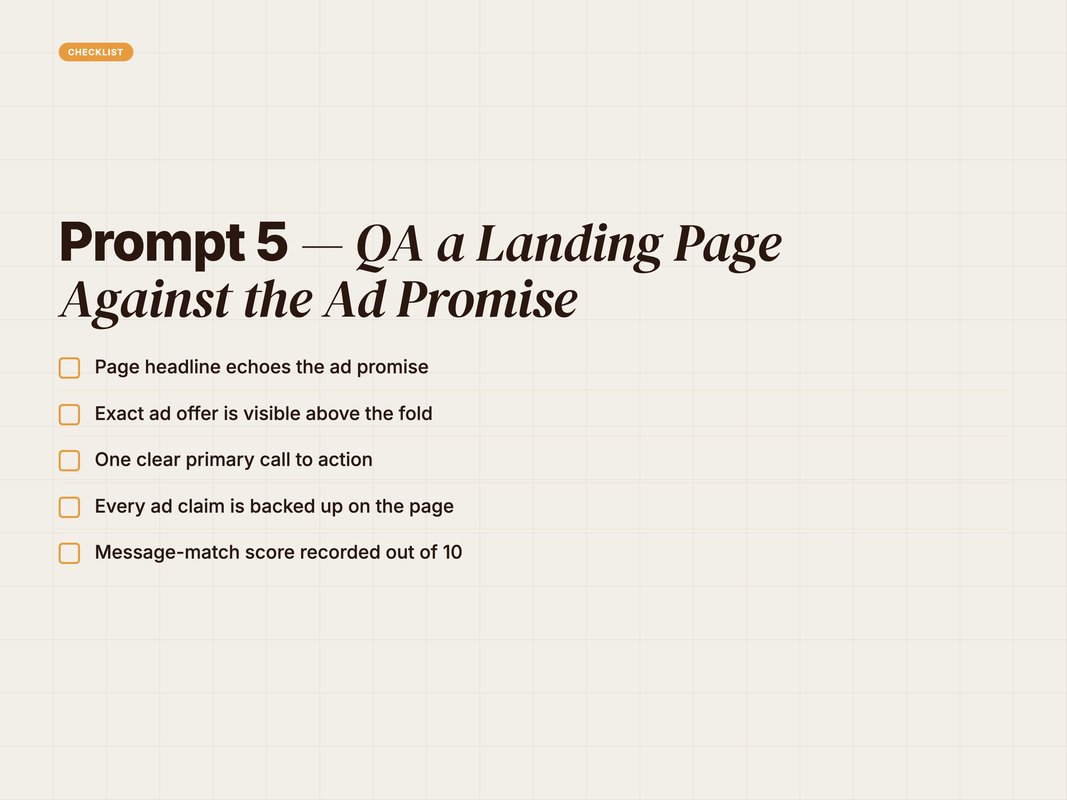
Run this before every new campaign. A weak match wastes the whole click budget. A strong one compounds.
The ranked fixes are the payoff. You don't get a wall of notes. You get three moves, ordered by likely impact, so you fix the costly gap first.
Q: What files does this prompt need?
A: Just two plain-text files: your ad copy and your page's above-the-fold copy. Paste each into a file in your project folder. Claude reads both and compares them line by line. No screenshots or special formats needed to get a useful first pass.
Manual Workflow vs Claude Code Workflow
The shift isn't about doing new things.
It's about doing the same things in minutes, not hours.
Here's the contrast on five everyday jobs.
| The job | Manual way | Claude Code way |
|---|---|---|
| Search-term cleanup | Scroll, sort, eyeball | One prompt, ranked list |
| RSA copy | Write, count, re-edit | 15 headlines, counted |
| Budget pacing | Spreadsheet formulas | Auto scorecard + moves |
| GA4 triage | Hunt across reports | Plain-English read |
| Landing-page QA | Tab back and forth | Scored, quoted gap list |
None of this removes the marketer.
You still set the thresholds. You still approve the change. Claude does the grunt work in between.
That's the right division of labour. Judgement stays human. Toil goes to the machine.
Look at the time math. A search-term sweep by hand can eat an hour. The prompt does it in a minute.
Multiply that across five jobs and five accounts. The week looks different. You stop drowning in exports.
And the quality holds. The same rules run every time. No tired-Friday mistakes. No skipped steps when the calendar gets busy.
Q: Does Claude Code replace my paid media manager?
A: No. It removes the busywork around the role, not the role. The strategy, the bids, the brand calls — those stay with you. Claude handles the reading, counting, and first drafts so your team spends time on decisions, not data entry.
Make These Prompts Reusable
A great prompt run once is a nice afternoon.
A great prompt saved is leverage.
Claude Code lets you save any prompt as a custom slash command in your project (Source: Anthropic, 2026 — code.claude.com/docs/en/slash-commands).
So your search-term audit becomes one short command. The whole team runs it the same way.
A custom slash command is just a small file. It holds your prompt text. You name it once. After that, typing the name runs the whole thing.
The payoff is consistency. Two marketers run the same audit and get the same shape of answer. No drift. No re-explaining the rules each week.
Use the checklist below to set this up.
- Save each prompt as a custom slash command in your project folder.
- Add a CLAUDE.md file with your brand voice and ad rules.
- Name the data file each prompt expects, so the input stays consistent.
- Keep Claude in read-and-recommend mode until you trust the output.
- Share the commands with your team so outputs stay uniform.
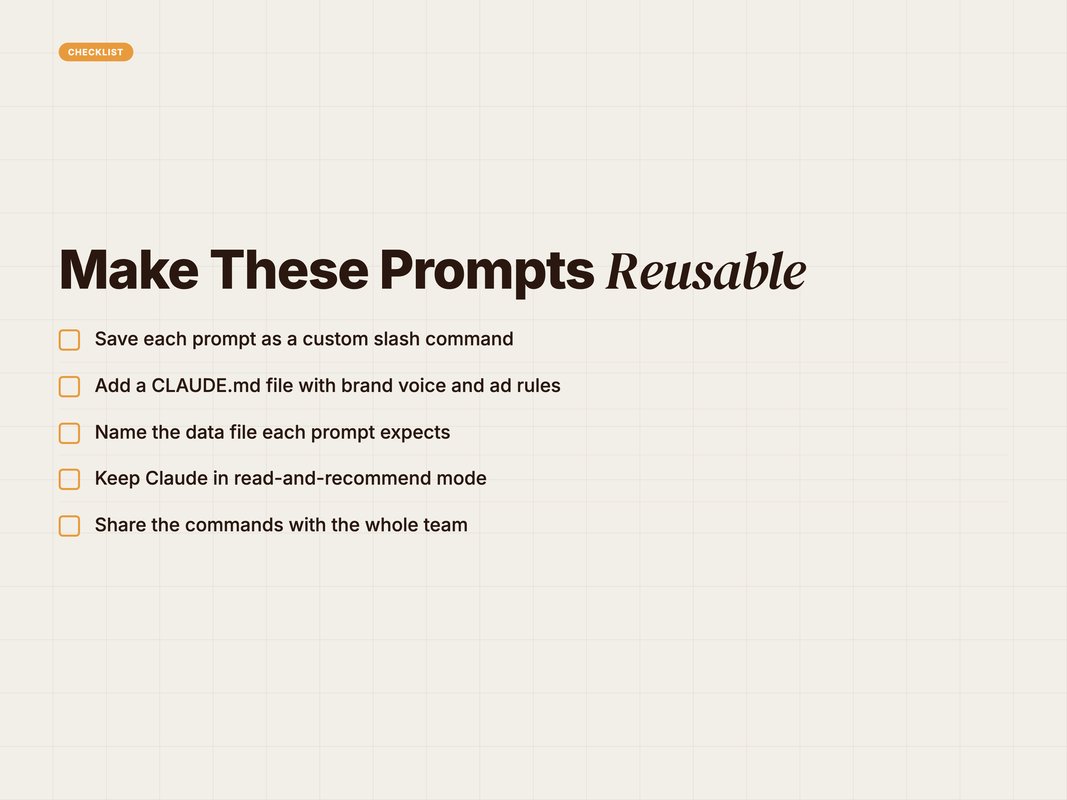
Once these are commands, the work compounds. A weekly audit is a two-minute habit. A new hire inherits the whole playbook on day one.
That's the real prize. Not one clever prompt. A system.
Q: Where do I store a custom slash command?
A: Inside your project, in a commands folder Claude Code reads automatically. Each command is a small file holding your prompt. Once saved, typing the command name runs the full prompt. Your team shares the folder, so everyone gets the same result.
How YARD Uses Claude Code in Real Campaigns
We're an AI-first growth marketing agency.
Performance marketing, LLM SEO, AI creatives, and AI funnels for D2C and B2B brands.
Claude Code sits inside how we run paid media. We connect live ad platforms through MCP servers, so Claude reads and acts on real account data, not stale exports.
Search-term mining, RSA drafting, and pacing audits run as saved commands across client accounts. The output is consistent because the prompts are shared, not improvised.
The result is simple. Our team spends less time in spreadsheets. They spend more time on strategy and creative.
That's the promise of AI for marketers done right. The machine handles the repeatable. People handle the judgement.
We treat each prompt like a small product. We test it on real exports. We tighten the rules until the output needs no clean-up.
Then it becomes a command the whole pod uses. A new account inherits the playbook on day one, not month three.
If you want this built into your account, we can help. We design the prompts. We wire the connections. We hand you a workflow your team actually uses.
See how we approach this. [internal link: ai-marketing-automation-services]
Conclusion
Claude Code is not another chatbot.
It reads your data, writes your copy, and audits your spend. On your real accounts.
The five prompts above cover the daily grind. Search-term waste. Ad copy. Pacing. GA4 triage. Landing-page QA.
Copy them. Run them on one export today. Then save the winners as commands.
The barrier is low. You don't need code. You need a folder, an export, and a clear ask.
Start small. One prompt, one report. Feel the time you get back. Then build the rest into your week.
The compounding is real. Each saved command frees an hour. Each freed hour goes to strategy.
That's how performance marketing automation actually lands. One useful prompt at a time.
Want a workflow built around your accounts? You can book a call with YARD and we will set it up with you.
FAQ
Q: Do I need to be a developer to use Claude Code prompts?
A: No. You point Claude Code at a folder of CSV exports and ask in plain English. It reads the files, runs the analysis, and writes the output. You review the result, not the code.
Q: Where does Claude Code get my campaign data?
A: Two ways. You can drop CSV exports from Google Ads, Meta, or GA4 into a folder. Or you can connect a live source through an MCP server. Then Claude reads the platform directly, not a static file.
Q: Will Claude Code change my live campaigns automatically?
A: Only if you let it. By default it reads and drafts. It asks before running anything. Keep it in read-and-recommend mode until you trust the output, then grant write access deliberately.
Q: Can I reuse a Claude Code prompt every week?
A: Yes. Save a prompt as a custom slash command in your project. Then a whole audit runs from one short command. The team shares the same command, so the output stays consistent.
Q: Are Claude Code outputs accurate enough to trust?
A: Treat them as a strong first draft. Claude is good at math, pattern-spotting, and copy. You still own the final call. Always spot-check the numbers against the source export before you act.
Q: How is Claude Code different from a chatbot?
A: A chatbot only talks. Claude Code reads files, runs commands, and edits real outputs on your machine. It can connect to your tools through MCP. That makes it an operator, not just an advisor.
Insights from Our Experts
Explore our latest articles on digital marketing strategies.