

Your AI tool is smart. But it is also blind to the rest of your stack.
MCP servers fix that. They let your AI read your CRM. Edit your Airtable. Post to Slack. Pull ad spend from Meta. Write a brief in Google Docs. All from one chat window.
That is what marketers should care about. Not the spec. Not the protocol diagram. Just the fact that your assistant can finally act in your tools.
This guide covers what MCP servers are. Why adoption took off. What they cost to set up. And which ones are worth your time today.
What MCP Servers Actually Do
MCP stands for Model Context Protocol. It is an open standard from Anthropic. It launched on November 25, 2024 (Source: Anthropic, 2024 — anthropic.com/news/model-context-protocol).
Think of MCP as a plug. The AI is on one side. Your tool is on the other. The server is the wire that lets them talk.
Each MCP server exposes three things. Resources, which are read-only data the AI can pull. Tools, which are actions the AI can take. Prompts, which are reusable templates the tool itself ships with.

The wire goes both ways. The AI can ask for a Salesforce record. It can also create one. Same for Slack messages. Same for Airtable rows. Same for ad campaigns.
Q: Why call it a "protocol" instead of an API?
A: APIs differ from tool to tool. MCP is one shape that every tool can speak. The model only has to learn the protocol once. After that, every server just works.
Before MCP, each AI tool needed a custom integration for each platform. Now every tool that supports MCP can talk to every server that supports MCP.
That is the unlock.
Why Marketers Need to Pay Attention Now
The numbers moved fast. Faster than any AI standard before it.
The MCP SDKs hit 97 million monthly downloads by March 2026 (Source: Wikipedia, 2026 — en.wikipedia.org/wiki/Model_Context_Protocol). The public server registry crossed 9,400 servers in April 2026. A year earlier the count was 1,200 (Source: Digital Applied, 2026 — digitalapplied.com).

Among enterprise AI teams, 78% report at least one MCP-backed agent in production. A year earlier the number was 31% (Source: Digital Applied, 2026 — digitalapplied.com).
Every major platform now ships MCP support. Claude. ChatGPT (since April 2025). Google Gemini and Vertex AI Agent Builder (since March 2026). Cursor. Windsurf. The OpenAI Agents SDK (Source: Pento, 2026 — pento.ai).
Quick Facts: MCP at a Glance
- 97M monthly SDK downloads — (Source: Wikipedia, 2026 — en.wikipedia.org)
- 9,400+ public servers in registry — (Source: Digital Applied, 2026 — digitalapplied.com)
- Anthropic donated MCP to the Linux Foundation in Dec 2025 — (Source: Anthropic, 2025 — anthropic.com)
Marketers who skip this miss what comes next. Brief generation that pulls from real campaign data. Reports that build themselves on Monday morning. Briefs that already know your last 90 days of CTR.
That is what the rest of this guide is about.
The 4 Marketing Stacks MCP Replaces
You have probably used some version of these workflows. They were the best we had. They are not the best now.

Each row above is weekly work. An MCP-native stack shrinks every one. Not deletes. Shrinks.
The old way is not gone. ChatGPT chat windows still have a place. The shift is in the heavy work. More of it moves into the assistant. Less of it lives in human copy-paste.
Q: What is the catch?
A: MCP is wide, not deep. You still need a person to read what came back. Servers can move data. They cannot judge if the data is right. So treat the AI as a fast junior, not a senior.
That framing matters. Skip it and you ship work that looks finished but is not.
How to Connect Your First MCP Server
You can do this in under ten minutes if your client supports MCP. Most do.
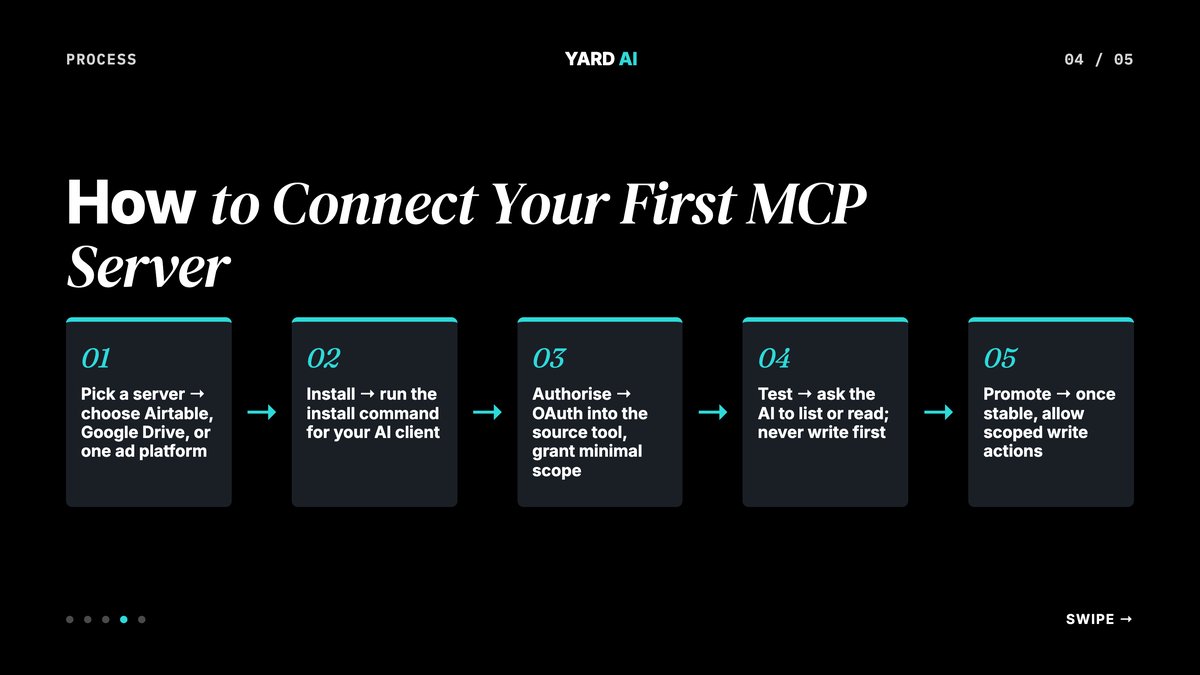
- Pick a server. Start with Airtable, Google Drive, or one ad platform.
- Install. Run the install command for your AI client.
- Authorise. OAuth into the source tool. Grant minimal scope.
- Test. Ask the AI to list or read. Never write first.
- Promote. Once stable, allow scoped write actions.
Step one is the only one that varies by tool. The rest is the same on every client.
For Claude Desktop, the install path is claude mcp add --transport http <name> <url>. Cursor uses a JSON config file in .cursor/mcp.json. ChatGPT uses Settings → Connectors. The pattern is the same every time. Name. URL or command. Auth.
Test it before you trust it. Ask the AI to list rows. Ask it to read a doc. Do not let the first action be a write.
Q: What if a server fails after install?
A: The most common cause is auth scope. The server may have read access but not write access. Check the OAuth screen in the source tool. Re-authorise with broader scope. Restart the client. The server will pick the new token up.
A bad server is loud. It returns errors fast. A misconfigured server is silent. It returns nothing. Watch for both.
6 MCP Servers Every Marketer Should Know
Some servers save time on day one. Others are nice-to-have. This list is the day-one set.

The Airtable and Google Drive servers pay for themselves in week one. They cover most weekly status work. The ad platform servers change reporting the most. The Webflow server is the unlock. Your AI can finally ship the blog, not just write it.
Start with three. Add more as you find the joins. Do not install every server you see. Each one is another auth token to manage.
Q: How many servers is too many?
A: When the AI hesitates between tools, you have too many. A clean stack of five servers beats a messy stack of fifteen. Audit quarterly.
Most teams stabilise at six to eight. That is enough to cover the weekly cycle without making the AI slow.
What MCP Won't Do For You
MCP is plumbing. Plumbing is useful. Plumbing is not strategy.
The standard does not give the AI new judgement. A Google Ads server still needs the AI behind it to know what good looks like. If the AI cannot read a brief, MCP cannot help.
Auth is your job. Each server runs with the access of the user who installed it. Connect a server to a live ad account and the AI now has that access.
Run through this checklist before you connect any new server:
- Confirmed the smallest OAuth scope that lets the server work
- Tested in a sandbox account before live
- Logged the install in your team's MCP register
- Set a 90-day re-review reminder
- Confirmed the server can be revoked from one place
Skip any of those and you are inviting a clean-up later.
Q: Is MCP a security risk?
A: It is the same risk as any other integration. The server has the access you grant. So treat each connection as you would treat a contractor account. Smallest scope that works. Time-bound where possible. Reviewed.
Errors are still possible. A server might pull stale data. A tool might rate-limit. Plan for retries. Plan for review.
How YARD Uses MCP Servers Today
YARD is an AI-first growth marketing agency. We run Performance Marketing, LLM SEO, AI Creatives, and AI Funnels. Our work covers multiple brands across several industries. We work with multiple D2C and B2B brands across performance, SEO, creative, and funnels
MCP is the layer that ties our stack together. One assistant. One chat window. Read access to every brand's Airtable, Google Ads, Meta, and Webflow CMS.
Take one of our recent clients — an Indian kids' fashion brand. We took monthly Google impressions from 1.1M to 2.3M in under 12 months. The brand now ranks on ChatGPT, Perplexity, Claude, Gemini, and Bing. That is AI-search visibility, not just classic Google. The MCP-driven content stack made that scale possible without a bigger team.
If your team is still copy-pasting between AI and tools, the easy gains are slipping away. We can map your stack to the same MCP setup we run for our brands.
Subscribe to the YARD newsletter for weekly AI-first marketing playbooks. Or follow along on the YARD blog as more of these go live.
The Bottom Line
MCP servers are not a buzzword. They are the new wiring of the AI stack. Once you have used a few, going back to copy-paste feels slow.
Start small. One AI client. Two or three servers. A test data set. Get one weekly task to run cleanly through the assistant. Then add the next.
Teams that adopt this layer in 2026 will look back next year. They will wonder how they ever briefed without it. The teams that wait will be one more cycle behind. The cost of trying is low. The cost of skipping it is the cost of every other AI shift you skipped before.
Pick one server today. Install it. Run one task. That is the whole game.
FAQ
Q: What are MCP servers in simple terms?
A: MCP servers are small programs that let an AI model talk to a tool or data source. Think of them as adapters. The AI plugs into the server. The server speaks the tool's language. The marketer gets one assistant that can act across every platform they use.
Q: Who built MCP and when?
A: Anthropic launched MCP on November 25, 2024. It is open source. In December 2025 Anthropic donated it to the Linux Foundation. OpenAI, Google, AWS, and Microsoft now back the standard. So it is no longer a single-vendor tool.
Q: Do I need to code to use MCP servers?
A: No. Most marketing tools now ship pre-built MCP servers. You install the server. You point your AI client at it. The setup is closer to adding a Slack app than writing code. A small amount of config is normal.
Q: Will MCP replace Zapier or Make?
A: Not yet. Zapier and Make are still better for fixed, scheduled flows. MCP wins when the work is judgement-based and changes shape every time. The two will live together for a while.
Q: Is MCP safe to use with client data?
A: It can be. Servers run with the same access as the user who installed them. Use OAuth where the tool offers it. Run sensitive servers locally. Audit which actions a server can take before you connect it to live accounts.
Q: What is the most useful MCP server for a small marketing team?
A: Start with three. The Google Drive server, the Airtable server, and one ad platform server (Meta or Google Ads). That stack covers content, project state, and paid media. You will feel the time saving in the first week.
Insights from Our Experts
Explore our latest articles on digital marketing strategies.