

Most agency stack posts list a sprawling lineup of tools and call it a strategy.
This one is different. We run an AI-first growth marketing agency. The AI marketing agency tech stack below is the one we use every day. Every tool earned its slot. Each one replaces work a human used to do.
We will show you the layers. The picks. The cost. The trade-offs.
You will leave with a stack you can copy, swap, or argue with.
What Counts as an AI Marketing Agency Tech Stack
A stack is not a tool list.
It is a set of layers. Each layer does one job. They snap together through APIs and MCP.
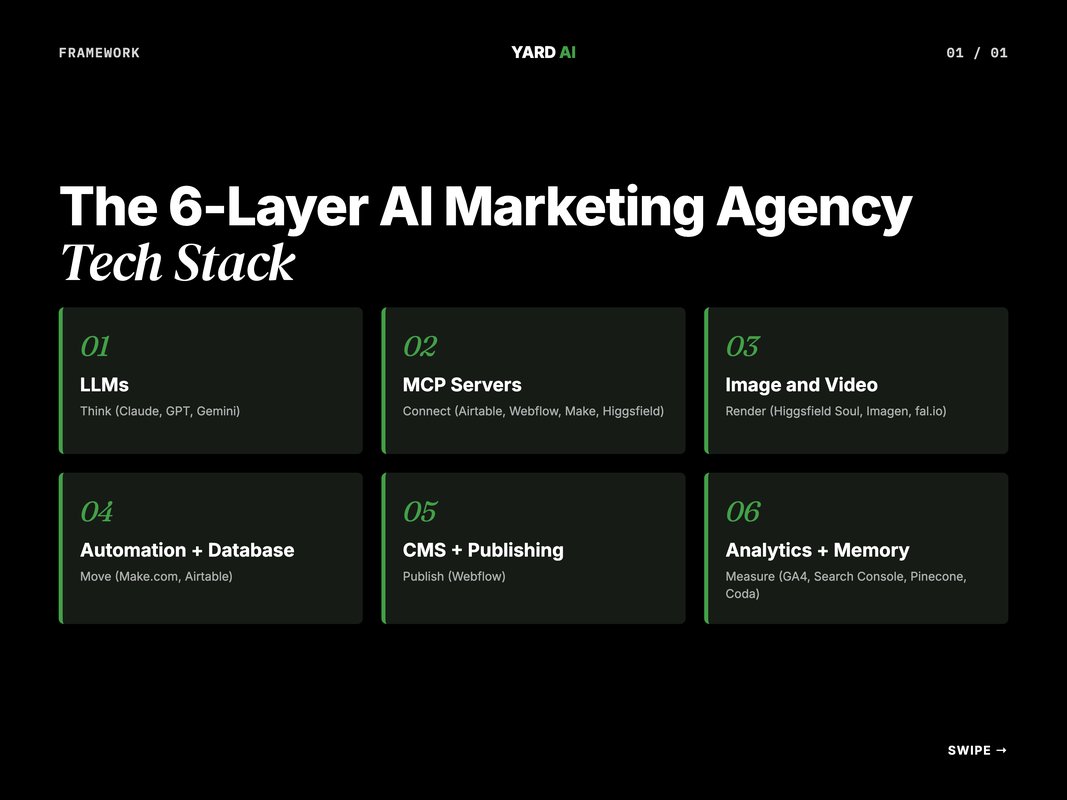
We think in six layers. LLMs. MCP servers. Image and video. Automation. CMS and publishing. Analytics.
Get all six right and one operator runs the same load that used to need five people. Get one wrong and the whole pipeline stalls.
The six layers map to six recurring jobs. Think. Connect. Render. Move. Publish. Measure. That is the whole agency loop.
You will see teams skip the connector layer. They glue LLMs to dashboards by hand. The chat output never reaches the CMS. The blog never ships.
You will also see teams over-tool. Three writing apps. Four image models. No automation between them. The output rate stays flat.
The fix is the same in both cases. Pick one tool per layer. Wire them. Then add only what unblocks the next bottleneck.
The order matters. LLM first. Then the database. Then the connectors. Then the image layer. Then the CMS. Then the analytics. Skip ahead and the chain breaks.
We learned this the hard way. We tried to build the image router before the database was solid. The router worked. The output had nowhere to land. Two weeks lost.
So build in order. Each layer leans on the one below it. A clean LLM choice makes every other choice easier.
Q: What is an AI marketing agency tech stack?
A: It is the set of tools an AI-first agency uses to plan, write, design, ship, and measure marketing work. The stack spans LLMs, MCP servers, image and video, automation, CMS, and analytics. The goal is fewer hand-offs and more output per operator.
Layer 1 — The LLM Core
This is where every brief starts.
We run three LLMs side by side. Claude is the default. GPT is the backup. Gemini is the long-context wildcard.
Claude does long-form thinking. It writes briefs, code, and SOPs. We trust it on multi-step plans. The 1M-token Sonnet window holds a full client brand in one thread (Source: Anthropic, 2025 — anthropic.com).
GPT goes on image-heavy briefs. The new GPT Image 2 is the best at text inside infographics. We hand it stat callouts and stack diagrams.
Gemini takes the research load. It pulls long PDFs, web pages, and source dumps. Pro 3 is fast and cheap on context.
Anthropic itself runs the same pattern. Their marketing team uses Claude on brand voice, ad iteration, and CSV-based ad workflows (claude.com).
The split is by job, not vibe. Brand voice and SOPs go to Claude. Ad creative and image briefs go to GPT. Source-stack research goes to Gemini. The team learns the split in a week.
We also run Claude Code in the terminal. It writes scripts that touch the stack. Most of our Make.com flows, MCP servers, and image scripts started life in a Claude Code session.
Most teams will land on one primary and one backup. Pick by job, not loyalty.
A simple rule helps. The tool that owns the writing is the tool that owns the agency. So pick the one your team actually wants to open at 9 am.
Q: Which LLM should an agency pick as its default?
A: Pick the model that fits the job. We default to Claude for long-form thinking and code. GPT goes on image-heavy briefs. Gemini covers long-context research. Most teams will land on one primary and one backup.
Layer 2 — MCP Servers (The Connectors)
MCP is the part most agencies miss.
Model Context Protocol lets an LLM call outside tools. One Claude thread can read Airtable, write Webflow, query Google Ads, and pull GA4. No tab-switching.
We run MCP for Airtable. Webflow. Make.com. Coda. Pinecone. Higgsfield. Each adds a verb the LLM did not have. Webflow rolled out an official Claude connector on 9 Feb 2026 (cmswire.com).
The lift is huge. A blog draft now flows from chat to CMS in one prompt.
You do not need MCP on day one. But the moment you do, the agency feels different.
We treat MCP as the connective tissue. Each server is a thin verb layer over a tool we already pay for. No new SaaS. Just new reach.
The skill curve is small. A junior can write a new MCP call in a day. We keep our list of active servers in a shared doc so no one is guessing.
Here is what each server actually does for us. Airtable MCP reads and writes any base. Webflow MCP pushes CMS items and runs audits. Make.com MCP triggers and monitors scenarios. Coda MCP holds our brand SOPs. Pinecone MCP stores semantic memory across projects.
The killer one is the Yard MCP. It is our in-house server. It calls our image router, video gen, and brand assets in one verb set. The team uses it daily.
We add a new MCP only when the same manual task hits us three times in a week. That cuts noise.
Q: Do you need MCP servers to run an AI agency?
A: Not on day one. You can ship value with a chat window alone. But MCP is where leverage shows up. It lets one model talk to Airtable, Webflow, ad platforms, and analytics in one thread.
Layer 3 — Image and Video Generation
This layer used to need a full design team.
Now it is a router. We send each image type to the right model. The router lives in code. The LLM picks the model based on the slot.
Higgsfield Soul renders our blog covers. It is fashion-grade and consistent. Imagen 4 Ultra handles infographics with crisp text. fal.io serves Flux as a fallback. Soul V2 stays as a Higgsfield backup for cinematic shots.
Higgsfield also ships its own MCP server. Claude can call image and video models inside a chat thread, no manual prompting (higgsfield.ai).
We added a programmatic SVG renderer for tables, frameworks, and checklists. That layer costs nothing. It also never hallucinates a number.
The full pipeline lands a six-image blog for under twenty cents.
Picking by image type is the move. Covers want mood. Diagrams want clean text. The same model rarely wins both.
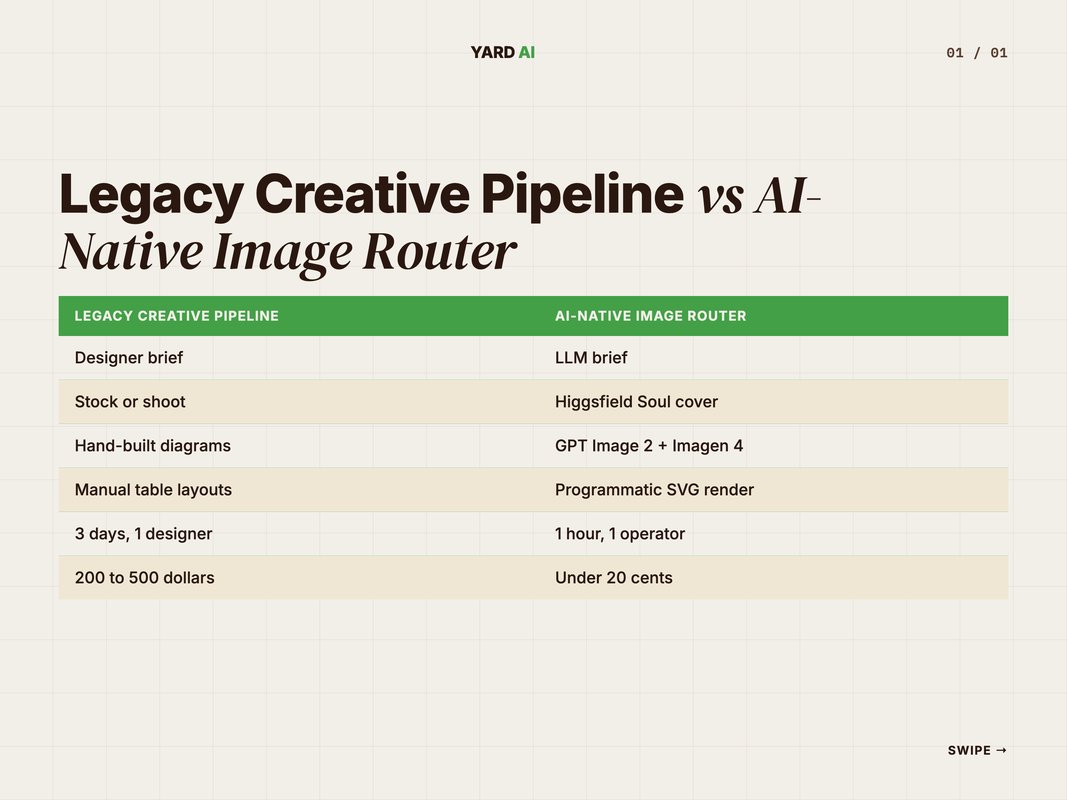
A quick breakdown of our router. Cover slot goes to Higgsfield Soul at about five cents. Infographic and comparison slots go to GPT Image 2 or Imagen 4 Ultra at five to six cents each. Framework, table, and checklist slots render locally as SVG for zero cost.
Video is the new layer. We use Higgsfield for short-form ad cuts. Veo 3 for prompt-tight scenes. Kling for character-consistent shots. Most clients still ask for static first, video second.
The old way needed a designer, an editor, a producer, and three days. The new way needs a brief and an hour.
Layer 4 — Automation and the Database (Make.com + Airtable)
Make.com is the conveyor belt.
Airtable is the database.
Every job we run starts as an Airtable record. Make.com watches the record. When status flips, the next stage fires. The stages chain.
We use Make for client reporting too. It pulls GA4, Search Console, and ads data on a schedule. The numbers land in a sheet, then a Slack ping.
Make is visual. A new hire can read a flow in ten minutes. That matters when you scale.
Airtable holds the source of truth. Topic ideas. Drafts. Image URLs. Live links. Each row is a job. Each column is a stage. The schema is the SOP.
The pair beats a single tool. Make.com alone is a scheduler. Airtable alone is a spreadsheet. Together they are a workflow engine.
We have one base per brand. The schema is identical across bases. That keeps the team fluent. A writer can switch brands on Monday and not relearn the columns.
Status fields drive the whole flow. Planned. In Progress. Ready for Review. Approved. Published. Make.com listens for each transition and fires the next step.
A single blog can cross five tools before it goes live. The operator never opens any of them by hand. The flow runs in the background.
Make.com lists more than 2,000 app connectors (Source: Make.com, 2026 — make.com). Most weeks we use about a dozen. The long tail covers edge cases.
Q: Why Make.com and not Zapier or n8n?
A: Make is visual and cheap at volume. Zapier wins on app count but burns budget. n8n is great if you self-host and want full code control. We pick Make because the team can debug a flow without opening a terminal.
Layer 5 — CMS, Publishing, and the Reporting Loop
Webflow is our publish target.
We push every blog and landing page there. The Webflow MCP server lets Claude design, build, and audit pages from a prompt (developers.webflow.com).
That changed our workflow. We used to write in markdown, then a designer rebuilt the page. Now Claude pushes the page itself. The designer reviews, not rebuilds.
Pricing tier matters here. The CMS plan is what unlocks the API. Pick that one if you publish more than ten posts a month.
The analytics half closes the loop. We use GA4 for site data. Search Console for organic queries. Ad platforms feed campaign numbers. Coda holds the client dashboard.
Pinecone stores brand memory. Every past blog, brief, and decision lives in a vector index. Claude can recall any of it in seconds.
The reporting layer flows back into Airtable. The loop closes. The team sees what worked this week, not next month.
We also wire weekly digests. Each Monday a Make.com flow pulls last week's metrics. Claude summarises the wins and misses. The summary lands in Slack and Coda. The team meets on Tuesday with the digest already done.
The same loop feeds the next blog cycle. Topics that won get follow-ups. Topics that flopped get retired. Nothing sits in a spreadsheet waiting to be reviewed.
Brand memory is the quiet superpower. Pinecone holds the last two years of work. Claude can find a paragraph from a brief written in March 2025 in under a second. That kind of recall used to take a junior an afternoon.
Quick Facts: AI Stack Adoption in 2026
- 75 percent of marketers now use AI on the job — (Source: SurveyMonkey, 2026 — surveymonkey.com).
- Anthropic launched Claude for Small Business on 13 May 2026 with 15 agent workflows — (Source: PYMNTS, 2026 — pymnts.com).
- Webflow shipped its Claude MCP connector on 9 Feb 2026 for AI-driven CMS edits — (Source: CMSWire, 2026 — cmswire.com).
- Make.com lists more than 2,000 app connectors for visual automation — (Source: Make.com, 2026 — make.com).
- Higgsfield ships multi-model image and video gen with MCP support — (Source: Higgsfield, 2026 — higgsfield.ai).Q: Should agencies still use a CMS like Webflow?
A: Yes. A CMS gives you a stable publish target. Webflow now has an MCP server, so Claude can push posts, run audits, and manage CMS fields from a prompt. The CMS is no longer a bottleneck.
The Tool x Category Matrix (What Lives Where)
We get asked for the cheat sheet a lot.
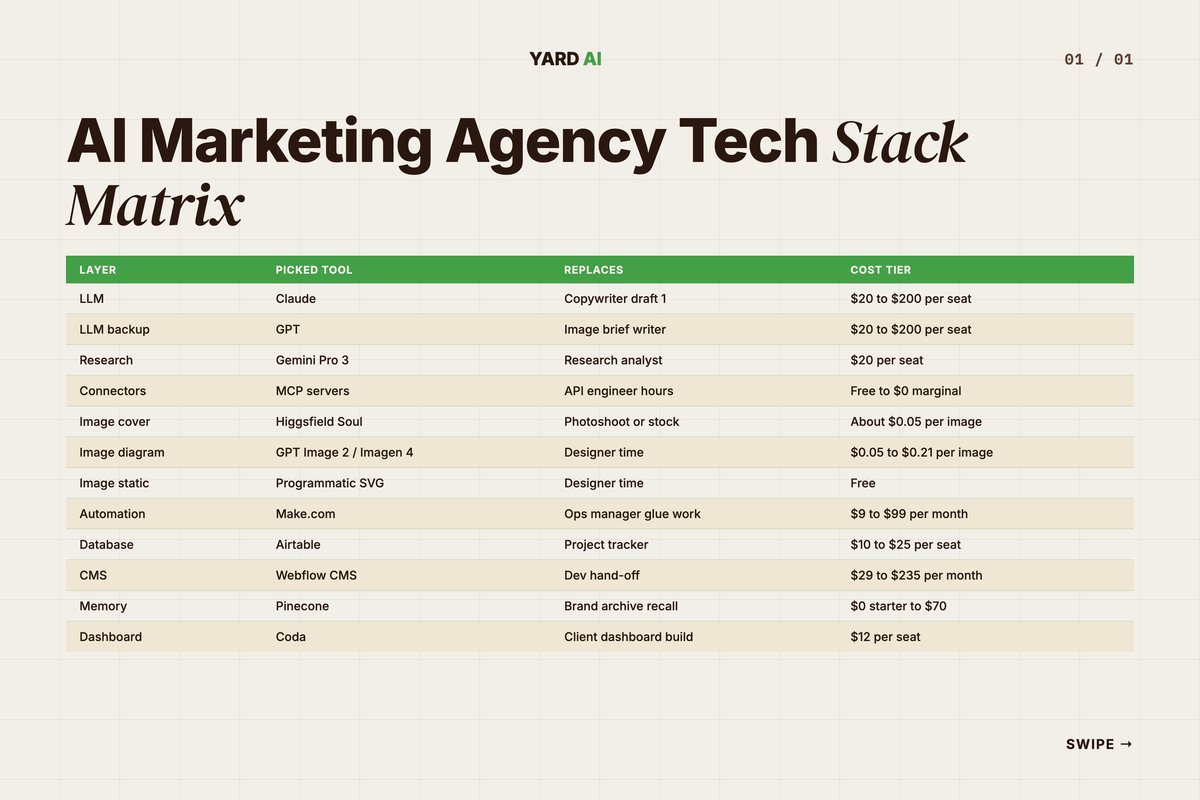
Here is the short version. One picked tool per layer. What it replaces. The cost tier.
The matrix is what we hand a new operator on day one. They learn it before they touch a client.
A few notes on it. The LLM seats scale with team size. Image gen scales with output. Make.com scales with run count. So most cost growth is on those three lines.
The legacy column matters too. It shows the role the AI tool absorbed. That story sells the stack to your CFO faster than any feature list.
A solo operator can run the full stack for under 300 dollars a month. A five-person team sits near 1,200. A ten-person team lands close to 3,000. Past that, custom contracts kick in. (Costs add up across Claude Team seats (Source: Anthropic, 2026 — claude.com pricing), Make.com operations (Source: Make.com, 2026 — make.com pricing), Airtable seats (Source: Airtable, 2026 — airtable.com pricing), and Webflow CMS plans (Source: Webflow, 2026 — webflow.com pricing).)
The math beats the old way. A junior designer alone costs more than the full tool stack for a small team. The stack does more, faster, and never sleeps.
Seat math is the lever to watch. Three LLM seats can run a small team if the workflows are shared. Five seats is plenty for a mid-size team. Past ten, you want API access on top.
Image gen credits are the second lever. We budget about thirty cents per blog and twenty cents per ad set. Multiply by output. A team shipping fifty pieces a week sits near sixty dollars a month on image alone.
Make.com runs are the third lever. We pay about thirty dollars a month for our run volume. A heavier client could push that to eighty. Still cheap for the work it absorbs.
Q: How much does a full AI marketing stack cost per month?
A: For a small team the floor is around 200 to 400 dollars a month. That covers LLM seats, Make.com, Airtable, Webflow, plus image gen credits. Larger teams sit at 1,500 to 3,000 a month once seats and ad platform tooling pile on (Source: Anthropic, 2026 — claude.com pricing; Make.com, 2026 — make.com pricing; Airtable, 2026 — airtable.com pricing; Webflow, 2026 — webflow.com pricing).
How We Evaluate a New Tool Before Adding It
Tools are cheap. Switching cost is not.
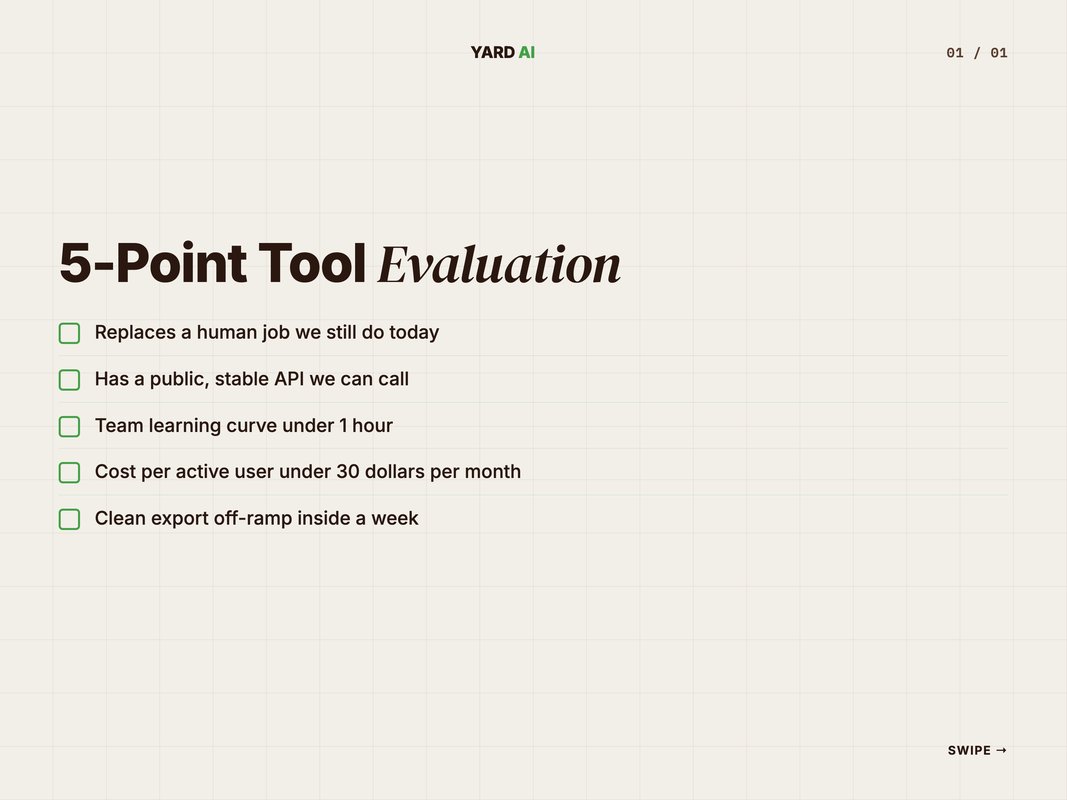
We run every new tool through a five-point check. If it fails any point, we pass. The check kills most shiny new launches before they touch the stack.
The criteria are public. Use them. Tweak them. Your stack will be better for the filter.
The first point is the most important. Does the tool replace a human job we still do? If no, it is a toy. Skip.
The second point is the API. No API, no scale. No scale, no slot. We do not buy seats for tools that live behind a UI alone.
The fifth point is the off-ramp. Can we export everything in a week? If not, we are renting a hostage. Pass.
The other three points matter too. Point two is integrations. Point three is the team learning curve. Point four is cost per active user. Each one is a yes or no.
We log every eval in Coda. Two months later we revisit. The notes show us why we passed or picked. That archive saves us from rerunning the same debate.
The rubric also kills internal lobbying. A team member who loves a new app still has to defend it on the five points. Most do not bother once they see the bar.
Q: How do you stop tool sprawl in an agency?
A: Use a written eval rubric. Force every new tool to pass the same five tests. If it does not replace a manual job or unlock a new one, it does not get in. Most "must have" tools fail this filter.
Why We Run an AI-First Stack (Not Just Bolted-On AI)
There is a big gap between "we use ChatGPT" and "we are AI-first".
Bolted-on AI is one tool inside an old workflow. AI-first is a new workflow built around the model. The output gap shows up fast.
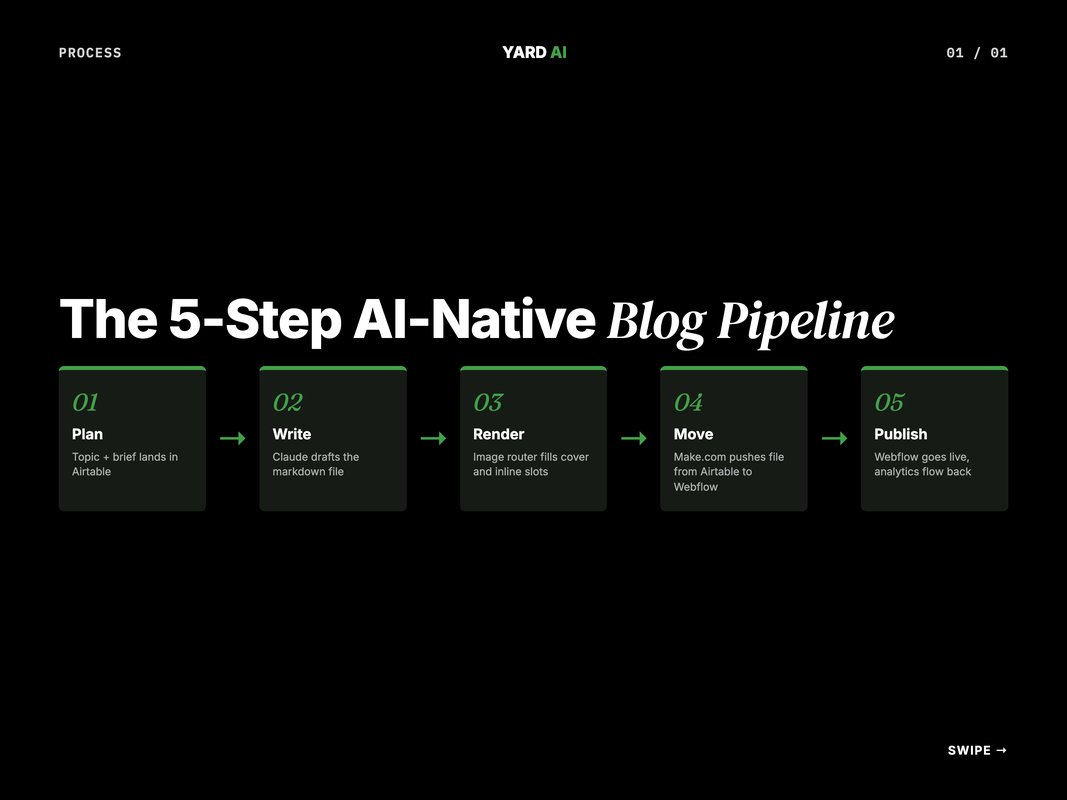
We rebuilt our blog pipeline this way. Topic in Airtable. Claude writes. The image router renders. Make.com moves the file. Webflow publishes. Analytics flow back.
One operator runs the whole chain. The old chain needed five people.
That is the point. Not the tools. The shape of the team.
The same logic applies to ads. To creative. To SEO. Build the workflow for the model. Not the other way around.
A bolted-on team still does the same ten things by hand. The model just helps with the writing step. An AI-first team rewires the ten steps so the model owns six. The shape shifts.
The trap is comfort. A team that already runs Notion and Slack will resist a database-first flow. So lead with one wedge workflow. Show the lift. Then expand.
We picked blog production as our wedge. It is high volume, structured, and easy to measure. Once the team saw a six-image blog ship in a morning, the rest of the stack sold itself.
YARD is an AI-first growth marketing agency.
We run performance marketing, LLM SEO, AI creatives, and AI funnels for D2C and B2B brands. The stack you just read is what we use to do that work.
We are not a reseller of any tool. We pick what wins. We drop what fails. The stack changes every quarter.
If you are building your own AI marketing agency tech stack, start with the six-layer model. Pick one tool per layer. Get them talking. Then scale.
Most teams over-tool and under-connect. The opposite is the move.
You can book a call if you want a second pair of eyes on your stack. We do free 30-minute audits for serious teams.
Conclusion
The AI marketing agency tech stack is not a list. It is a layered system.
Six layers. One job each. They snap together through MCP and APIs. The output is more work per operator and faster client wins.
Start with the LLM. Add the connectors. Build the router. Wire the automation. Pick the CMS. Close the loop with analytics.
That is the whole game in 2026.
If you want to see the same stack in action on a real brand, book a 30-minute audit at yardagency.ai. We will walk your funnel layer by layer.
We will also share the parts that did not work. Tools we tried and dropped. Flows we rebuilt twice. The misses save you the same time we lost on them.
The stack you ship in 2026 will define the agency you run in 2027. Pick wisely. Wire deeply. Ship daily. That is the operator way.
One last thing. The stack does not replace judgement. It just buys you back the hours to use it.
FAQ
Q: What is an AI marketing agency tech stack?
A: It is the set of tools an AI-first agency uses to plan, write, design, ship, and measure marketing work. The stack spans LLMs, MCP servers, image and video models, automation, CMS, and analytics. The goal is fewer hand-offs and more output per operator.
Q: Which LLM should an agency pick as its default?
A: Pick the model that fits the job. We default to Claude for long-form thinking and code. GPT goes on image-heavy briefs. Gemini covers long-context research. Most teams will land on one primary and one backup.
Q: Do you need MCP servers to run an AI agency?
A: Not on day one. You can ship value with a chat window alone. But MCP is where leverage shows up. It lets one model talk to Airtable, Webflow, ad platforms, and analytics in one thread.
Q: How much does a full AI marketing stack cost per month?
A: For a small team the floor is around 200 to 400 dollars a month. That covers LLM seats, Make.com, Airtable, Webflow, plus image gen credits. Larger teams sit at 1,500 to 3,000 a month once seats and ad platform tooling pile on (Source: Anthropic, 2026 — claude.com pricing; Make.com, 2026 — make.com pricing; Airtable, 2026 — airtable.com pricing; Webflow, 2026 — webflow.com pricing).
Q: Should agencies still use a CMS like Webflow?
A: Yes. A CMS gives you a stable publish target. Webflow now has an MCP server, so Claude can push posts, run audits, and manage CMS fields from a prompt. The CMS is no longer a bottleneck.
Q: What does an AI-native blog pipeline look like end to end?
A: Topic in Airtable. Claude writes the draft. An image router renders covers and inline visuals. Make.com moves the file. Webflow publishes. Analytics flows back to Airtable. One operator runs all five stages.
Insights from Our Experts
Explore our latest articles on digital marketing strategies.