

Most content teams ship slowly. Ideas pile up. Drafts get stuck in inboxes.
An automated blog pipeline fixes that flow. It moves a post from idea to publish with clear stages and few handoffs. A database tracks each post. Claude writes the draft. Quality gates check the work.
In this guide you will build one. We use Airtable as the database and state machine. We use Claude for drafting. We use simple automation glue to move work between stages.
You do not need a big stack. You need one table, one model, and a few checks. Let us build it step by step.
What an Automated Blog Pipeline Actually Is
A pipeline is just a path with stages. Each post walks that path. Each stage has one job.
Think of four core stages. Topic. Draft. Review. Publish. A post sits in exactly one stage at a time.
The magic is the rule between stages. A post only moves when it meets a clear bar. That bar is your quality gate.
This matters because content scales badly by hand. AI adoption is now near-universal in marketing teams. About 80% of marketers already use AI for content creation, and 94% plan to in 2026 (Source: HubSpot, 2026 — blog.hubspot.com).
So the bottleneck is no longer writing. It is coordination. It is knowing what is drafted, what is reviewed, and what is live.
A pipeline solves coordination. The database holds the truth. The automation moves the work. The model fills the page.
Picture the old way for a moment. A topic lives in a doc. A draft lives in an email. A status lives in someone's head.
Nothing connects. Work gets lost. People ask "where is this post?" three times a day.
The pipeline ends that. One row holds the whole story of a post. Anyone can glance at it and know the state.
That single view is the real win. It is not the speed alone. It is the calm of always knowing where things stand.
Q: What is an automated blog pipeline?
A: It is a workflow that moves a post from idea to publish with little manual handoff. A database tracks each post's state. Claude drafts the copy. Quality gates check each draft before it ships.
Airtable as the State Machine
Here is the core idea. Airtable is your single source of truth.
Each blog post is one row. Each column holds a field you care about. Topic. Keywords. Draft. Status.
The Status field is the heart of it. Make it a single-select with your stage names. Planned. Drafting. In Review. Published.
A state machine means a post moves between named states on clear rules. Airtable supports this pattern well. You trigger an automation only when Status changes to a chosen value (Source: Airtable, 2026 — airtable.com/platform/automations).
That trigger rule keeps your pipeline clean. Work fires once. No double drafts. No silent misfires.
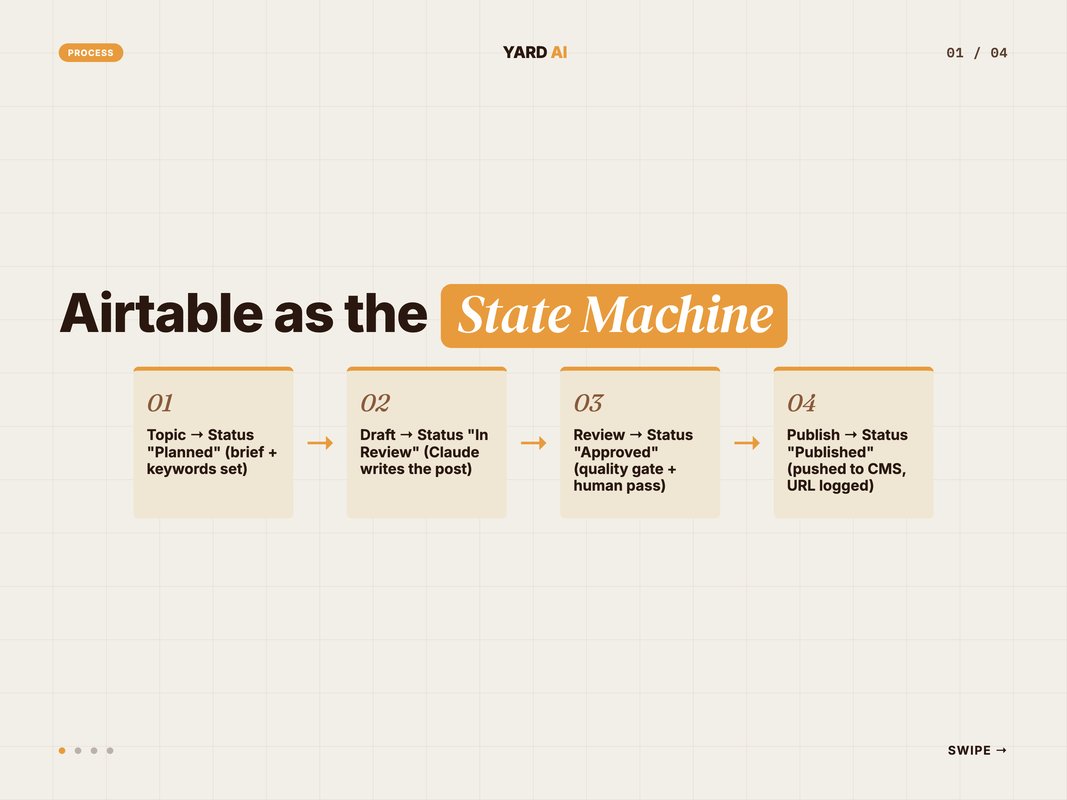
Your script and your team share this table. A human can edit a topic. The script can write a draft to the same row. Both read one truth.
Mind the limits as you scale. The Airtable API allows 5 requests per second per base. Go over and you get a 429 error, then a 30-second wait (Source: Airtable, 2026 — airtable.com/developers/web/api/rate-limits).
So batch your writes. You can update up to 50 records per request, which keeps you well under the cap (Source: Airtable, 2026 — support.airtable.com).
Set up your fields with care from day one. A few field types do most of the work here.
Use a single-select for Status. Use long-text for the draft. Use a URL field for the live link. Use a number field for the quality score.
Add a few helper fields too. A "Last updated" date. An "Assigned to" person. A "Notes" field for review comments.
These small fields pay off later. They let you sort, filter, and group your whole pipeline in seconds. You see every stuck post at a glance.
Q: Why use Airtable as the database for a content pipeline?
A: It gives you a shared, visual table that doubles as a state machine. A single-select Status field tracks each stage. Automations fire on status change. Humans and scripts share one source of truth.
Claude as the Drafting Engine
Now add the writer. Claude turns a topic row into a full draft.
Pick the right model for each job. They are not all the same.
Claude Sonnet 4.6 is the default for most writing. It gives near-Opus quality at faster speed and lower cost (Source: Anthropic, 2026 — platform.claude.com).
Use Claude Opus 4.8 for the hardest passes. Use Claude Haiku 4.5 for cheap, fast steps like sorting topics.
The price gap is real, so model choice saves money. Sonnet 4.6 runs at $3 input and $15 output per million tokens. Haiku 4.5 runs at $1 and $5 (Source: Anthropic, 2026 — platform.claude.com).
Here is a simple call pattern for the draft step:
1. Read the topic row from Airtable (title, keywords, pillar).
2. Build a prompt: brief + outline rules + word count + tone.
3. Call Claude Sonnet 4.6 to draft the full post.
4. Write the draft text back to the row's Draft field.
5. Set Status to "In Review".
Keep your prompt tight. Pass the brief, the target word count, and the structure you want. Ask for headings, an intro, and an FAQ.
One more lever. Use prompt caching for the parts that repeat. Cached input can cost up to 90% less, which trims your per-post bill (Source: Anthropic, 2026 — platform.claude.com).
Your brief and your style guide rarely change. So cache them. Only the topic varies from post to post.
Batch jobs help too. Running drafts in a batch is 50% cheaper across all models (Source: Anthropic, 2026 — platform.claude.com).
So draft your week in one overnight run. The batch saves money. You wake up to a full set of drafts ready for review.
Keep your prompts in version control, not in chat. Treat them like code. When a draft reads off, you tweak the prompt, not the post.
Q: Which Claude model should I use for drafting blog posts?
A: Claude Sonnet 4.6 is the best default for production writing. Use Claude Opus 4.8 for the hardest reasoning passes. Use Claude Haiku 4.5 for cheap classification and routing steps.
The Automation Glue: MCP and Triggers
Something has to connect the parts. That is your glue layer.
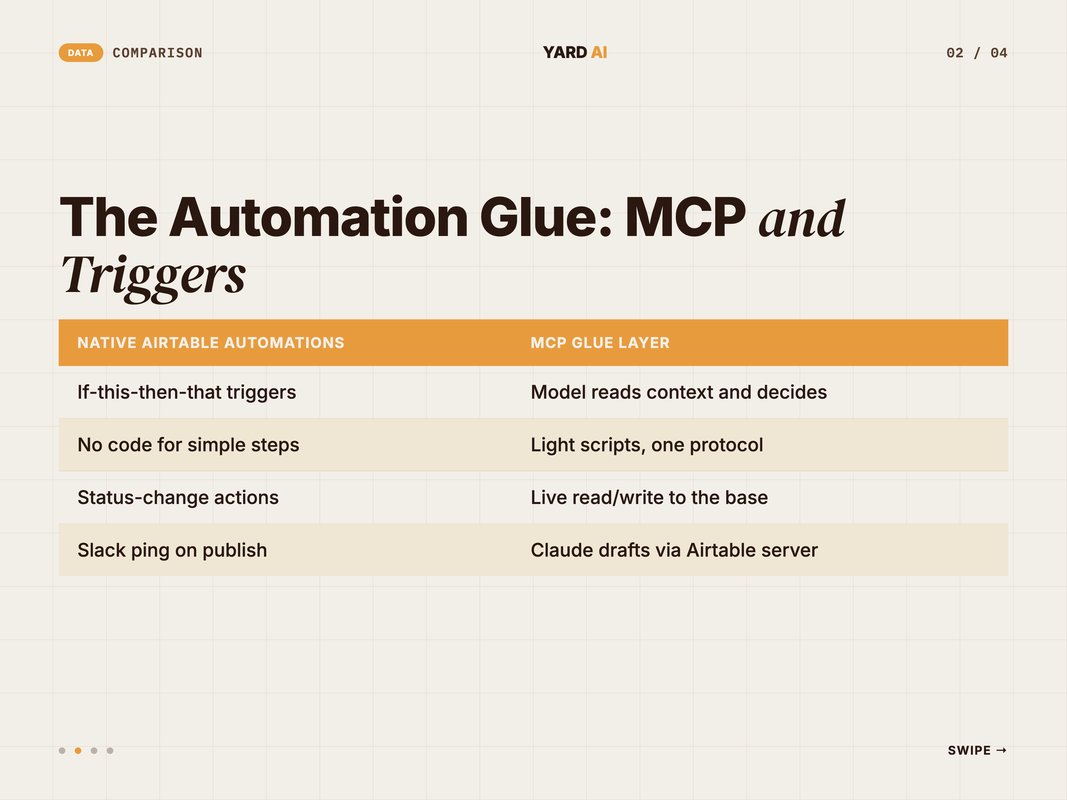
You have two clean options. Native Airtable automations. Or the Model Context Protocol.
MCP is an open standard from Anthropic. It connects an AI model to outside tools and data through one interface (Source: Anthropic, 2024 — anthropic.com).
Think of MCP like a USB-C port for AI. One plug, many tools (Source: Model Context Protocol, 2026 — modelcontextprotocol.io).
With an Airtable MCP server, Claude can read and write your base directly. You skip writing custom API code for each call. The model talks to the table through the protocol.
This pattern keeps your stack lean. MCP has become the de-facto standard for connecting agents to tools and data (Source: Anthropic, 2026 — anthropic.com).
Mix both layers by job. Use native automations for simple triggers, like a Slack ping on publish. Use MCP for the steps where Claude needs live table access.
Why does this split matter? Native automations are easy but limited. They handle "if this, then that" well. They struggle with anything that needs judgment.
MCP fills that gap. It lets the model read context and act on it. The model is not just triggered. It can decide.
There is a deeper reason to lean on MCP, too. It keeps your tool count low. One protocol replaces a pile of custom integrations (Source: Anthropic, 2024 — anthropic.com).
Here is how the glue fires across the pipeline:
- Status = "Planned"     → trigger draft job (Claude via MCP)
- Status = "In Review"   → trigger quality gate script
- Status = "Approved"    → trigger publish job
- Status = "Published"   → trigger Slack notify + log
Q: What is MCP and why does it matter for content automation?
A: MCP is the Model Context Protocol, an open standard from Anthropic. It connects an AI model to external tools and data through one interface. With an Airtable MCP server, Claude can read topics and write drafts to your base. You skip custom code for each call.
Quality Gates: The Part Most Teams Skip
Speed without checks is a trap. AI drafts need review. Skipping it is how bad posts go live.
The data is clear here. About 86% of marketers review and edit AI content before publishing (Source: HubSpot, 2026 — blog.hubspot.com).
And most do real work on it. Only 7% publish AI drafts with no edits, while 56% revise them heavily (Source: Siege Media, 2026 — siegemedia.com).
So build the review into the pipeline. A quality gate is a check a draft must pass to move on.
Make it a script, not a vibe. Run it the moment a draft lands. Score the draft on hard rules.
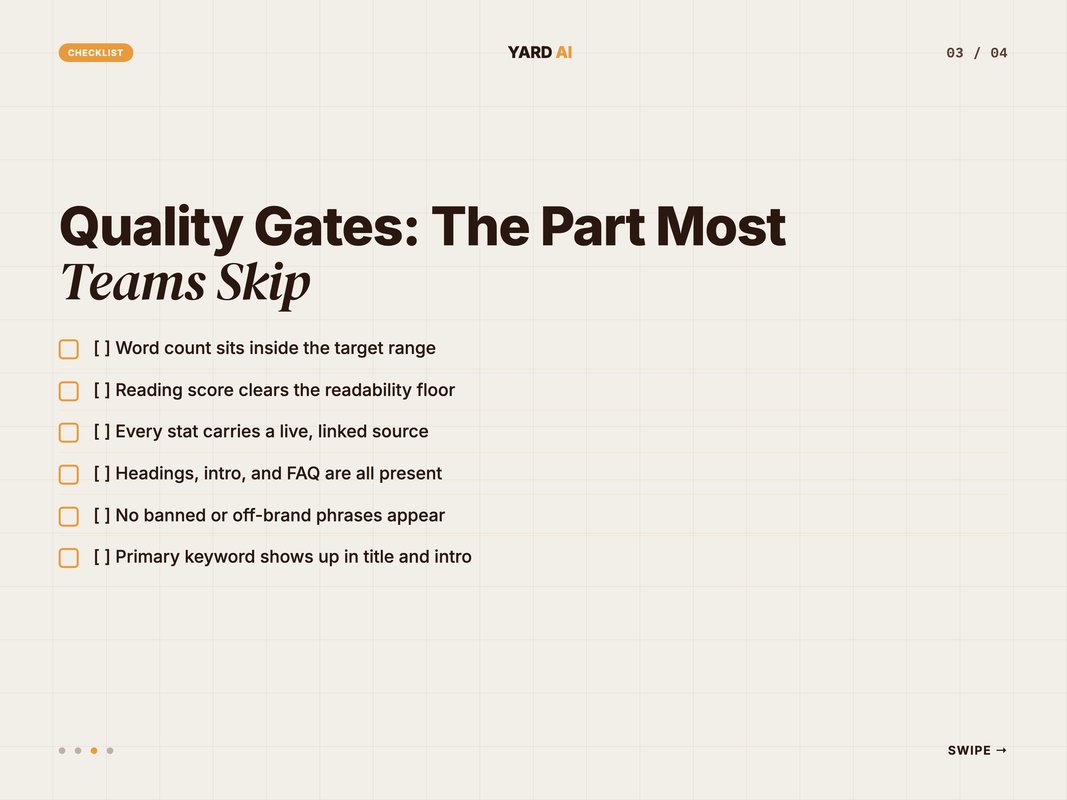
Run this gate checklist before any post advances:
- Word count sits inside the target range.
- Reading score clears your readability floor.
- Every stat carries a live, linked source.
- Headings, intro, and FAQ are all present.
- No banned or off-brand phrases appear.
- Primary keyword shows up in the title and intro.
If a draft fails, it does not move. The script keeps Status where it is. It flags a human to step in.
If it passes, it advances to "In Review" for a quick human pass. The gate does the grunt work. The person does the judgment.
Why split the work this way? Because each side is good at different things. A script checks rules fast and never gets bored. A person catches tone, nuance, and truth.
So let the gate handle the boring checks. Word count. Link liveness. Keyword placement. These are easy to score and easy to fail.
Then let the human focus on what matters. Is the argument sound? Does it sound like us? Is every claim true?
Loop on failure, not on success. A failed draft goes back with the exact reasons. The model fixes those reasons and tries again.
Cap the retries. Three tries, then a human steps in. That stops a bad draft from looping forever.
Save the failure reasons in the row too. Over time, patterns show up. You learn which checks fail most, and you fix the prompt at the source.
Q: How do quality gates work in an AI content pipeline?
A: A gate is a check a draft must pass to move forward. A script scores word count, readability, citations, and structure. If it fails, the post stays put and a human is flagged. Only passing drafts advance.
Putting It Together: A 5-Step Build
Let us assemble the whole thing. Here is the build order.
Start small. One table. A few stages. Then add automation once it works by hand.
Follow these five steps to stand up your pipeline:
1. Build the Airtable table: one row per post, Status single-select.
2. Add fields: Topic, Keywords, Draft, Quality Score, Published URL.
3. Wire the draft job: read row → Claude Sonnet 4.6 → write Draft.
4. Add the quality gate: score the draft, block on fail, pass on clear.
5. Connect publish: on Approved, push to your CMS, set Published.
Test each stage alone first. Draft one post by hand through the flow. Watch the Status field move.
Do not automate a broken step. If a stage fails by hand, it will fail at scale too. Fix the manual flow before you wire the triggers.
This order saves you pain. You debug one stage at a time. You never chase a bug across the whole chain at once.
Then automate the triggers. Map each stage to a job and a model.
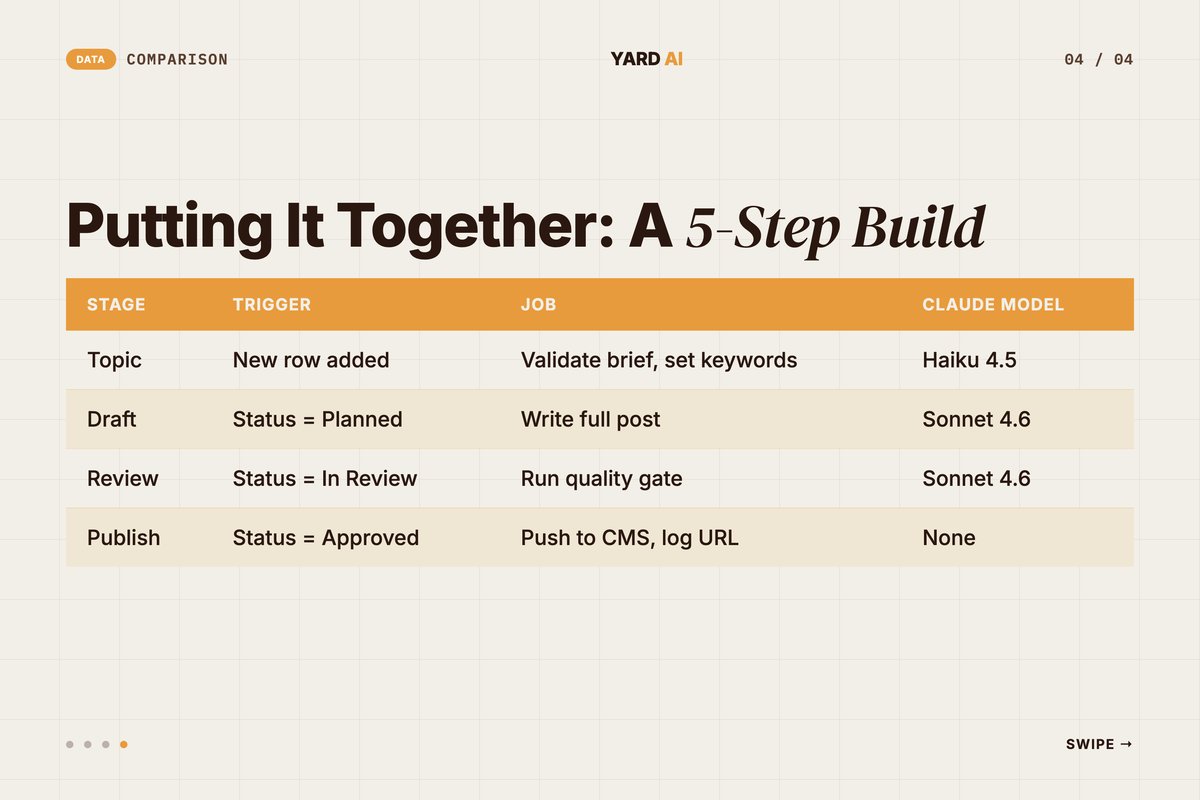
Topic intake runs on Haiku 4.5. It is cheap and fast for sorting. Drafting and the gate run on Sonnet 4.6. Publish needs no model at all.
Keep humans in the loop at review. The pipeline drafts and checks. A person approves.
This is the shape we favor at YARD. The database holds state. The model does the heavy lifting. The gate protects quality.
One more habit. Log every state change with a timestamp. You will want that trail when you tune the flow later.
It also helps you spot stuck posts. If a row sits in Drafting too long, you know to look. A pipeline you can see is a pipeline you can fix.
Add internal links as a final touch. Drop link suggestions right in the draft. Mark them with a simple tag the publish step can resolve.
This builds a mesh across your blog. Each new post strengthens the old ones. The model can even suggest the links as it writes.
Start lean, then layer. Get the four stages working first. Add caching, batching, and links once the core flow holds.
Q: Can this pipeline run without writing code?
A: Partly. Airtable automations and AI fields cover simple steps with no code. For drafting, validation, and MCP calls you will write light scripts. Most teams blend native triggers with a small drafting-and-gate script.Quick Facts: AI Content Pipelines at a Glance.
- Marketer AI use for content sits at 80%, with 94% planning to use it in 2026 — (Source: HubSpot, 2026 — blog.hubspot.com).
- Most marketers review and edit AI content before publishing, at 86% — (Source: HubSpot, 2026 — blog.hubspot.com).
- Airtable's API caps at 5 requests per second per base; batch up to 50 records per request — (Source: Airtable, 2026 — airtable.com/developers).
- Claude Sonnet 4.6 costs $3 input and $15 output per million tokens — (Source: Anthropic, 2026 — platform.claude.com).
How YARD Runs Content at Scale
We are an AI-first growth marketing agency. We build these pipelines for a living.
Our content stack runs on the same parts you just read about. Airtable holds the state. Claude drafts and reviews. MCP connects the model to the data.
We pair that with hard quality gates. Every draft clears readability, citation, and structure checks before a human ever sees it. That keeps speed high and standards higher.
This is how we ship LLM-first SEO content for D2C and B2B brands. Performance marketing, AI creatives, and AI funnels sit alongside it. The pipeline is the engine under all of it.
We help teams move from one-off posts to a repeatable system. You get more output per week. You also get fewer dropped drafts and cleaner handoffs.
We tune the system to your voice, not ours. Your brief and your style guide drive the prompts. The output sounds like your brand from the first draft.
We also wire the boring parts you would rather skip. Link liveness checks. Schema in the frontmatter. Plain-text exports for fast review.
If your content flow feels stuck, this is the fix. A clear state machine. A strong model. Real gates.
Want a pipeline like this for your brand? Book a call with our team. We will map your stages. We will wire the glue with you.
The Bottom Line
An automated blog pipeline is not magic. It is structure plus a good model.
Airtable gives you the state machine. Each post is a row. The Status field moves it through stages on clear rules.
Claude gives you the writer. Pick Sonnet 4.6 for most drafts. Reach for Opus 4.8 and Haiku 4.5 when the job calls for it.
MCP gives you clean glue. One protocol connects the model to your data. Native automations handle the simple triggers.
The quality gate is what makes it safe. It blocks weak drafts and flags a human. Only strong posts move forward.
Start with one table and four stages. Test by hand. Then automate. Your content will ship faster and read better. Your team will breathe easier too.
FAQ
Q: What is an automated blog pipeline? A: An automated blog pipeline is a workflow that moves a post from idea to publish with little manual handoff. A database tracks each post's state. Claude drafts the copy. Automation glue moves work between stages. Quality gates check each draft before it ships.
Q: Why use Airtable as the database for a content pipeline? A: Airtable gives you a shared, visual table that doubles as a state machine. A single-select Status field tracks each post's stage. Automations fire on status change. Your team can read and edit the same records a script writes to, so humans and machines share one source of truth.
Q: Which Claude model should I use for drafting blog posts? A: Claude Sonnet 4.6 is the recommended default for most production writing. It gives near-Opus quality at faster latency and lower cost. Use Claude Opus 4.8 for the hardest reasoning passes and Claude Haiku 4.5 for cheap classification and routing steps.
Q: What is MCP and why does it matter for content automation? A: MCP is the Model Context Protocol, an open standard from Anthropic. It connects an AI model to external tools and data through one interface. With an Airtable MCP server, Claude can read topics and write drafts back to your base directly. You skip wiring custom code for each call.
Q: How do quality gates work in an AI content pipeline? A: A quality gate is a check a draft must pass before it moves forward. You run a script that scores word count, readability, citations, and structure. If it fails, the post stays in its current stage and a human is flagged. Only passing drafts advance to review.
Q: Can this pipeline run without writing code? A: Partly. Airtable automations and built-in AI fields cover the simple steps with no code. For drafting, validation, and MCP calls you will write light scripts. Most teams use a mix: native automations for triggers, and a small script for the Claude drafting and quality-gate stages.
Insights from Our Experts
Explore our latest articles on digital marketing strategies.