
Most teams still treat AI image tools like a single prompt box. One prompt. One image. Move on.
That is not how performance creative works in 2026. You need 20 to 50 assets per ad set to feed Meta Advantage+ properly. Skinny creative pools are the main reason most automated campaigns underperform manual ones (Source: AdMove, 2026. Meta Advantage+ Creative Best Practices).
Freepik AI ad creatives solve that bottleneck if you run them like a production line, not a toy. This guide shows the exact pipeline. Which model to pick. How to lock the brand. How to batch in AI Flow. How to QA before pushing to the ad platform.
We will cover the model ladder, three copy-pasteable prompt patterns, the brand pack setup, and a 5-step batch workflow. By the end you can ship 40 on-brand variants in a single working session.
Why Freepik Beats Single-Prompt Tools for Paid Media
The shift from one-off generations to batch production is the story of 2026.
HubSpot reports that 86.4% of marketers now use AI tools. Content creation sits at 42.5% and media creation at 37.2% of use cases (Source: HubSpot, 2026. State of Marketing Report). Yet 53% say their AI content fails to stand out. And 52% think AI has made content less effective overall (Source: HubSpot, 2026. State of Marketing Report).
Why? Single-prompt tools force a choice. You either burn an hour on one hero shot or you flood the queue with off-brand noise.
Freepik fixes this by stacking three things in one suite. Model variety. A node-based batch canvas called AI Flow. And a stock library plus brand-pack memory.
That stack matters because creative volume now drives ROAS. Brands that master creative velocity see 30 to 50% ROAS lifts. Dynamic creative optimisation alone boosts ROAS by the same range (Source: Logical Position, 2026 — Creative Velocity Strategy). The best operators ship 15 to 40 new concepts per month with 20% of spend always on new variants (Source: Logical Position, 2026 — Creative Velocity Strategy).
Singapore, Japan, and Thailand are the fastest-growing APAC markets for AI image production right now (Source: ContentGrip, 2026. Singapore AI image boom). The teams winning there are not the ones with the best prompts. They are the ones with a brand-locked batch process.
Q: What makes Freepik different from Midjourney for ad creative?
A: Freepik bundles image, video, stock, editing, and music in one suite, with a List node for batch variants and brand-pack reuse. Midjourney is one model with no native batch flow or stock library, so it suits hero shots but not paid-media scale.
The Freepik Model Ladder: Match Model to Use Case
Most teams default to one model and ship boring work. The fix is a model ladder.
Freepik bundles Mystic, Imagen 4 (Fast, Standard, Ultra), Flux 1.1 Pro, Ideogram. A handful of stylised models in one suite (Source: Magnific, 2026. AI image models and credits). Each model has a job.
Use the table below as your routing map. Pin it next to the brief.
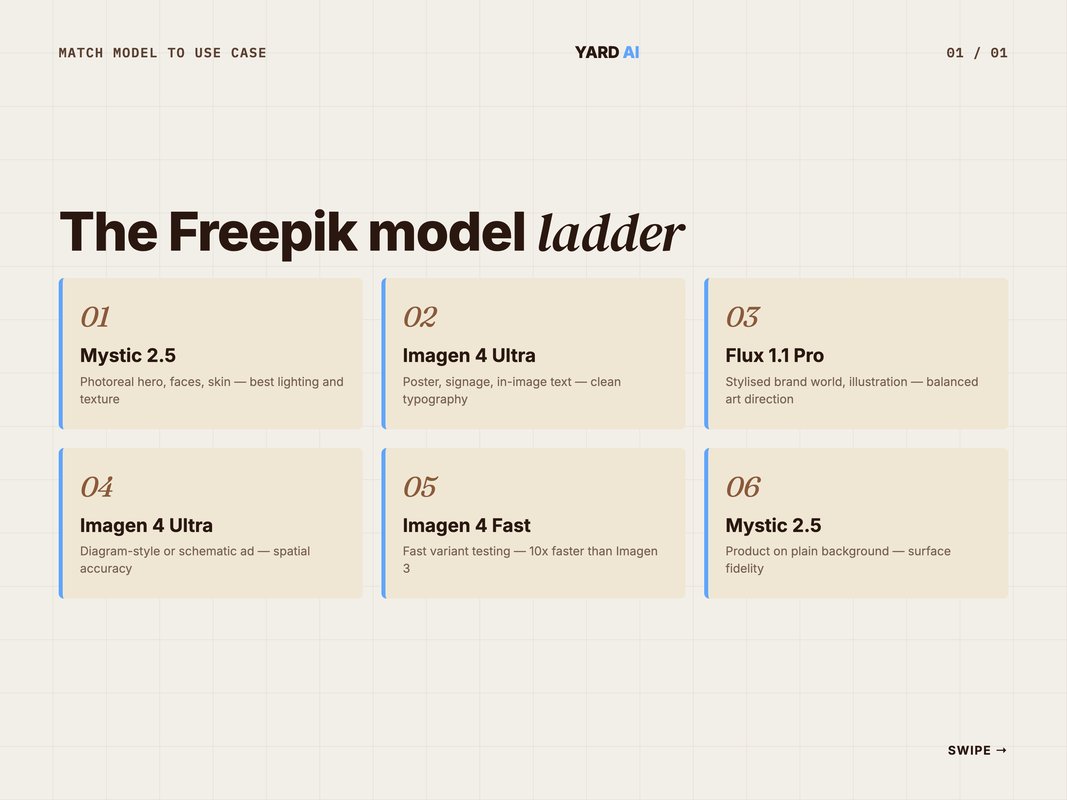
- Photoreal hero shot, faces, and skin. Use Mystic 2.5. Strongest on lifelike texture and lighting.
- Poster, signage, or in-image text. Use Imagen 4 Ultra. Clean typography and editorial layouts.
- Stylised brand world or illustration. Use Flux 1.1 Pro. Balanced realism and art direction.
- Diagram-style or schematic ad. Use Imagen 4 Ultra. Spatial accuracy with readable labels.
- Fast variant testing at low cost. Use Imagen 4 Fast. Up to 10x faster than Imagen 3.
- Product on a plain background. Use Mystic 2.5. Surface and reflection fidelity.
Imagen 4 Ultra delivers ultra-realism on hair, water, and fabric. It also renders correctly spaced text for posters and signage (Source: Freepik Blog, 2026. Google Imagen 4 Guide). Imagen 4 Fast is up to 10x faster than Imagen 3 (Source: Freepik Blog, 2026 — Google Imagen 4 Guide). Mystic 2.5 is the photoreal anchor for faces and skin, with strong handling of short brand names in-frame (Source: Magnific, 2026 — Mystic AI page).
The rule of thumb. Photoreal humans go to Mystic. Anything with readable in-image text goes to Imagen 4 Ultra. Mood-led brand worlds go to Flux 1.1 Pro.
Q: Which Freepik model handles in-image text best?
A: Imagen 4 Ultra wins on legible typography for posters, signage, and editorial frames. Mystic handles short brand names and slogans cleanly. Anything beyond a tagline still belongs in your design template, not the prompt.
Build the Brand Pack Before You Generate Anything
Generating before you brand-lock is the most common failure mode.
You end up with 200 images that all look slightly off. None of them ship.
The fix is a brand pack. It takes one afternoon to build and you reuse it on every batch from then on.
The 4-part brand pack
- Reference image set. 8 to 12 photos of real product, model, or scene. Upload to Freepik's reference panel.
- Custom style training. Train a named style on the reference set. Freepik calls this "custom characters" or "trained styles" depending on the surface.
- Reusable prompt header. A 2 to 3 line snippet you paste at the top of every prompt. Palette, lighting, lens, vibe.
- Negative list. Words you always exclude. Watermarks, deformed hands, extra fingers, harsh shadows, generic stock vibe.
Once it is built, every batch becomes a 60-second prompt tweak instead of a 60-minute redo cycle.
A working header looks like this:
Style: trained_brand_v2 strength 0.8.
Palette: warm cream, deep maroon, gold accents.
Lighting: soft daylight, north-facing window.
Lens: 50mm, shallow depth of field, natural film grain.
Avoid: cartoon, deformed hands, watermark, generic stock.
This sits above whatever scene-specific prompt you write. Mystic and Flux both honour it. Imagen 4 honours about 80% of it — text rendering takes priority there.
Q: How long does it take to build a brand pack in Freepik?
A: About 2 to 4 hours start to finish. Collect references, train one named style, write the reusable header, and document the negative list in a shared doc. After that, every new batch reuses the same pack.
Five Prompt Patterns That Actually Convert
Prompts are the part teams over-engineer. You do not need a 200-word prompt. You need a repeatable pattern.
These five cover roughly 80% of paid social briefs.
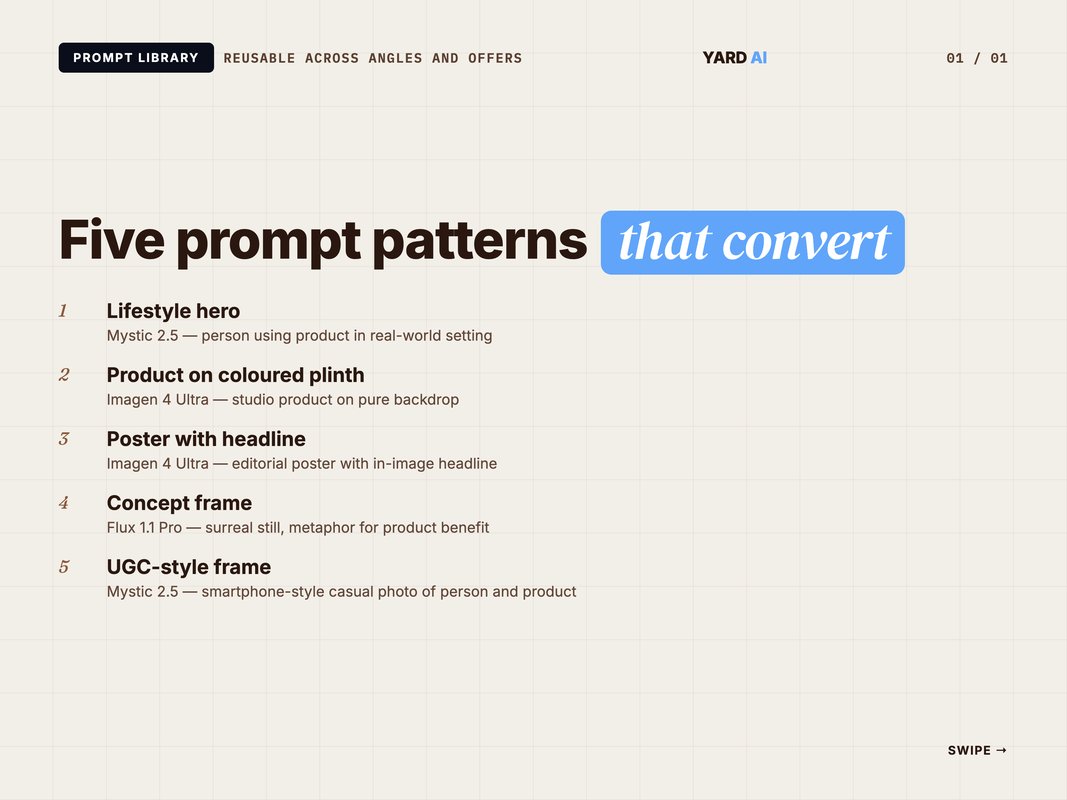
Pattern 1 — Lifestyle hero (Mystic 2.5)
[Brand header]
A [age range] [gender] using [product] in [specific real-world setting].
Mood: [one adjective]. Time: [morning/golden hour/blue hour].
Composition: 4:5, subject mid-frame, eye-line at upper third.
Texture: real fabric, natural skin, soft fall-off.
Pattern 2 — Product on coloured plinth (Imagen 4 Ultra)
[Brand header]
[Product] on a [colour] geometric plinth, studio backdrop.
Pure [shadow type] shadow under product, no clutter.
1:1 ratio, product fills 70% of frame.
Sharp edges, glossy reflection, editorial finish.
Pattern 3 — Poster with headline (Imagen 4 Ultra)
[Brand header]
Editorial poster with the headline "[exact 4–6 word headline]"
set in modern sans-serif at top third.
Background: [scene description].
Headline contrast: high. Spacing: clean. No additional text.
4:5 ratio.
Pattern 4 — Concept frame (Flux 1.1 Pro)
[Brand header]
A surreal still showing [abstract metaphor for product benefit].
Composition: rule-of-thirds, single focal point, blank space top-left for ad copy.
Mood: aspirational, cinematic.
1:1 ratio.
Pattern 5 — UGC-style frame (Mystic 2.5)
[Brand header]
Smartphone-style photo of [person] holding [product], casual indoor light.
Slight motion blur, imperfect framing, no studio polish.
4:5 vertical. Looks shot on iPhone.
Run each pattern through the List node for 10 variations. You now have 50 on-brand drafts in one session.
Q: How specific should an AI ad creative prompt be?
A: Specific enough to remove ambiguity, loose enough to give the model room. Lock setting, mood, composition, lighting, and ratio. Leave colour palette and exact framing to the trained style. Around 40 to 80 words per scene block is the sweet spot.
The Bulk Workflow in AI Flow
AI Flow is the node-based canvas inside Freepik. This is where bulk actually happens.
Freepik AI Flow runs Spaces with Image Generator, Video Generator, Upscaler. Assistant nodes, plus a List node that batches multiple prompt variations in one run (Source: AI Builder Hub, 2026. Freepik AI Flow Review). You can generate 5 to 10 variants of one concept per run, swapping backgrounds, lighting. Crop ratios without re-prompting (Source: AI Builder Hub, 2026. Freepik AI Flow Review).
Here is the 5-step pipeline we use. Copy it.
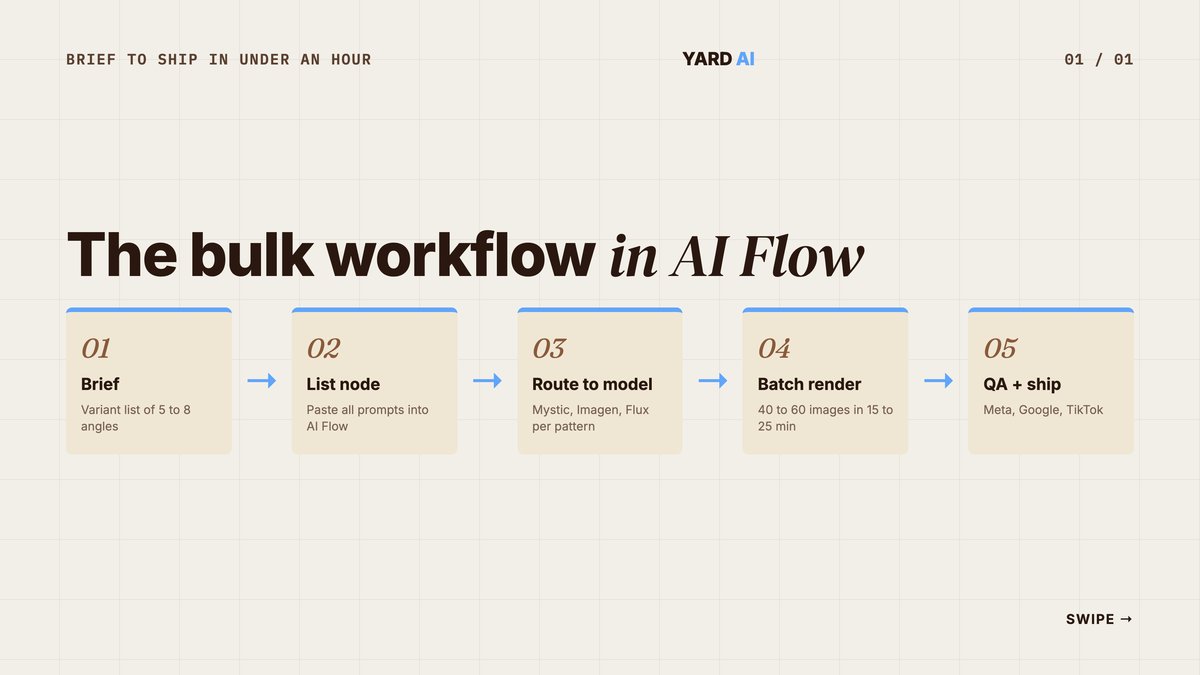
- Brief → variant list. Take the campaign brief. Break into 5 to 8 distinct angles. Each angle gets its own prompt block.
- Drop into a List node. Paste all prompts into one List node. Add the brand header to the global prompt field.
- Route to model. Connect List node to Image Generator. Set model per pattern (Mystic for lifestyle, Imagen 4 Ultra for poster, etc.).
- Batch render. Run the flow. Expect 40 to 60 images in 15 to 25 minutes depending on model and credits.
- QA gate + ship. Score outputs against brand checklist. Approve, edit, or reject. Push approved to the ad account.
The 4 R's framework keeps each batch on track. Reference, Recipe, Render, Review.
Reference — what does the brand look like.
Recipe — what is the prompt structure.
Render — which model and how many variants.
Review — what passes the brand checklist.
Lock those four and you stop firefighting prompts on the fly. You start running a creative engine.
Quick Facts: AI Ad Creative Production in 2026
- 86.4% of marketers use AI tools, with 37.2% on media creation — (Source: HubSpot, 2026 — State of Marketing).
- Brands that master creative velocity see 30 to 50% ROAS lifts — (Source: Logical Position, 2026 — Creative Velocity).
- 77% of GenAI marketing users apply it to creative development tasks — (Source: Gartner, 2025 — GenAI marketing adoption).
- GenAI could lift marketing productivity by 5 to 15% of total spend, worth ~$463B annually — (Source: McKinsey, 2024 — GenAI for consumer marketing).
- GenAI creative is projected to reach 40% of all video ads by 2026 — (Source: Gartner, 2024 — CMO AI impact survey).
Freepik vs Midjourney vs Higgsfield — Pick the Right Tool for the Job
You do not have to pick one tool. You should know which one earns its seat.
This is a brief comparison, not a deep tool review. Here is how the three sit side by side for paid media work.
- Bulk image variants. Freepik is strong via its List node. Midjourney is weak with no native batch. Higgsfield is weak with a single-flow UI.
- Photoreal humans. Freepik is strong on Mystic 2.5. Midjourney is strong on v6.1. Higgsfield sits in the middle.
- Short ad video. Freepik runs Veo, Luma, and Runway nodes. Midjourney has none. Higgsfield is the strongest for vertical Reels.
- Stock plus AI hybrid. Freepik has the full library. Midjourney has none. Higgsfield has none.
- Brand-locked output. Freepik uses trained styles. Midjourney relies on reference images only. Higgsfield uses presets.
- Price for unlimited use. Freepik Premium+ unlocks unlimited generations. Midjourney Pro is metered. Higgsfield costs more per credit.
Midjourney v6.1 still wins on raw artistic image quality but offers no video, no batch. No stock library (Source: TechPilot, 2026 — Freepik vs Higgsfield). Higgsfield is built for scroll-stopping vertical video on TikTok and Reels but has no stock library. Every asset must be AI-generated or uploaded (Source: TechPilot, 2026 — Freepik vs Higgsfield). Freepik wins as the production hub when you need image, video, stock, edit, and music under one roof.
Pricing matters too. Freepik Essential sits at $5.42/month, Premium at $10.83/month. Premium+ at $24.33/month on annual billing, with Premium+ unlocking unlimited image generation on most models (Source: Flowith, 2026 — Freepik AI pricing). For a team shipping 200+ variants a month, Premium+ pays for itself in week one.
Q: When should I use Midjourney over Freepik?
A: Use Midjourney for one-off hero shots where artistic quality is the priority and you have time to iterate prompt by prompt. Use Freepik when you need 20+ on-brand variants in one session, plus video and stock.
The Pre-Ship QA Checklist
Volume without QA produces noise. The checklist below is the gate every batch passes through before going to the ad account.
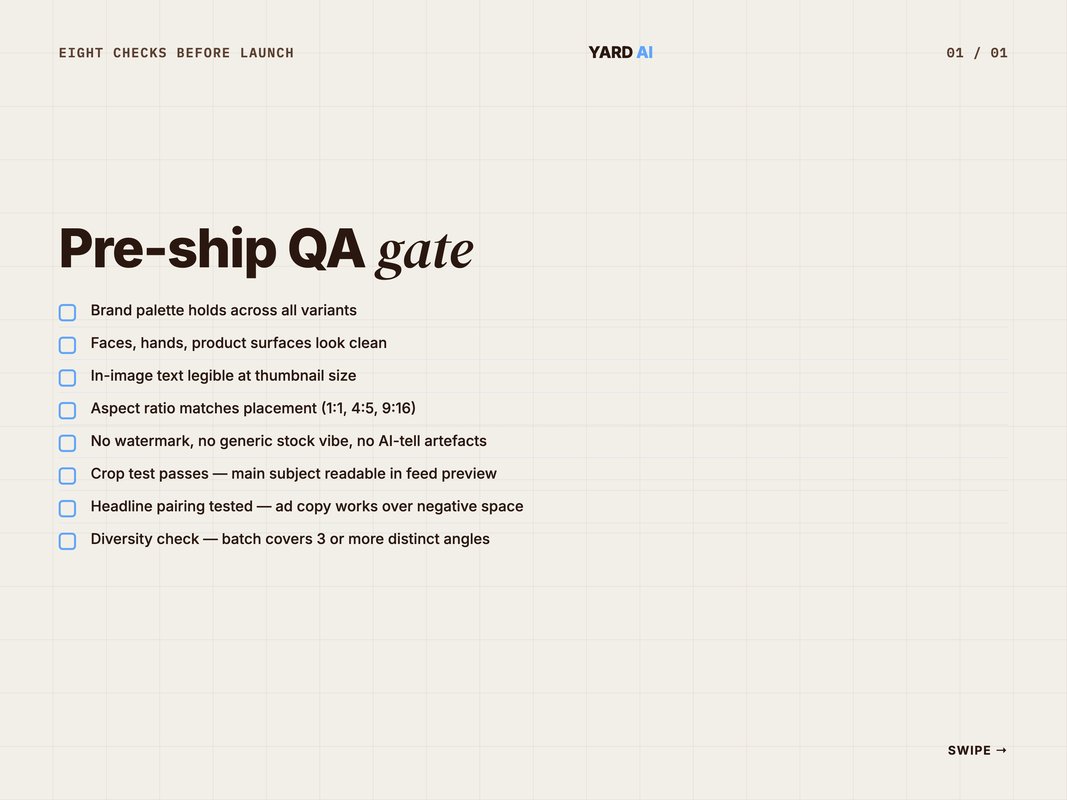
- Brand palette holds across all variants in the batch.
- Faces, hands, and product surfaces look clean. No extra fingers, no melting product edges.
- In-image text is legible at thumbnail size on a mobile screen.
- Aspect ratio matches the placement. Use 1:1 for feed, 4:5 vertical, 9:16 for story.
- No watermark, no generic stock vibe, no AI-tell artefacts in the background.
- Crop test passes. Main subject stays readable when the platform auto-crops to feed.
- Headline pairing tested. The planned ad copy works over the negative space.
- Diversity check. The batch covers at least three distinct angles, not seven minor variants of one idea.
We reject roughly 30 to 50% of any batch on first pass. That is normal. Approved variants get pushed to Meta, Google, and TikTok ad libraries the same day.
Gartner found 77% of GenAI users in marketing apply it to creative development tasks. Only 23% of marketing leaders say GenAI is clearly improving campaign performance (Source: Gartner, 2025 — GenAI marketing adoption). The gap between those two numbers is QA. Teams generating without a gate produce more, perform worse.
Q: How strict should the QA gate be?
A: Reject anything that breaks brand palette, has unfixable anatomy issues, or fails the thumbnail-legibility test. Borderline frames go to a 5-minute edit pass in Freepik's editor. Aim to approve 50 to 70% of any batch.
The Credit Math: What Each Variant Actually Costs
Most teams ignore credit cost until the bill hits. Then they over-correct and starve the funnel.
A simple math layer fixes this. Freepik prices its plans at $5.42, $10.83. $24.33 per month on annual billing for Essential, Premium. Premium+ (Source: Flowith, 2026. Freepik AI pricing). Premium+ unlocks unlimited image generation on most models, which is the line you want for any team shipping 100+ variants a month.
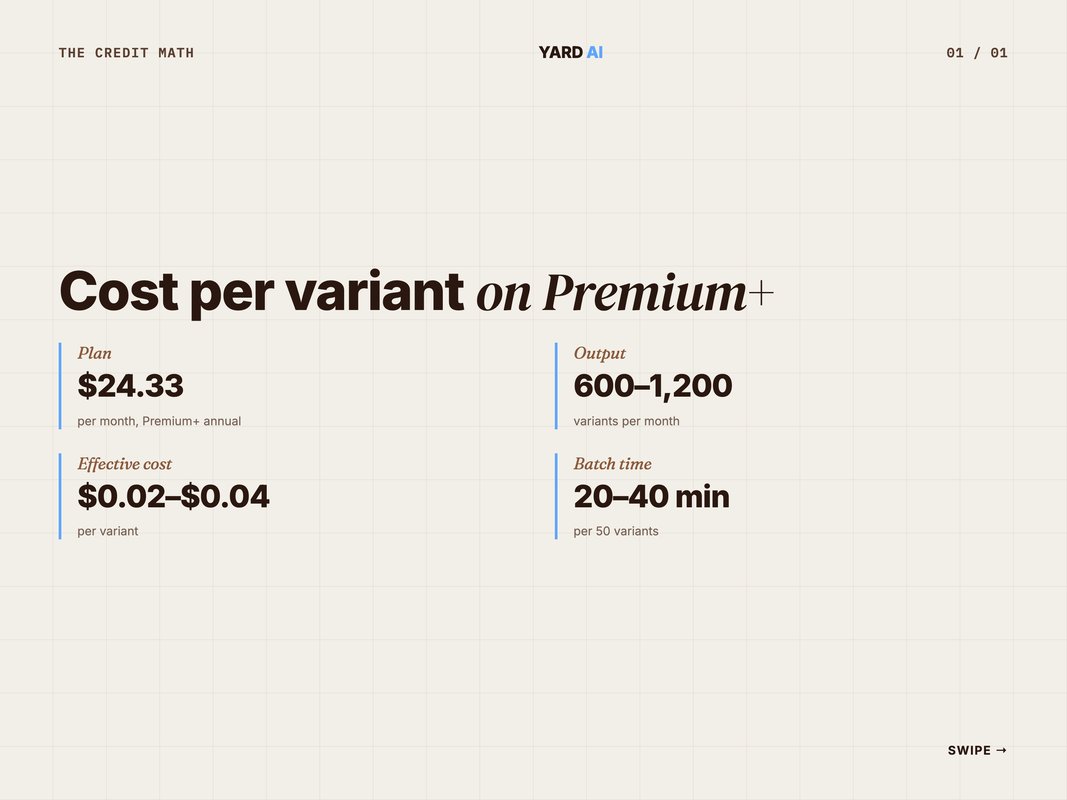
Here is the cost-per-variant math we use to plan paid media.
Quick Math: Variant Cost on a Premium+ Plan
- Plan cost: $24.33 per month, annual billing.
- Realistic monthly output: 600 to 1,200 image variants.
- Effective cost per variant: $0.02 to $0.04.
- Time per batch of 50 variants: 20 to 40 minutes.
- Equivalent stock-photo or studio cost: $5 to $50 per asset.
The point is not that AI is free. The point is that the unit cost drops below the noise floor of paid media testing. You can afford to throw out 30% of a batch and still come out ahead.
McKinsey estimates GenAI can boost marketing productivity by 5 to 15% of total spend, worth ~$463 billion annually (Source: McKinsey, 2024. GenAI for consumer marketing). The catch. Only 23% of marketing leaders say GenAI is clearly improving campaign performance (Source: McKinsey, 2024. GenAI for consumer marketing). The teams capturing that 5 to 15% gain are the ones treating bulk variant production as a unit-economics game, not an art project.
Track three numbers per month. Variants generated. Variants shipped. Top-quartile ROAS lift on the new variants vs control.
If the gap between generated and shipped is wide, your prompt patterns need work. If the ROAS lift is flat, your angles need work. The Freepik tooling is not the variable. The brief and the QA gate are.
Q: How many variants should I budget for per ad set per month?
A: Plan for 20 to 50 fresh variants per ad set per month for Meta and TikTok, and 10 to 20 for Google Performance Max. Premium+ on Freepik covers that volume for under $25 a month per seat.
How AI-Native Teams Run This
Building the brand pack, prompt patterns, and AI Flow batch is the easy part. Running it weekly is where most teams quietly fall off.
That is the layer YARD plugs into. We are an AI-first growth marketing agency. We run performance marketing, LLM SEO, AI creatives, and AI funnels for D2C and B2B brands.
For paid media clients, the creative ops loop sits inside the broader funnel. Brief comes in Monday. Freepik AI Flow batch on Tuesday. QA gate Wednesday. Ship to Meta, Google, TikTok ad libraries by Thursday. Read the data on Friday and feed winning angles back into the next brief.
The repeatable part is the cadence. Same brand pack, same prompt patterns, same QA checklist, every week. Volume stops being a sprint and becomes a system.
We pair the creative loop with Claude and MCP automations on the planning side. Brief writing, angle generation, and post-campaign analysis are all LLM-assisted. The Freepik layer is one node in that workflow. The output is a brand that ships 40 to 80 fresh, on-brand ad variants every month without burning out the creative team.
Talk to us if you want to see how the full loop runs on your stack. The site is yardagency.ai.
Conclusion: Treat Freepik Like a Factory, Not a Sketchpad
The teams winning with Freepik AI ad creatives are not the ones with the best prompts. They are the ones with the simplest system.
Build the brand pack once. Pin the model ladder. Run 50-variant batches through AI Flow. Pass everything through the QA gate. Ship.
Most teams will spend 2026 still treating AI image tools like a sketchpad. One prompt at a time, no brand lock, no batch flow. The teams who turn it into a factory will ship 5 to 10x more tested creative for the same headcount.
Freepik is the production layer. Your strategy, brand, and QA gate are the moat. Build those right, and the volume takes care of itself.
If you want help wiring this into a working paid-media loop, that is what we do at YARD. Start with the model ladder. Build the pack. Ship the batch.
The teams getting real ROAS lift from AI creative are not the ones with the fanciest prompts. They are the ones with the simplest weekly cadence. One brief in. Fifty variants out. A clear QA gate. A read of the data five days later.
That loop is small enough to fit in a single working week. It is also strict enough that the brand stays sharp at volume. Most teams overshoot on prompt sophistication and undershoot on cadence. Reverse that and the work compounds.
Pin the model ladder. Lock the brand pack. Run the AI Flow batch every Tuesday. The rest sorts itself out across a quarter.
FAQ
Q: What is Freepik AI used for in paid media? A: Freepik AI is used by paid media teams to generate bulk ad creatives across image and video. You build a brand pack, pick a model per use case, and batch dozens of variants from one brief. It is the production layer between strategy and the ad platform.
Q: Which Freepik model is best for ad photos? A: Mystic 2.5 is the strongest pick for photoreal hero shots, faces, and skin texture. Imagen 4 Ultra wins on layouts with text, posters, and editorial signage. Flux 1.1 Pro sits between them for stylised brand work.
Q: How many Freepik AI ad creatives should I run per week? A: Plan for 20 to 50 assets per ad set as a baseline and ship 15 to 40 new concepts per month at the account level. Meta Advantage+ Shopping can take up to 150 assets. Volume only works with brand-locked output.
Q: Can Freepik AI write text on ad creatives? A: Yes. Imagen 4 Ultra renders clear typography for posters, signage, and editorial layouts. Mystic also handles short brand names and slogans well. Long copy still belongs in the platform editor or a design template, not the prompt.
Q: How do I keep Freepik AI on-brand? A: Build a brand pack first. Train a custom style with 8 to 12 reference photos, lock palette and lighting in a reusable prompt header. Feed product shots as image references. Then run every batch through that frame.
Q: Is Freepik AI worth it for small teams? A: Yes for most teams shipping paid social. Premium+ unlocks unlimited generation with most models and the AI Flow batch canvas. A lean team can ship more variants in a week than a five-person studio used to deliver in a month.
Insights from Our Experts
Explore our latest articles on digital marketing strategies.