

Most SEO reports are written by hand. That is wasted time.
A junior on the team spends three hours a week pulling GSC data into a sheet. They highlight the drops.
They write a Slack message no one reads. Then they do it again the next Monday.
You can replace that loop with a script and an LLM. The script pulls the data.
The model reads it and writes the report. You sign off and ship the fixes.
This guide walks you through a Google Search Console AI automation end to end. You get the API setup, the Python pulls, the Claude prompts, and the weekly runbook.
Every snippet is copy-pasteable. Nothing is theoretical.
What Google Search Console AI Automation Actually Means
Google Search Console AI automation is a loop. You pull GSC data through the API.
You hand it to an LLM. The model writes the report and the fix list.
That is the whole idea.
The hard part is not the AI. It is the plumbing.
You need a Google Cloud project. You need a service account with read access.
You need a script that respects the 48 to 72 hour data lag.
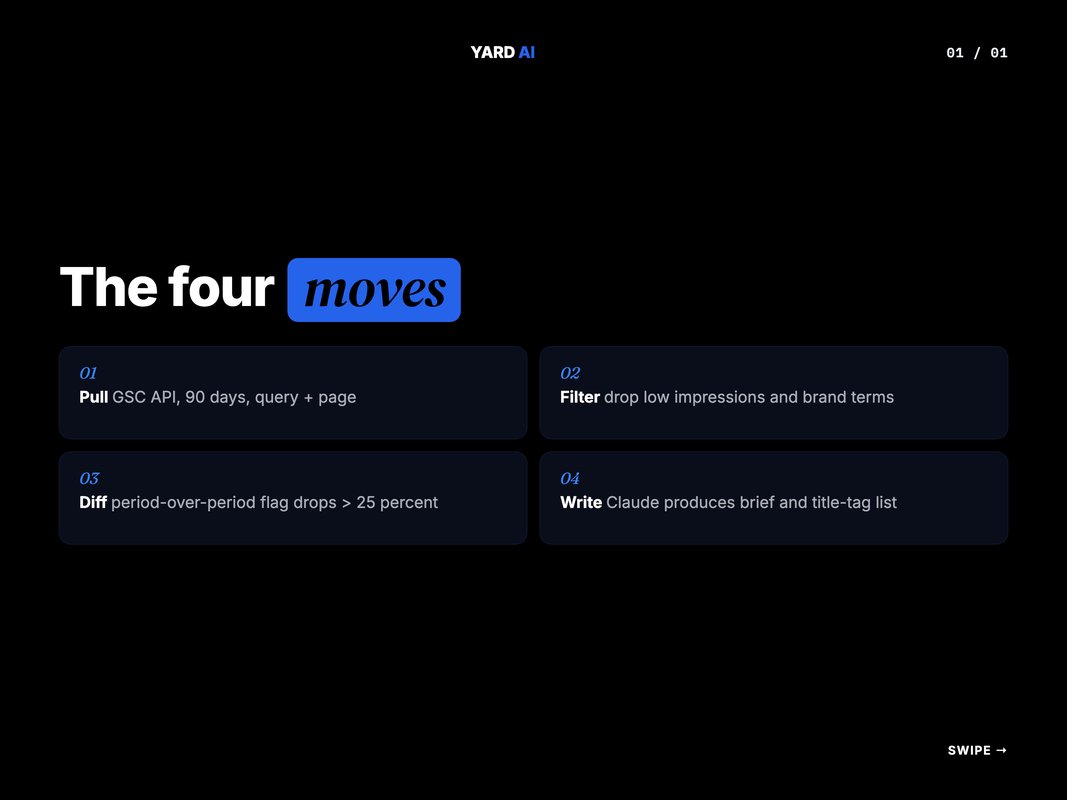
Quick Facts: GSC + AI Reporting in 2026
- GSC data has a 48 to 72 hour lag â pull data at least 3 days old. (Source: Google Search Central, 2026 â developers.google.com/webmaster-tools).
- AI Overviews coverage grew 58% between Feb 2025 and Feb 2026. (Source: Search Engine Journal, 2026 â searchenginejournal.com).
- The GSC API gives you 6 dimensions: date, page, query, country, device, searchAppearance. (Source: Google Search Central â developers.google.com).
- B2B query AI Overview coverage jumped from 36% to 82% in one year. (Source: Search Engine Journal, 2026 â searchenginejournal.com).
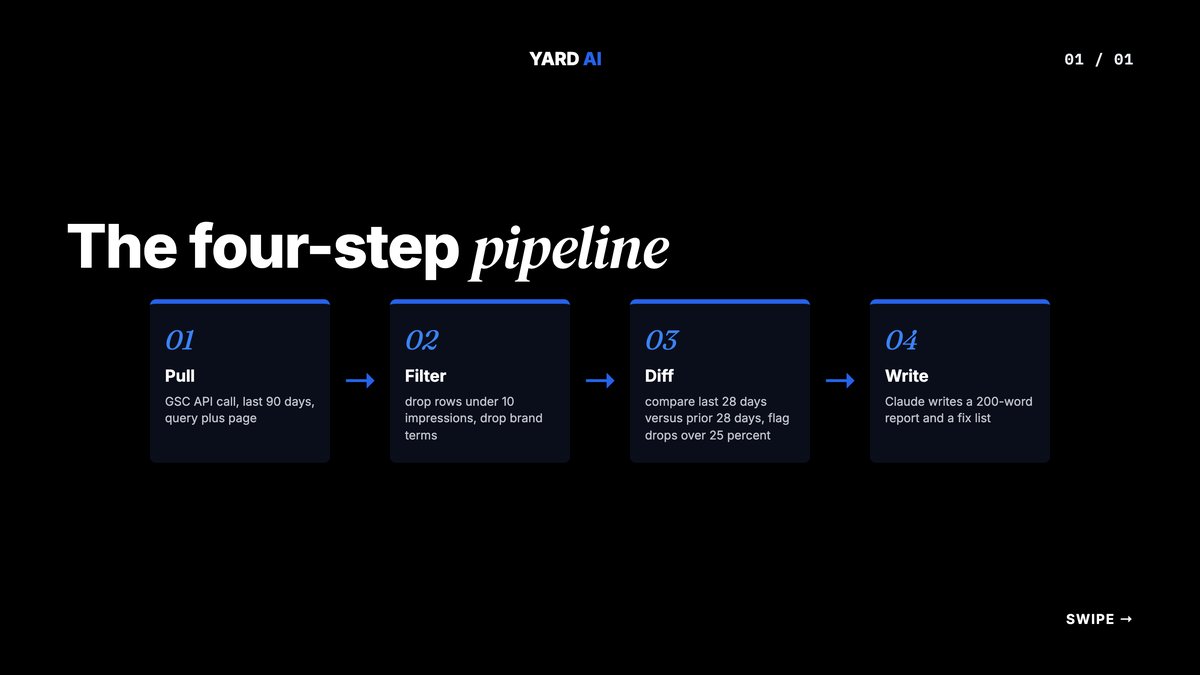
Once the data lands, the model takes over. It groups queries by topic.
It flags pages losing impressions. It drafts new title tags for CTR misses.
You stop being the analyst. You start being the editor.
This shift matters more than it sounds. Most SEO teams are buried in spreadsheet work.
Pull a CSV. Pivot it. Highlight drops. Type a Slack summary.
The work eats half the week. The thinking gets ten minutes.
With the loop in place, the math is done by Tuesday morning. The team spends the rest of the week shipping fixes.
Q: How is this different from a normal GSC export?
A: A normal export gives you a sheet you still have to read. An AI automation reads the sheet and writes the next move. You skip the analysis step and go straight to the decision.
The 4-Step GSC Automation Framework
Every working GSC + AI automation follows the same four steps. Steal them.
This is the framework we use on every YARD client account. It scales from a one-page site to a 50,000-URL e-commerce store.
- Pull â Hit the GSC API for the last 90 days. Pull at the query + page level.
- Filter â Strip rows under 10 impressions. Drop brand terms. Keep the signal.
- Diff â Compare the last 28 days to the 28 before that. Flag drops over 25%.
- Write â Hand the diff to Claude. Ask for a 200-word report and a fix list.
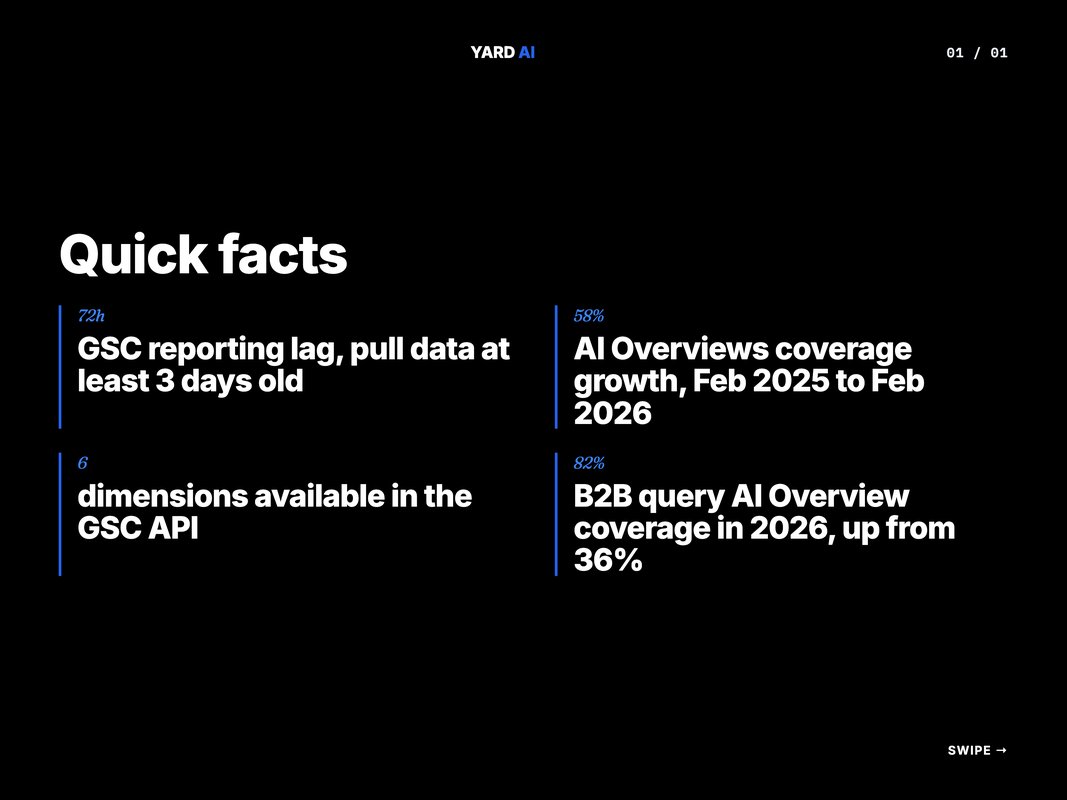
Each step is one Python function. Each function is under 30 lines.
The framework is boring on purpose. Boring scales.
Clever breaks at 3am.
Q: Why 28 days and not 30?
A: GSC uses a rolling 28-day window in its own UI. Matching that window makes the numbers line up. It also avoids partial-month weirdness.
The fourth step is where most teams overbuild. They try to make the LLM do the math.
Do not. Math is for Python. Words are for Claude.
Keep the boundary clean. The script does numbers. The model does prose.
That split is what makes the whole thing reliable.
Step 1 â Set Up the Google Search Console API
You need three things before you write any code. A Google Cloud project.
The Search Console API enabled. A service account with a JSON key.
Here is the exact path through the console. It takes under 10 minutes end to end.
1. console.cloud.google.com â New Project â name it "seo-automation"
2. APIs and Services â Library â search "Search Console API" â Enable
3. APIs and Services â Credentials â Create Credentials â Service Account
4. Name it "gsc-reader" â Role: none needed â Done
5. Click the service account â Keys â Add Key â JSON â download
6. Open the JSON file â copy the client_email field
7. In Search Console â Settings â Users and Permissions â Add User
8. Paste the client_email â permission: Full â Add
That is the full setup. No CLI gymnastics.
The service account email looks like gsc-reader@your-project.iam.gserviceaccount.com. Treat it like a real user.
Give it access to every property you want to read.
Q: Do I need OAuth instead of a service account?
A: Not for automation. OAuth needs a human to click consent. A service account runs headless on a cron job. For a weekly script, service accounts are the right call.
Once you have the JSON key, store it in a secrets manager. Never commit it.
Add the file path to your .gitignore on the first commit. The key file is your password.
Anyone with it can read your search data.
Step 2 â Pull GSC Data with Python
This is the script that does the work. Save it as pull_gsc.py.
from google.oauth2 import service_account
from googleapiclient.discovery import build
from datetime import date, timedelta
import json
SCOPES = ['https://www.googleapis.com/auth/webmasters.readonly']
KEY_PATH = '/path/to/gsc-reader-key.json'
SITE_URL = 'sc-domain:yourdomain.com'
creds = service_account.Credentials.from_service_account_file(KEY_PATH, scopes=SCOPES)
service = build('searchconsole', 'v1', credentials=creds)
end_date = date.today() - timedelta(days=3)
start_date = end_date - timedelta(days=90)
request = {
    'startDate': start_date.isoformat(),
    'endDate': end_date.isoformat(),
    'dimensions': ['query', 'page'],
    'rowLimit': 25000,
    'startRow': 0
}
response = service.searchanalytics().query(siteUrl=SITE_URL, body=request).execute()
with open('gsc_raw.json', 'w') as f:
    json.dump(response, f, indent=2)
print(f"Pulled {len(response.get('rows', []))} rows")
That is the whole pull. Under 25 lines.
A few notes on what it does. The end_date is three days back, which respects the GSC lag.
The dimensions list is the grouping. Query + page is the most useful combo for content work.
The rowLimit is the API max per call. For sites with more than 25,000 query-page pairs, you paginate with startRow.
The GSC API gives you six dimensions to slice on. Knowing what each one means saves hours of confused debugging later.
- Date dimension â the day the search happened, in your property's timezone.
- Page dimension â the canonical URL that showed in results.
- Query dimension â the search term as Google saw it.
- Country dimension â the user's country, ISO-coded.
- Device dimension â desktop, mobile, or tablet.
- SearchAppearance dimension â the SERP feature, like AMP or a rich result.
Most teams only need query and page. Add country if you sell across regions.
Add device if your mobile traffic is more than 60% of the total.
Q: What if I get a 403 error on the first call?
A: The service account email is not yet a user on the property. Go back to Search Console settings and add it. Wait 60 seconds. Try again.
Run the script once by hand. Confirm the JSON file lands on disk.
Then you are ready for the next step.
Step 3 â Run the AI Analysis with Claude
The model does not need raw JSON. It needs a clean summary.
Build the summary in Python first. The pattern is simple.
You compute period-over-period diffs in code. Then you give Claude the diffs and ask for prose.
import anthropic
import json
with open('gsc_raw.json') as f:
    data = json.load(f)
rows = data.get('rows', [])
movers = []
for r in rows:
    if r['impressions'] < 100:
        continue
    if r['ctr'] < 0.02 and r['position'] < 10:
        movers.append({
            'query': r['keys'][0],
            'page': r['keys'][1],
            'impressions': r['impressions'],
            'ctr': round(r['ctr'] * 100, 2),
            'position': round(r['position'], 1)
        })
prompt = f"""You are a senior SEO analyst. Below are GSC queries that rank in the top 10 but have CTR under 2 percent.
Data:
{json.dumps(movers[:25], indent=2)}
For each row, write a new title tag under 60 characters that would lift CTR. Use the query as the main phrase. Keep the brand at the end. Return a markdown table with columns: page, current CTR, new title tag."""
client = anthropic.Anthropic()
msg = client.messages.create(model="claude-opus-4-5", max_tokens=4000, messages=[{"role": "user", "content": prompt}])
with open('weekly_report.md', 'w') as f:
    f.write(msg.content[0].text)
That is the second half of the loop.
The filter logic is the magic. You only send the model rows that need attention.
That keeps the prompt short, the cost low, and the output focused.
Q: Why not send all the data and let the model filter?
A: Tokens cost money. A 25,000-row JSON file is millions of tokens. A 25-row filtered list is a few thousand. Same answer, 1000x cheaper.
The output is a markdown file you can drop into a Notion page or a Slack message. Or you can pipe it into a follow-up step that opens GitHub PRs against your CMS.
A second prompt pattern is worth knowing. Use it when you want a topic-level brief instead of title tags.
Send the model the top 50 queries grouped by topic cluster. Ask it to write three things per cluster.
What is working. What is leaking impressions. What new content the cluster needs to defend its rankings.
The output reads like an SEO strategist's morning standup. It runs in under two minutes.
You can also chain two prompts. First, ask Claude to cluster the queries by intent.
Then feed each cluster back in a second call for the brief. Two calls cost less than one big call with 50 queries.
The lesson is the same. Keep prompts narrow. Keep inputs filtered.
Step 4 â Compare Manual vs Automated SEO Reporting
The two workflows look similar on paper. They are not.
Here is what changes when you put the automation in place. Read the rows top to bottom.
- Data pull â manual workflow: export a CSV from the GSC UI. AI-automated workflow: a Python script via the API.
- Filter signals â manual: pivot tables in Sheets. Automated: a Python filter, one rule per line.
- Period compare â manual: VLOOKUP between two tabs. Automated: a code diff sorted by impact.
- Report writing â manual: junior writes a Slack post. Automated: Claude writes a 200-word brief.
- Title tag drafts â manual: copywriter spends 30 minutes each. Automated: the model takes 30 seconds each.
- Frequency â manual: monthly because it hurts. Automated: weekly because it does not.
- Time per cycle â manual: 3 to 5 hours. Automated: 4 minutes plus a quick review.
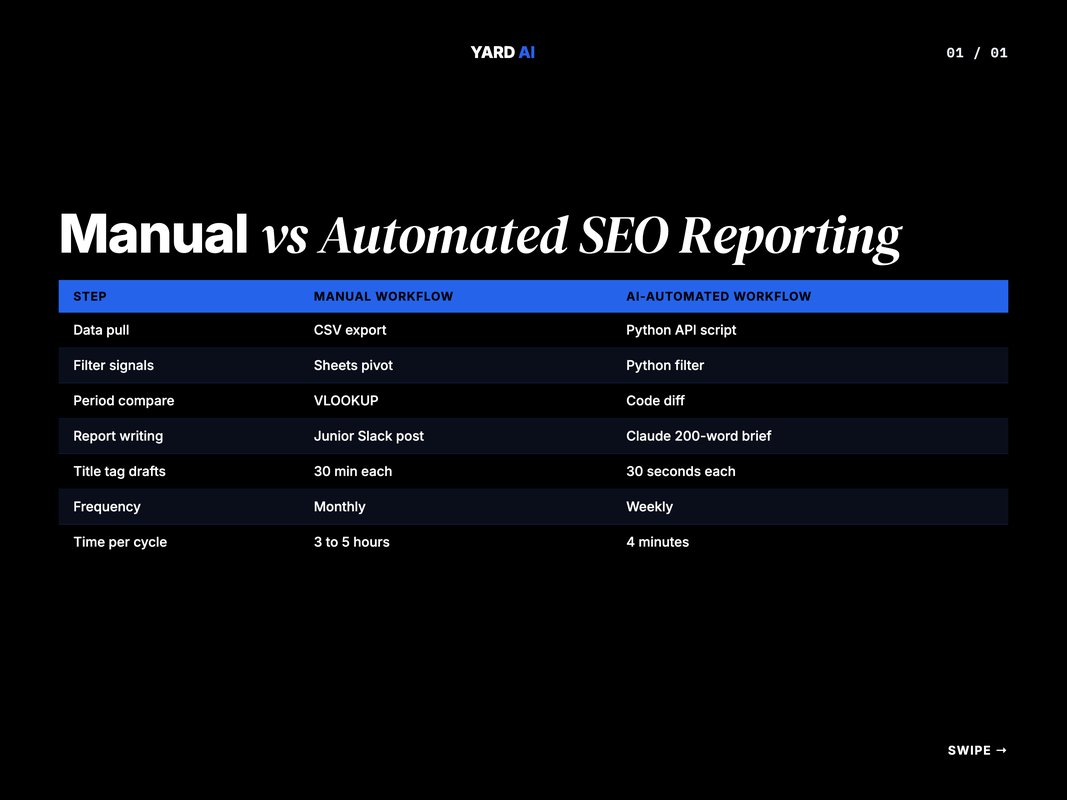
The shift is not about saving hours. It is about changing what gets done.
When reports take five hours, you write them once a month. When they take four minutes, you write them every Monday.
That cadence is what catches drops while they are still small.
Q: Does the manual version teach the junior more about SEO?
A: Yes, the first three times. After that it is data entry. Free the junior to read the AI brief and pick which fixes to ship.
The automation is not a replacement for an SEO. It is a multiplier.
One operator can now run SEO reporting for 10 client accounts instead of 2.
Step 5 â The Weekly Runbook Checklist
You have the script. You have the prompt.
Now you need a runbook. A runbook is the boring document that keeps the automation honest.
Print it. Tape it next to your monitor.
- Confirm the cron job ran on Sunday at 6am â check the log file.
- Open
weekly_report.mdand read the top 5 movers. - Spot-check 3 of the new title tags against the live page meta.
- Open a GitHub issue for each title tag you want to ship.
- Push the title tag changes through the CMS by Tuesday EOD.
- Check GSC by next Friday for early impression movement.
- Archive the weekly report into the SEO Notion database.
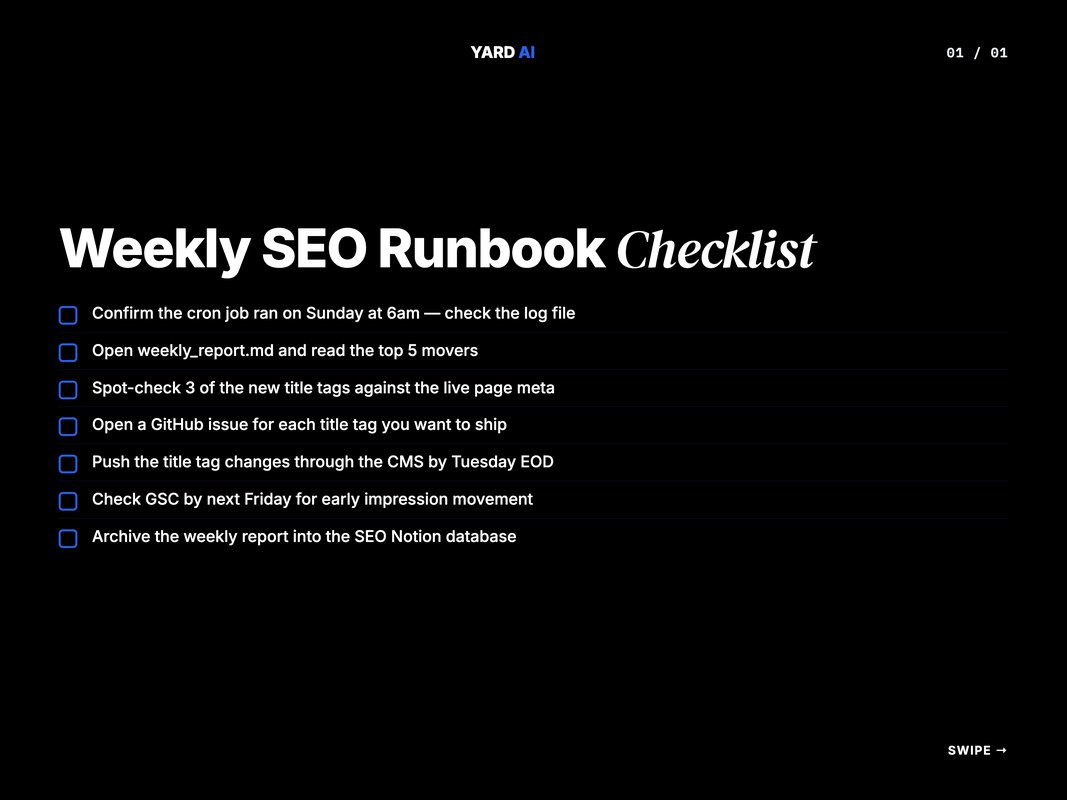
That is the loop. Seven boxes, twenty minutes a week.
The first three weeks feel slow. You are still building trust with the model's output.
By week four, you skim the report and ship five fixes in under an hour. By week twelve, you have shipped 60 title tag improvements.
That is when the chart in GSC starts to bend.
Q: What if the AI writes a bad title tag?
A: Reject it. The runbook step "spot-check 3" exists for that reason. Bad titles get caught at the spot-check, not in production.
The cron job is set with one line. Use your platform's scheduler.
GitHub Actions, Cloud Functions, or a plain crontab on a VM all work. We use GitHub Actions for portability.
name: gsc-weekly
on:
  schedule:
    - cron: '0 6 * * 0'
That cron fires every Sunday at 6am UTC. The job pulls, filters, calls Claude, and commits the report.
You wake up Monday to a fresh brief in the repo.
A small note on logs. Always write the script's stdout to a dated log file.
gsc_2026_04_28.log is easier to grep than a single rolling file. Six months in, you will be glad.
The logs also serve as a paper trail for stakeholders. When a brand asks why a title tag changed in week 14, you point to the log and the AI brief.
No memory required. The system tells its own story.
Common Failure Modes and How to Fix Them
The script will break. That is normal.
Here are the four breaks we see most often.
The first is the 403 permission error. The service account is not yet a verified user on the GSC property.
Add it in the property settings and wait a minute.
The second is the rate limit. GSC allows 1,200 queries per minute per project.
If you pull many sites in a loop, throttle to one call per second.
The third is the empty response. Some properties have no data for the date range.
Always check response.get('rows', []) before iterating.
The fourth is the model returning broken JSON. Wrap the call in a try-except.
Fall back to a plain-text format if parsing fails.
Q: What about the recent GSC reporting issue in May 2026?
A: Google confirmed a logging bug between May 7 and 8, 2026, that under-counted clicks and impressions. (Source: Search Engine Land, 2026 â searchengineland.com) The API showed the same gap. Note the dates in your report so the dip is not flagged as a real drop.
Every break has a fix. None of them require rewriting the whole pipeline.
That is the value of the four-step framework â each step fails in isolation. When a script breaks at 3am, you fix one function.
Not the system.
One more break is worth a heads-up. The data freshness window can shift during Google's reporting outages.
The May 2026 logging bug showed this. So did the smaller bugs in 2024 and 2023.
Build your script to skip any day where total impressions dropped more than 70% versus the trailing 7-day average. Flag the gap in the report.
That tiny guardrail saves a frantic Monday morning. The team does not chase a phantom drop.
It waits a day, sees the data refill, and moves on.
A second guardrail is worth adding. Snapshot the prior week's report into the new run.
The model gets to see what it said last Monday. It can call out a fix that landed and a fix that did not.
That self-correction loop is what turns a script into a system. Without it, the AI gets stuck in groundhog day, suggesting the same title tag every week.
With it, the brief reads like a real strategist. One who remembers what was tried.
That single piece of memory changes the read of the report. It moves from "list of suggestions" to "recap and next moves".
Where YARD Fits In
Most teams know they need this. Fewer have the time to build it.
At YARD, we run AI-first growth marketing for D2C and B2B brands. The GSC + AI loop is one of the standard pieces we ship on every SEO engagement.
It lives next to the Claude-powered content briefs, the LLM-readable site structure work, and the AI Overview tracking. The reason we run it ourselves and do not just hand over a script is the maintenance.
The Google API changes. Claude models update.
AI Overviews change which queries trigger them. A pipeline that works today needs to keep working in six months.
We build the loop, run it weekly, and review the output with the brand team. The client team reads the brief and signs off.
Engineering ships the changes. The whole cycle takes under an hour a week on the client side.
We work with brands across D2C, B2B SaaS, hospitality, and wellness. Each gets its own dashboard, its own thresholds, and its own prompt template tuned to its voice.
If you want the same loop running on your site by next Monday, that is what we do. Book a call through yardagency.ai and we will walk through your current SEO stack on the first call.
Read the AI content automation playbook next for the wider stack story.
Conclusion
Manual SEO reporting is a tax on your team. Automated reporting frees the team to ship.
A working Google Search Console AI automation is one Python script, one Claude prompt, and a seven-step weekly runbook. None of it is fancy.
All of it is repeatable.
Start with the basics. Get the API connected.
Pull 90 days of data. Run the filter.
Hand it to the model. Ship one title tag fix.
That first fix is the loop closing. Once it closes, you keep shipping.
If you want help building it on your stack, drop a note through yardagency.ai. We can also run the whole loop for you while your team focuses on content and product. The first call is a free 30-minute stack review.
FAQ
Q: What is Google Search Console AI automation?
A: It is a workflow that pulls GSC data through the API and pipes it into an LLM. The model finds CTR gaps, ranking drops, and content decay. Then it writes fixes you can review and ship.
Q: Do I need to be a developer to automate GSC reporting?
A: No. You need a Google Cloud project, a service account, and a short Python script. Claude Code or an MCP server can run the script for you on a weekly schedule.
Q: How fresh is Google Search Console data?
A: GSC data lags by 48 to 72 hours. Your automation should pull data that is at least three days old. That avoids working off provisional figures.
Q: Which AI model is best for SEO reporting from GSC?
A: Claude is strong at long context and clean prose. GPT models work well too. Pick the one your team already uses and that has a stable API and MCP support.
Q: Will GSC API automation get me banned?
A: No. The Search Console API is an official Google product. As long as you stay inside your daily quota and pull only sites you own, you are safe.
Q: How often should the automation run?
A: Weekly is the sweet spot for most teams. Daily runs are useful for high-traffic sites that ship content often. Monthly reports miss too many drops.
Insights from Our Experts
Explore our latest articles on digital marketing strategies.