
Most teams run ads in too many tabs.
Google here. Meta there. A spreadsheet to glue it all. We got tired of that.
So we built a way to manage multi-platform ads from one Claude prompt. You type a plain-English command. Claude reaches Google and Meta through MCP tool connections. It pulls the data, drafts the change, and queues it across both.
This is BOFU, so let us be plain. We will not share client numbers here. We will show you the architecture, the guardrails, and the line between bot work and human work.
Here is how it works.
Why Multi-Platform Ad Management Breaks Down
Ad work is not hard because of one platform.
It is hard because of many. Each one has its own login. Its own report. Its own quirks.
The split is real. In the U.S., traditional TV holds 44.2% of screen time. Streaming now holds 44.8% (Source: Nielsen, 2025 — nielsen.com). Attention is scattered. Your ads must follow it.
That scatter has a cost. Every platform you add is another tab. Another export. Another place to miss a problem.
Most teams patch this with manual work. They pull each report by hand. They paste it into a sheet. By the time the sheet is done, the data is stale.
A stale number leads to a slow call. A slow call wastes spend. The pain is not one big failure. It is a hundred small lags.
There is a second cost too. Context loss. You build a picture in Google, then lose half of it when you switch to Meta.
By the time you flip back, you have forgotten the detail. So you re-check. You re-export. The loop repeats.
We wanted one entry point instead. One prompt. Many platforms. One picture that holds.
Q: Why is multi-platform ad management so painful?
A: Each platform has its own login, report, and rules. You hop between tabs and paste data into sheets. The work grows with every channel you add. One prompt removes that hopping.
What "One Prompt" Actually Means
Let us be exact about the claim.
You do not click through Google Ads. You do not open Meta Ads Manager. You type a request to Claude.
For example: "Pull last 7 days of spend and ROAS for Google and Meta. Flag any campaign over budget."
Claude reads that. It calls each ad API. It returns one merged answer.
The magic is not the model alone. It is the connection layer under it. That layer is MCP.
MCP is the Model Context Protocol. It is an open standard for linking AI tools to data and APIs (Source: Anthropic, 2024 — anthropic.com). It gives Claude a safe, repeatable way to reach outside systems.
Think of it as a shared plug. Every tool speaks the same shape. So one prompt can touch many tools.
This is the part most people miss. The prompt is the easy bit. The connection layer is the real work.
MCP did not appear from nowhere. It launched in late 2024 as an open standard. Within a year it became a common way to link AI to tools.
That maturity matters for ads. You are not on a fragile hack. You build on a standard many teams now trust and use.
Q: What does "one prompt" really mean here?
A: It means a single plain-English command to Claude. Claude then calls Google and Meta ad APIs through MCP. You never open the native dashboards for routine work.
The Architecture Behind the Prompt
Here is the stack, top to bottom.
At the top sits you. You type intent in plain English.
Below that sits Claude. The model reads intent and picks the right tools. Anthropic's newer models are strong at this kind of tool use. Claude Opus 4.5 shipped in late 2025 as a top model for agents and tool work (Source: Anthropic, 2025 — anthropic.com).
Below Claude sits MCP. It is the open standard that routes each call to the right API (Source: Model Context Protocol, 2025 — modelcontextprotocol.io).
At the base sit the ad APIs. The Google Ads API lets software manage campaigns, ad groups, ads, and budgets (Source: Google for Developers, 2026 — developers.google.com). The Meta Marketing API lets developers create and manage campaigns, ad sets, and ads (Source: Windsor.ai, 2026 — windsor.ai).
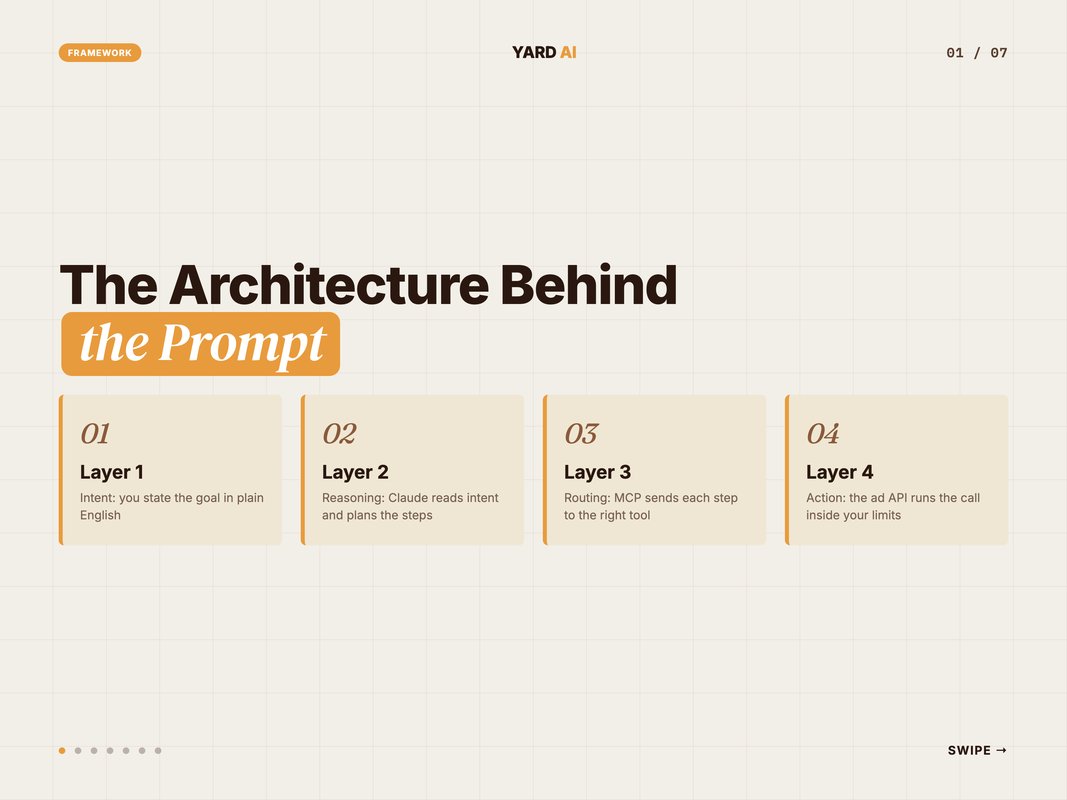
We gave this stack a name so the team can repeat it. We call it the 4-Layer Prompt-to-Platform Model. Each layer has one job. No layer reaches past its lane.
- Layer 1, Intent: you state the goal in plain English.
- Layer 2, Reasoning: Claude reads intent and plans the steps.
- Layer 3, Routing: MCP sends each step to the right tool.
- Layer 4, Action: the ad API runs the call inside your limits.
This model is why "one prompt" is not chaos. Each layer is bounded. It also makes debugging easy. If a result looks wrong, you know which layer to check.
Say a budget edit fails. You do not panic. You check Layer 4 first. Maybe the API rejected the call. Maybe a cap blocked it. The layer tells you where to look.
The same map helps when you scale. Add a third platform and only Layer 4 changes. The top three layers stay the same. Your prompts barely change at all.
Q: What sits between Claude and my ad accounts?
A: MCP tool connections sit in the middle. Claude never touches your account by guesswork. It calls a defined tool, which calls the platform API with your rules attached.
Natural-Language Commands That Do Real Work
The daily driver is the command itself.
A good command is specific. It names the platform, the window, and the action. Claude does the rest.
Here are commands we use as a base. Copy them. Swap in your own accounts and limits.
- Pull 7-day spend, clicks, and conversions for Google and Meta in one table.
- Find every campaign pacing over its daily budget and list the overspend.
- Draft a 10% budget cut for the three worst ROAS campaigns, but do not apply it.
- Add these five terms as negative keywords on the brand Search campaign.
- Summarise yesterday across both platforms in five lines for the client update.
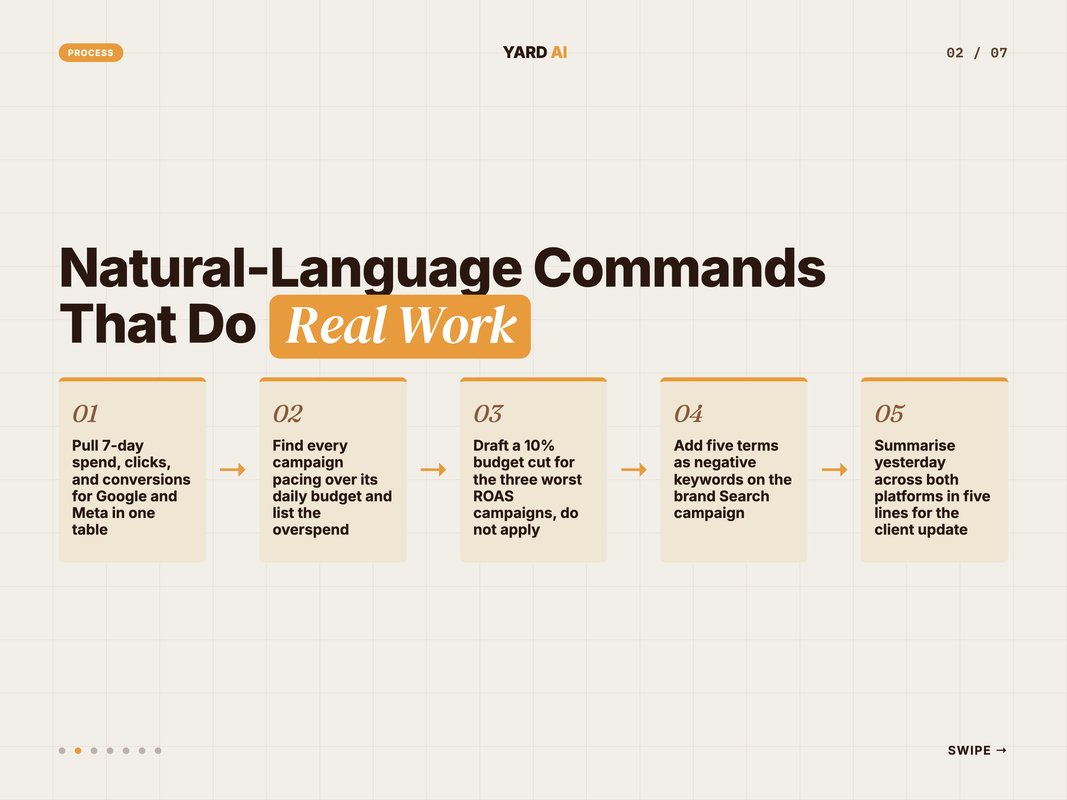
Notice the pattern. Each one is short. Each one is testable. Each one keeps risk low.
Command three is the key habit. It ends with a hold step. That single phrase keeps a human in the loop.
Vague commands cause vague results. So we write them like recipes. Clear inputs. One clear output. No room to drift.
We also keep a small library of these commands. New team members start from the library, not a blank box. They learn the pattern fast.
The library grows as we find new needs. A weekly pacing check. A creative fatigue flag. Each one is a saved prompt the whole team can reuse.
Q: What makes a good ad command?
A: Name the platform, the time window, and the exact action. Keep it short. End risky commands with a preview step so nothing goes live without review.
Unified Reporting Without the Tab-Hopping
Reporting is where the prompt earns its keep.
Old way: open Google, export. Open Meta, export. Merge by hand. Reformat. Send.
New way: one command. Claude pulls both APIs and merges the numbers into one view.
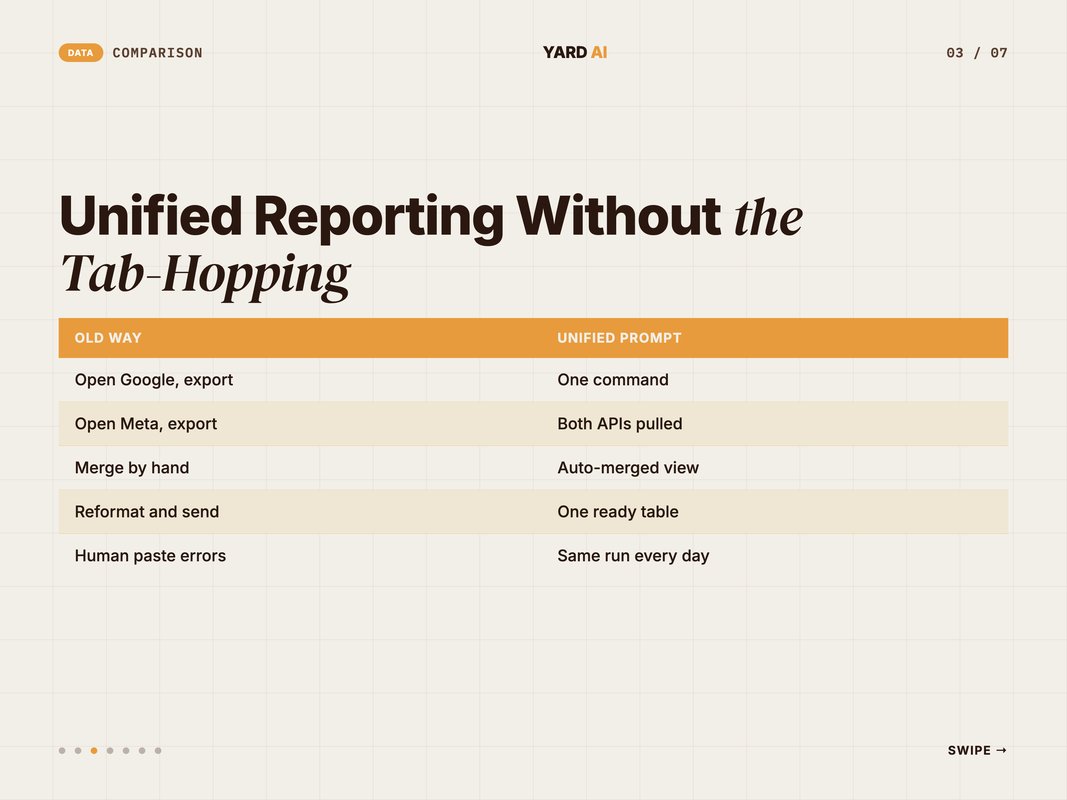
The shift is not just speed. It is trust. The same prompt runs the same way each day. No human paste error.
This matters because so much of marketing now runs on automation. About 92% of marketers use automation for data analysis and reporting (Source: HubSpot, 2026 — hubspot.com). We point that habit at one clean entry point.
Unified ad reporting also changes the meeting. You stop debating which export is right. You read one table and move to the decision.
Q: How does unified reporting save time?
A: It removes the export-merge-reformat loop. One prompt pulls Google and Meta, then merges them. You read one table instead of stitching two dashboards by hand.
These numbers frame the shift. Research shows automation is now the norm, not the edge. The job is to aim it well.
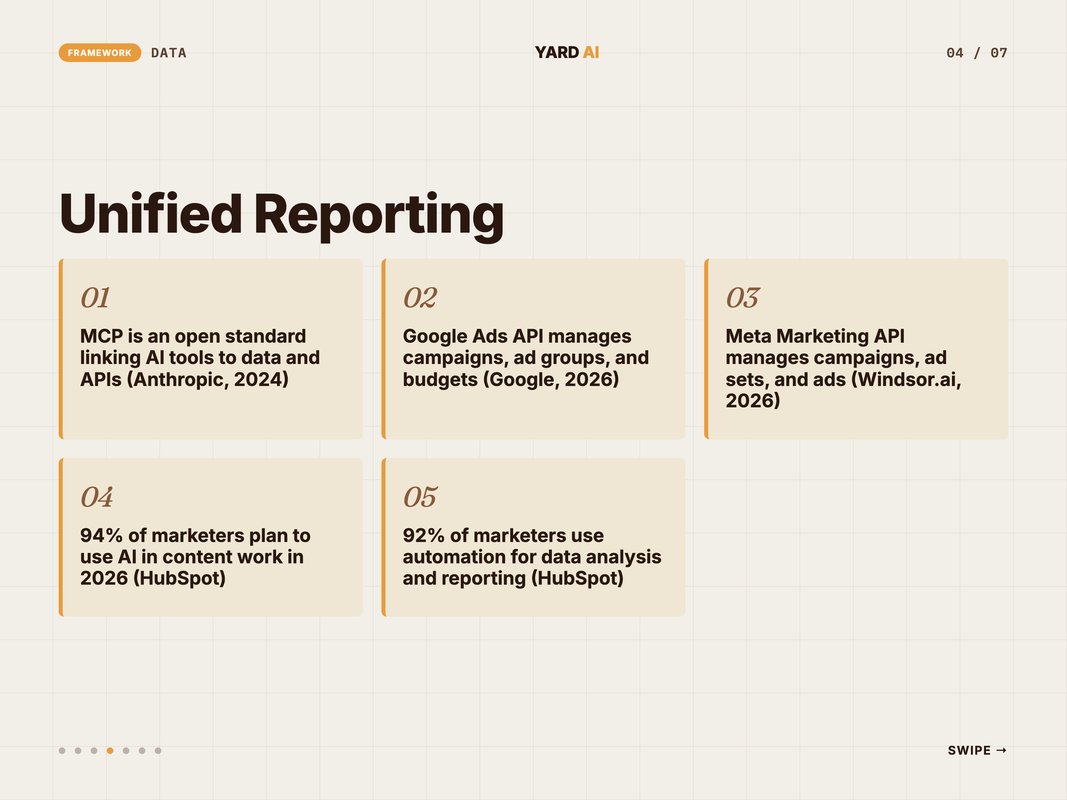
Quick Facts: Multi-Platform Ad Automation at a Glance
- MCP is an open standard for linking AI tools to data and APIs — (Source: Anthropic, 2024 — anthropic.com).
- The Google Ads API lets software manage campaigns, ad groups, and budgets — (Source: Google for Developers, 2026 — developers.google.com).
- The Meta Marketing API lets developers manage campaigns, ad sets, and ads — (Source: Windsor.ai, 2026 — windsor.ai).
- About 94% of marketers plan to use AI in content work in 2026 — (Source: HubSpot, 2026 — hubspot.com).
- Around 92% of marketers use automation for data analysis and reporting — (Source: HubSpot, 2026 — hubspot.com).
According to this data, the tools are ready. The edge is in how you wire and bound them.
Guardrails: The Rules That Keep It Safe
Speed without limits is a bad trade.
So we wrap every prompt in guardrails. The model can move fast, but only inside a fence.
Here is the fence we use. Set yours before you connect a single account.
- Set a hard daily spend cap per platform that the prompt cannot exceed.
- Require human approval for any budget change above a set percent.
- Run every change as a dry-run preview before it goes live.
- Log every action with a timestamp and the prompt that caused it.
- Limit tool scope so Claude can only touch named accounts.
- Review the action log once a day, every day.
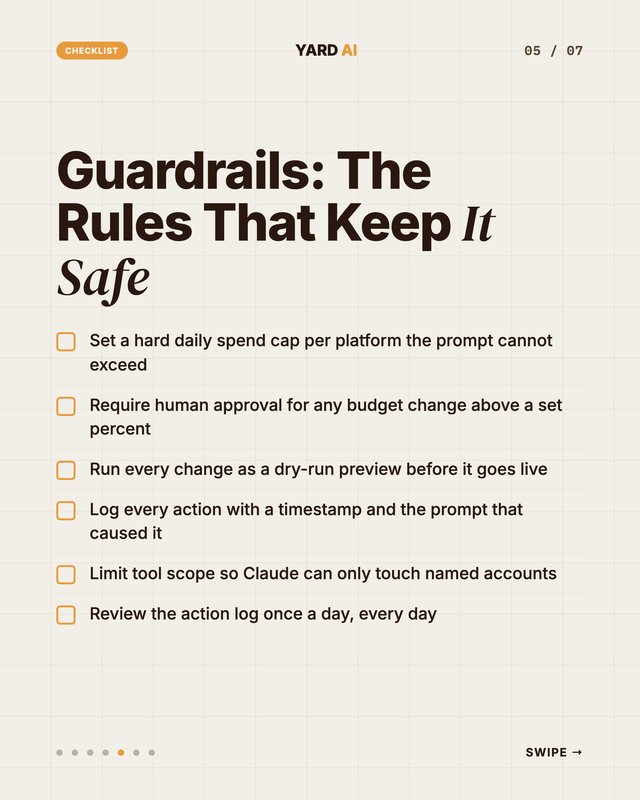
These six lines are non-negotiable for us. They turn a powerful prompt into a safe one.
The logging line matters most. If you cannot see what changed and why, do not automate it.
The dry-run step is the second pillar. Claude shows the diff first. You read it. Only then does it go live.
Q: How do you stop AI from making a costly mistake?
A: Use spend caps, approval gates, dry-run previews, and full logging. Claude proposes. A human approves big moves. Every change is traceable to the exact prompt.
What to Automate vs What to Keep Human
Not every task should be a prompt.
Some work needs judgment, taste, or a hard call on money. That work stays with people.
Here is how we split it. The line is simple. Low-risk and repeatable goes to the bot.
Keep these as a prompt:
- Daily data pulls across Google and Meta.
- Pacing and budget checks against your caps.
- Unified reporting in one merged table.
- Small bid and keyword edits inside set limits.
- Anomaly flags when a metric jumps.
Keep these human:
- Channel strategy and the quarterly plan.
- Large budget shifts that move real money.
- Brand voice, hooks, and creative calls.
- New campaign structure from scratch.
- Final spend approval on every big move.
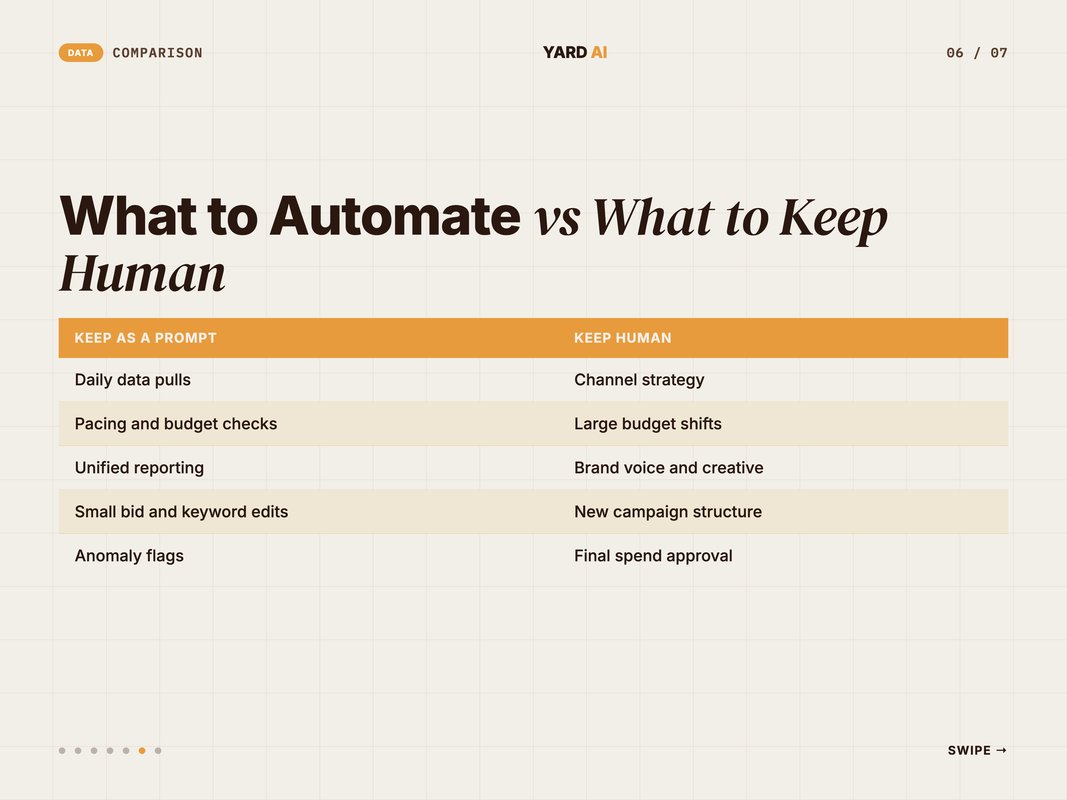
The pattern is clear. The prompt owns the loop you run daily. The human owns the call you make rarely.
Automation is broad, but it is not the whole job. Around 93% of marketers now use automation for admin tasks (Source: HubSpot, 2026 — hubspot.com). The win is giving people back time for the big calls only they can make.
So the prompt does the dull, fast work. The human does the rare, large work.
Get this line wrong and you either move too slow or take on too much risk. Get it right and the two halves compound.
Q: Which ad tasks should stay human?
A: Strategy, big budget moves, brand voice, and final approval stay human. Let the prompt handle pulls, reports, pacing, and small edits. The split keeps speed high and risk low.
Mistakes We Made So You Do Not Have To
We did not get this right on day one.
The first build was too eager. We let the prompt apply changes with no preview. That was a mistake.
A bad budget edit slipped through once. We caught it fast, but it stung. So we added the dry-run step the next day. It has stayed ever since.
The second mistake was scope. We gave the early setup wide access. The prompt could touch accounts it had no business touching.
We fixed that with tight tool scope. Now each connection sees only named accounts. Nothing more.
The third mistake was vague prompts. "Optimise the campaigns" is not a command. It is a wish. Claude cannot act well on a wish.
So we rewrote our prompt habits. Every command now names the platform, the window, and the action. Clear in, clear out.
The fourth mistake was skipping the log review. We had logs, but no one read them daily. A drift built up quietly.
Now the log review is a fixed morning step. Five minutes. Every day. It catches small drift before it grows.
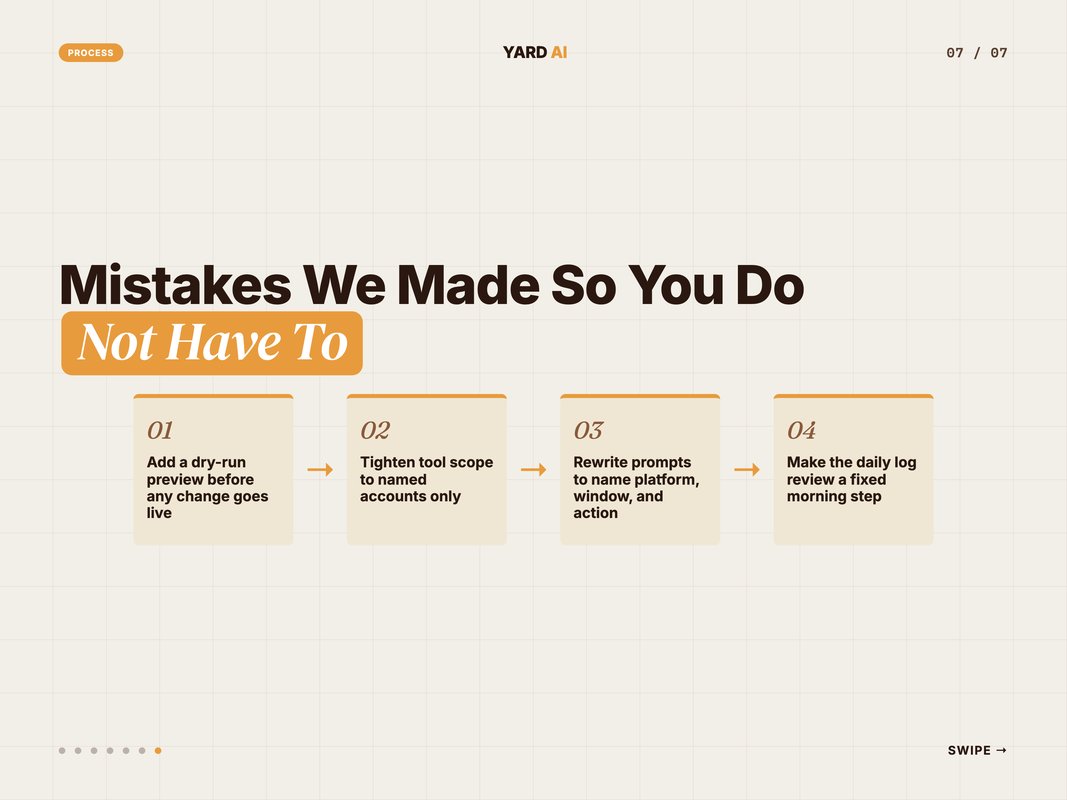
Here is the lesson under all four. The prompt is not the risk. Weak rules are the risk. Tighten the rules and the prompt becomes a quiet, steady hand.
This is why we share the guardrails first, not last. They are the difference between a tool you trust and a tool you fear.
Q: What is the biggest mistake teams make with ad automation?
A: They automate before they set guardrails. Skip the spend cap, the dry-run, or the log, and risk creeps in. Set the rules first, then let the prompt run.
How YARD Builds This for Brands
This is the kind of system we build at YARD.
We are an AI-first growth marketing agency. We run performance marketing, LLM SEO, AI creatives, and AI funnels for D2C and B2B brands.
The prompt-to-platform setup is core to how we work. We wire the MCP tool connections once. We set the guardrails with you. Then your team can manage multi-platform ads in plain English.
According to current adoption data, most teams already lean on automation. We help you do it with control, not chaos. You keep the strategy. The prompt handles the grind.
What you get is fewer tabs and faster reads. You get one entry point for Google and Meta. You get a log of every change, so trust is built in.
We also train your team on the prompt habits. They learn the command pattern. They learn the guardrails. The system does not depend on us to run it.
Over time, your prompt library becomes an asset. It holds your best checks and reports. New hires ramp on it in days, not weeks.
We do not hand you a black box. We hand you a system you can see and steer. That is the YARD way.
If you run ads across many platforms, this is your next step. Our [internal link: ai-funnels-for-d2c-brands] page shows the wider funnel work. Book a call and we will map it to your stack.
The Bottom Line
You do not need ten tabs to manage multi-platform ads.
You need one prompt, one connection layer, and clear rules. Claude reads your intent. MCP routes the call. The ad APIs do the work. A human approves what matters.
The win is not magic. It is structure. Four clean layers, six guardrails, and a sharp line between bot work and human work.
Start small. Wire one platform. Add a spend cap and a dry-run step. Then add the second platform. Grow the prompts as trust grows.
That is how we manage multi-platform ads from a single Claude prompt. Fewer tabs. Faster reads. Full control. If you want this built for your brand, let us talk.
FAQ
Q: Can you really manage multi-platform ads from one Claude prompt? A: Yes. We type a plain-English command to Claude. Claude calls Google and Meta ad APIs through MCP tool connections. One prompt can pull data, draft a change, and queue it across both platforms at once.
Q: What is MCP and why does it matter for ad management? A: MCP is the Model Context Protocol. It is an open standard that links AI tools to data sources and APIs. It lets Claude reach Google Ads and Meta in a safe, repeatable way, so we manage multi-platform ads from one place.
Q: Is it safe to let AI change live ad campaigns? A: It is safe when you add guardrails. We use spend caps, human approval on big moves, and a dry-run preview. Claude proposes the change first. A human signs off before anything goes live.
Q: Which ad tasks should stay human? A: Keep strategy, big budget shifts, and brand voice human. Let the prompt handle pulls, reports, pacing checks, and small bid edits. The split keeps speed high and risk low.
Q: Do I need to code to run this kind of setup? A: You need someone to wire the MCP tool connections once. After that, the daily work is plain English. You ask. Claude acts inside the rules you set.
Q: How does unified reporting work across Google and Meta? A: Claude pulls metrics from each API and merges them. You get one view of spend, clicks, and results. No tab-hopping. No copy-paste between dashboards.
Insights from Our Experts
Explore our latest articles on digital marketing strategies.