

Performance Max optimization is mostly about inputs.
You feed the system clean data. It does the placement work. Get the inputs wrong, and no bid tweak saves you.
This guide is for e-commerce teams. We cover asset groups, audience signals, and feed work. We cover target ROAS bidding too. Then the new 2026 controls that open the black box.
So this is your main retail engine now. Let's tune it the right way.
Start With the Product Feed, Not the Creative
Most teams fix ads first. That's backwards for retail.
In Performance Max, the feed does the heavy lifting. Feed-based ads make up 74% to 97% of spend in retail campaigns. (Source: Digital Applied, 2026 — digitalapplied.com)
So your Merchant Center feed is the biggest lever you own. Treat it like a product, not a chore.
Start with titles. The title is the single most important field. Google matches it to queries. Shoppers read it to decide on a click.
Put the words that matter up front. Brand. Product type. Key attribute. Then color and size where they help.
For big catalogues, build titles with feed rules. Concatenate brand, type, color, and size from separate fields. (Source: Digital Applied, 2026 — digitalapplied.com)
Then fix the basics. Accurate prices. Real availability. Clean images on a plain background.
Fill every attribute you can. Material. Size. Color. Age group. Each one helps the model match niche queries you would never bid on by hand.
Use product types and custom labels next. Tag items by margin, season, or bestseller status. Then build asset groups around those labels.
Keep the feed fresh too. Stale prices get products disapproved. A disapproved product earns nothing.
Check the diagnostics tab weekly. Fix every flag the day it appears. Small feed errors cost real clicks.
Teams that treat the feed as a craft pull ahead. Merchants who learn how the AI reads the feed see 2x to 5x better results than black-box accounts. (Source: Digital Applied, 2026 — digitalapplied.com)
So the gap is huge. Feed work is the fastest win in retail.
Q: Why does the feed matter more than the ad copy?
A: Because most Performance Max spend in retail flows through feed-based formats, not text ads. The feed is the data the system uses to match, rank, and price your products. Clean it first, and every other lever works harder.
Structure Asset Groups Around Themes
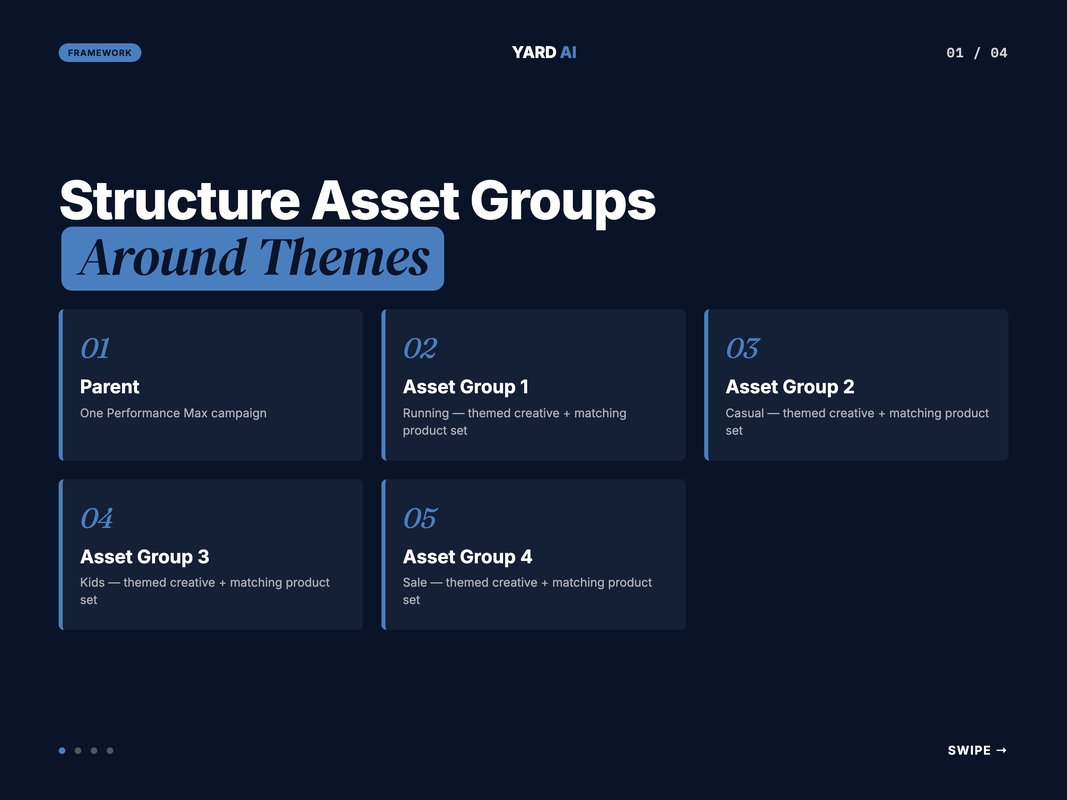
Think of asset groups as themes. Each one holds creative built for a slice of your store.
An asset group can hold up to 15 headlines, 5 descriptions, 20 images. 5 videos. (Source: Google Ads Help, 2026 — support.google.com)
Google mixes these into combinations per placement. So feed the system range.
Thin groups starve it. One headline and one image will lose to a full, themed set. The model can only work with what you give it.
Here's the test from Google's own playbook. Would you show every asset to every audience in that group? If not, split it. (Source: Google Ads Help, 2026 — support.google.com)
Split by category. By theme. By language. By audience. One campaign can hold several focused groups.
Name them clearly too. "Running Shoes, Men" beats "Asset Group 3" every time. Clear names make weekly reviews faster.
Tie each group to a product set in Merchant Center. That keeps the feed and the creative aligned. The story and the products match.
Watch the asset strength labels too. Aim for "Good" or "Best" on every slot. A "Low" label usually means a missing image size or a thin headline.
Refresh creative on a schedule. Tired assets drag a whole group down. Swap your two weakest each month.
Video earns special care in 2026. When you skip it, Google auto-builds a video from your images and headlines. Upload your own instead. You control the story that way.
We use a simple model on every account. We call it the Four-Theme Split.
Q: How many asset groups should an e-commerce account run?
A: Enough to keep each one coherent, not so many that data thins out. Map groups to real product themes or margin tiers. A mid-size store often runs three to six. Each group should earn its own creative and its own audience signal.
Treat Audience Signals as Hints, Not Targeting
This is the most misread setting in Performance Max.
Audience signals are not hard targeting. They are directional hints to Google's AI. (Source: AdNabu, 2026 — blog.adnabu.com)
They tell the system where to start the search for buyers. Think of them as a head start.
The system can expand past them. When it predicts better results elsewhere, it goes there. So a signal shortens learning. It does not box you in.
The best signals come from three places. First-party data. Site behavior. Search intent.
Build from your strongest inputs:
- Customer lists of high-value buyers, repeat buyers, and VIPs.
- Site visitors to top-margin categories and high-intent pages.
- Custom segments from queries that show real purchase intent.
Lead with your own data. First-party lists are the sharpest signal you own. Nobody else has them.
Build custom segments from real intent. Drop in the search terms your buyers use. Add the URLs of your best product pages.
Keep those lists fresh. A stale list teaches the model old habits. Sync new buyers weekly so the signal stays sharp.
Give signals time to work. The model needs a learning window. Resist the urge to rip them out after one slow week.
Do not over-segment. Two to three strong signals per asset group is plenty. (Source: AdNabu, 2026 — blog.adnabu.com)
Too many fragments slow learning. They also dilute the result. Fewer, stronger signals win.
Match each signal to its asset group. The story and the audience should line up. A mismatch confuses the model.
Review your signals each month. Drop the weak ones. Add fresh first-party lists as they grow.
Q: Will a bad audience signal hurt my campaign?
A: A weak signal mostly wastes the early learning phase. It points the system at the wrong start. A strong first-party signal does the opposite. It shortens learning and lifts early efficiency, which is the most leveraged launch action you can take.
Set Target ROAS With Enough Data Behind It
Target ROAS is powerful when fed. It is fragile when starved.
For e-commerce, value-based bidding wins. Google recommends Maximize Conversion Value with a target ROAS when you track values. (Source: Google Ads Help, 2026 — support.google.com)
Revenue-first beats pure volume for stores. You care about value, not just count.
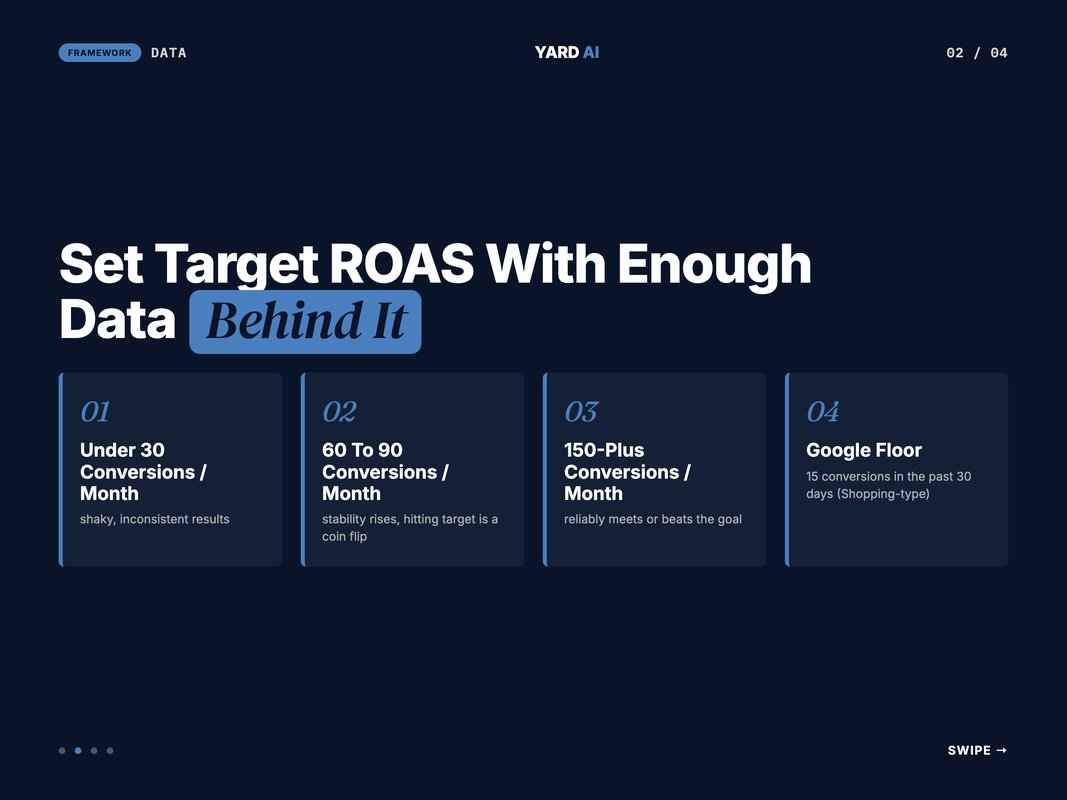
But the target needs data. Google's floor for Shopping-type campaigns is at least 15 conversions in the past 30 days. (Source: Google Ads Help, 2026 — support.google.com)
That is a floor, not a goal. Real stability needs more.
Research on retail campaigns shows the pattern clearly:
- Under 30 conversions a month: expect shaky, inconsistent results.
- At 60 to 90 conversions: stability rises, but hitting target is a coin flip.
- At 150-plus conversions: campaigns reliably meet or beat the goal. (Source: smarter-ecommerce, 2026 — smarter-ecommerce.com).
So volume is the gate. Feed the model enough conversions and the target holds. Starve it and even a clean setup wobbles.
Before you lock a target, let value data settle. Google advises four weeks or three conversion cycles of value reporting first. (Source: Google Ads Help, 2026 — support.google.com)
Move the target slowly. Big jumps reset learning. Small steps keep delivery steady.
Raise budgets gently too. Step up by 20% to 30% at a time. Then wait a week or two before the next change.
Split products with very different margins. A high-margin item and a clearance item want different targets. Mixed in one campaign, the model chases an average that fits neither.
Watch the trend, not the day. ROAS smooths over time. A single soft day means little. Judge it across two or three weeks.
Q: What target ROAS should I start with?
A: Start near your real recent ROAS, not your dream number. Set it too high, and spend stalls because the system can't find enough qualifying conversions. Ease the target down once data is stable, then test small step changes.
Use the New 2026 Search Terms and Channel Reports
For years, Performance Max felt like a sealed box. That changed in 2026.
Google added real reporting. Search terms reporting now rolls out inside Performance Max. It sits on top of existing search terms insights. (Source: Google, 2026 — blog.google)
You now see which queries drove real traffic. The old guessing game is over.
That visibility changes the whole workflow. You optimize from data, not hunches.
You will see a subset, not every query. (Source: Google Ads Help, 2026 — support.google.com)
Still, it is enough to act. A clear sample beats a black box.
Channel performance reporting arrived too. It shows how your campaign delivers across Google's channels and inventory. (Source: Google Ads Help, 2026 — support.google.com)
A timeline view breaks it down by channel. Search, YouTube, Display, Discover, Gmail, and Maps each show their share. (Source: Google, 2026 — blog.google)
Now you can see where the budget really goes. That used to be hidden.
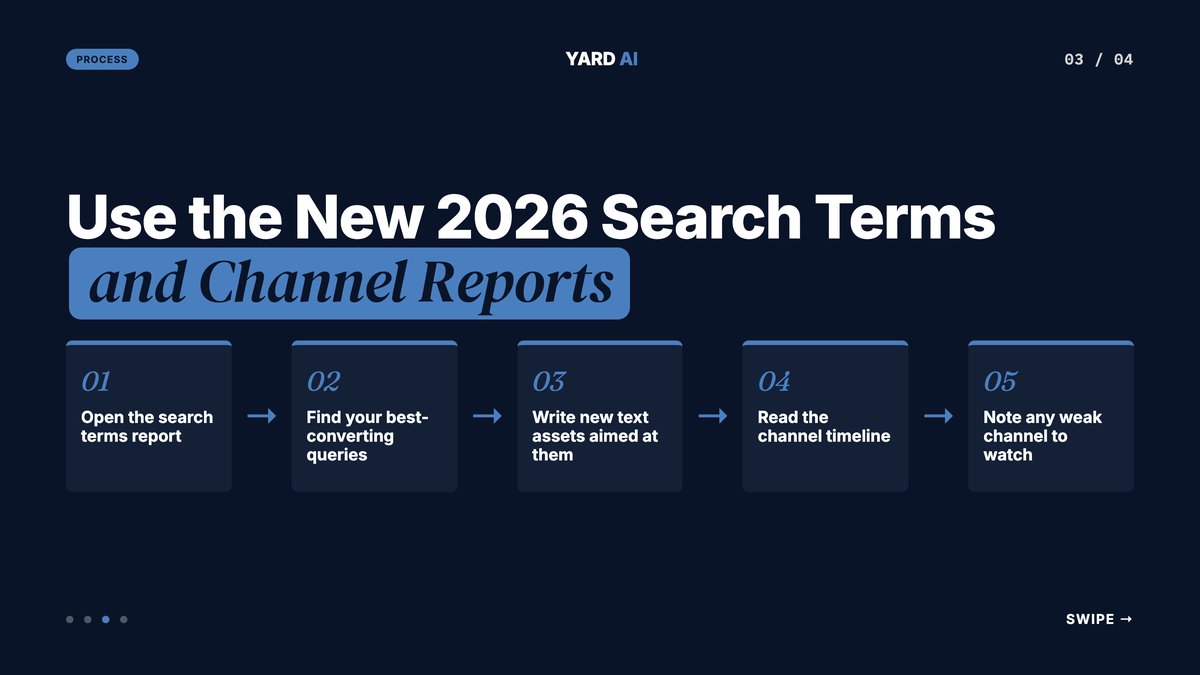
Use this loop every week:
- Open the search terms report.
- Find your best-converting queries.
- Write new text assets aimed at them.
- Read the channel timeline.
- Note any weak channel to watch.
Q: What can I do with Performance Max search terms now?
A: Two things. Build new text assets around your top queries so creative matches demand. And trim waste with campaign-level negative keywords or brand exclusions for terms that don't fit. It turns reporting into a real optimization loop.
Apply Negative Keywords and Brand Exclusions
Reporting is only half the job. Action is the other half.
Performance Max now supports campaign-level controls. You can apply campaign-level negative keywords. (Source: Google, 2026 — blog.google)
You can set brand exclusions too. Both used to be missing here.
Use negatives to cut clear waste. Off-topic terms. Wrong-intent queries. Searches that never convert for you.
Pull these straight from the search terms report. See a bad term, block it. The loop is tight now.
Keep a running negative list. Add to it every week. Over time it sharpens your whole account.
Use brand exclusions with care. Block competitor brands you do not want to serve on. Or stop your own brand traffic from inflating a prospecting campaign.
Branded clicks are cheap. So they flatter your ROAS. But they rarely bring new demand. Exclude them when growth is the goal.
There is one more new control. You can now exclude specific customer lists from a campaign. (Source: Google, 2026 — blog.google)
That keeps recent buyers out of acquisition spend. It is huge for new-customer goals.
Q: Should I exclude my own brand terms from Performance Max?
A: It depends on the campaign's job. For a pure prospecting push, excluding brand terms keeps the ROAS honest and stops easy branded clicks from masking weak acquisition. For a catch-all campaign, you may want brand traffic in. Decide by the goal you set.
Build a Hybrid Setup With Standard Shopping
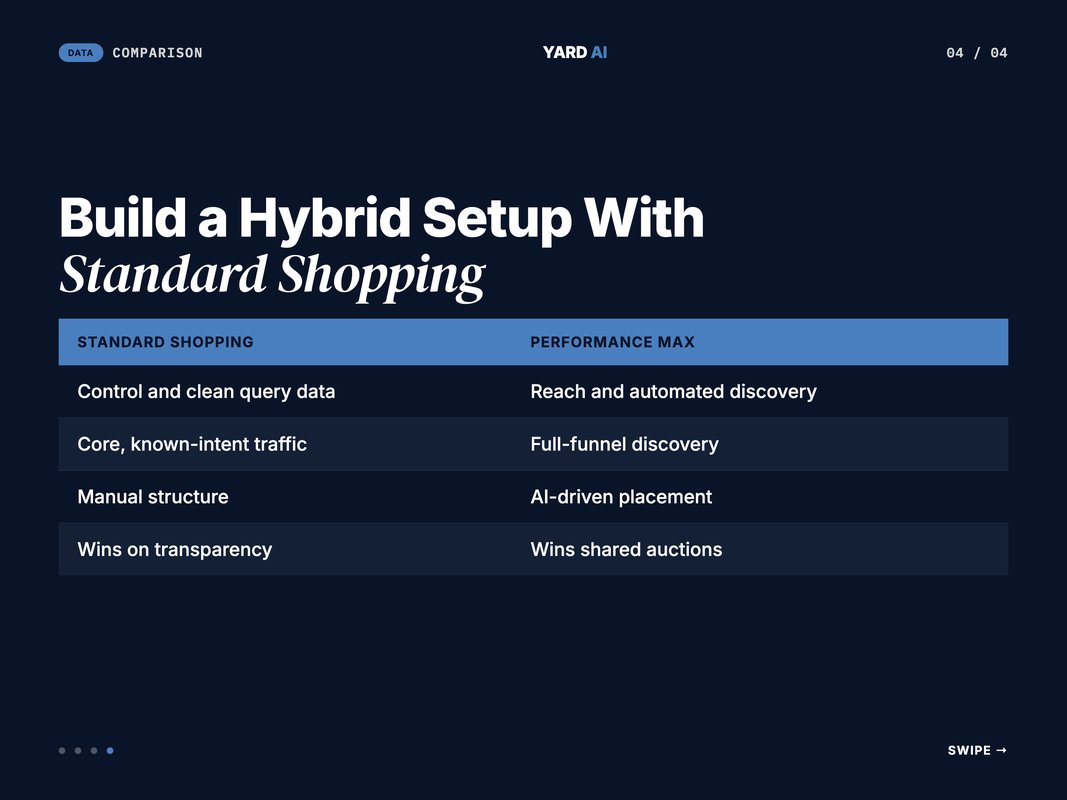
You do not have to pick one campaign type. The strongest retail setups in 2026 run both.
The reason is balance. Standard Shopping gives you control and clean query data. Performance Max gives you reach and automated discovery. (Source: Digital Applied, 2026 — digitalapplied.com)
Let each do what it's best at. Standard Shopping handles core, known-intent traffic. Performance Max handles full-funnel discovery.
This split also protects your data. You keep a clean view of search terms in Standard Shopping. You still get the scale of Performance Max on top.
Many retail teams now run both by default. The hybrid setup is the 2026 standard for serious stores.
Watch the overlap. When both can serve the same product, Performance Max usually wins the auction. So set priorities and budgets with intent.
Map each campaign to a job. Give each one its own lane. Then they work as a team, not as rivals.
Q: Does Performance Max cannibalize my Standard Shopping?
A: It can, because Performance Max tends to win shared auctions. The fix is structure, not fear. Use campaign priorities, budget caps, and clear roles so each campaign owns a lane. Run them as a team, not as rivals.
Quick Facts: Performance Max for E-Commerce
Quick Facts: Performance Max for E-Commerce in 2026
- Performance Max now captures 62% of Shopping spend and 61% of Shopping-attributed sales — (Source: Search Engine Journal, 2026 — searchenginejournal.com).
- Feed-based ads make up 74% to 97% of retail Performance Max spend — (Source: Digital Applied, 2026 — digitalapplied.com).
- Feed-literate merchants see 2x to 5x better results than black-box accounts — (Source: Digital Applied, 2026 — digitalapplied.com).
- Target ROAS floor is 15 conversions in the past 30 days for Shopping-type campaigns — (Source: Google Ads Help, 2026 — support.google.com).
- An asset group holds up to 15 headlines, 5 descriptions, 20 images, and 5 videos — (Source: Google Ads Help, 2026 — support.google.com).
These numbers point one way. The feed and your data drive the engine. The bid only steers it.
Run a monthly pass and you will catch most waste early.
Monthly Performance Max Control Checklist
- Audit feed titles for front-loaded keywords.
- Clear every Merchant Center diagnostics flag.
- Split any asset group that mixes themes.
- Refresh your first-party audience lists.
- Review search terms and add negatives.
- Set brand exclusions where they fit.
- Check the channel report for budget drift.
Work the list top to bottom. The early items fix data. The later items steer spend.
Each item is small on its own. Together they keep the account honest. Skip the pass and waste creeps back in.
Q: How often should I optimize a Performance Max campaign?
A: Treat it as a weekly and monthly rhythm, not a one-off. Read search terms weekly and add negatives. Run a deeper feed, structure, and exclusion review monthly. Small, steady moves beat big resets that restart learning.
How We Run Performance Max at YARD
YARD is an AI-first growth marketing agency. We run performance marketing, LLM SEO, AI creatives, and AI funnels for D2C and B2B brands.
Performance Max is core to our retail work. We treat it as a data problem first. The feed gets fixed before the bid ever moves.
Our process is steady. We audit the Merchant Center feed. We rebuild titles around real demand. We split asset groups by theme and margin.
We do not chase quick wins that fade. We tune the levers that hold. The steady ones compound over months.
Then we wire in first-party audience signals. We feed value data until target ROAS has room to work. Only then do we push the target.
We lean hard on the new 2026 controls. We read search terms weekly. We trim waste with negative keywords and brand exclusions. We watch the channel timeline for soft spots.
We lean on automation to keep it tight. Claude and MCP workflows pull search terms each week. They flag waste and surface negative keyword candidates fast.
We also pair Standard Shopping with Performance Max for clean data. One D2C brand we work with saw revenue climb after a feed-first rebuild on this exact playbook. The lift came from the feed, not a magic bid.
Our edge is the system around the campaign. We wire feeds, signals, and reporting into one loop. Then the data tells us what to fix next.
If your Performance Max feels like a black box, that's fixable. We open it, tune it, and keep it honest. That's the whole job. [internal link: google-ads-feed-optimization-guide]
The Bottom Line
Performance Max optimization rewards clean inputs over clever tricks.
Fix the feed first. It drives most of your retail spend. Build asset groups around real themes. Feed the system range, not scraps.
Treat audience signals as hints. Give target ROAS enough data before you push it. Then use the new 2026 controls to steer with intent.
The black box is open now. Search terms, channel reports, negative keywords, and brand exclusions hand you the wheel. Use them every week, not once a quarter.
Pick one section today. Tune that lever this week. Then move to the next and let the gains stack.
Want help running Performance Max optimization on your store? That's our home turf. Talk to YARD at yardagency.ai, and we'll start with a feed and structure review.
FAQ
Q: What is the fastest way to improve Performance Max performance? A: Fix the product feed first. Feed-based ads drive most Performance Max spend for retail. Clean titles, real attributes, and accurate prices move results faster than any creative change. Then layer in strong audience signals and a realistic target ROAS.
Q: How many conversions does Performance Max need for target ROAS? A: Google recommends at least 15 conversions in the past 30 days for Shopping-type campaigns. In practice, Performance Max stays steadier with much higher volume. Most accounts want 50 or more monthly conversions before pushing a strict target.
Q: Do audience signals control who sees my Performance Max ads? A: No. Audience signals are hints, not hard targeting. They tell Google where to start looking for buyers. The system can still expand past them when it predicts better results elsewhere.
Q: Can I see search terms in Performance Max now? A: Yes. Search terms reporting is rolling out inside Performance Max, on top of existing search terms insights. You see a subset of terms that drove real traffic. Then you act with campaign-level negative keywords or brand exclusions.
Q: Should I run Standard Shopping alongside Performance Max? A: Often, yes. A hybrid setup gives you control and clean data from Standard Shopping. Performance Max then handles reach and discovery. Many retail teams in 2026 run both and split budget by intent.
Q: How long does Performance Max take to learn? A: Plan for a learning period of about one to two weeks after a major change. Full optimization usually takes four to six weeks with steady conversion data. Avoid edits during that window or you reset the clock.
Insights from Our Experts
Explore our latest articles on digital marketing strategies.